
Participant
September 24, 2020
Answered

Indesign paragraph spacing

  • September 24, 2020
  • 2 replies
  • 562 views

Hi! I'm working on an Indesign document. On the paragraph spacing dialogue it shows that my paragraph spacing is .02" and .03" but the actual text doesn't look like it has spacing. The paragraph are very close together. Any ideas why this is happening?
This topic has been closed for replies.
Correct answer rob day

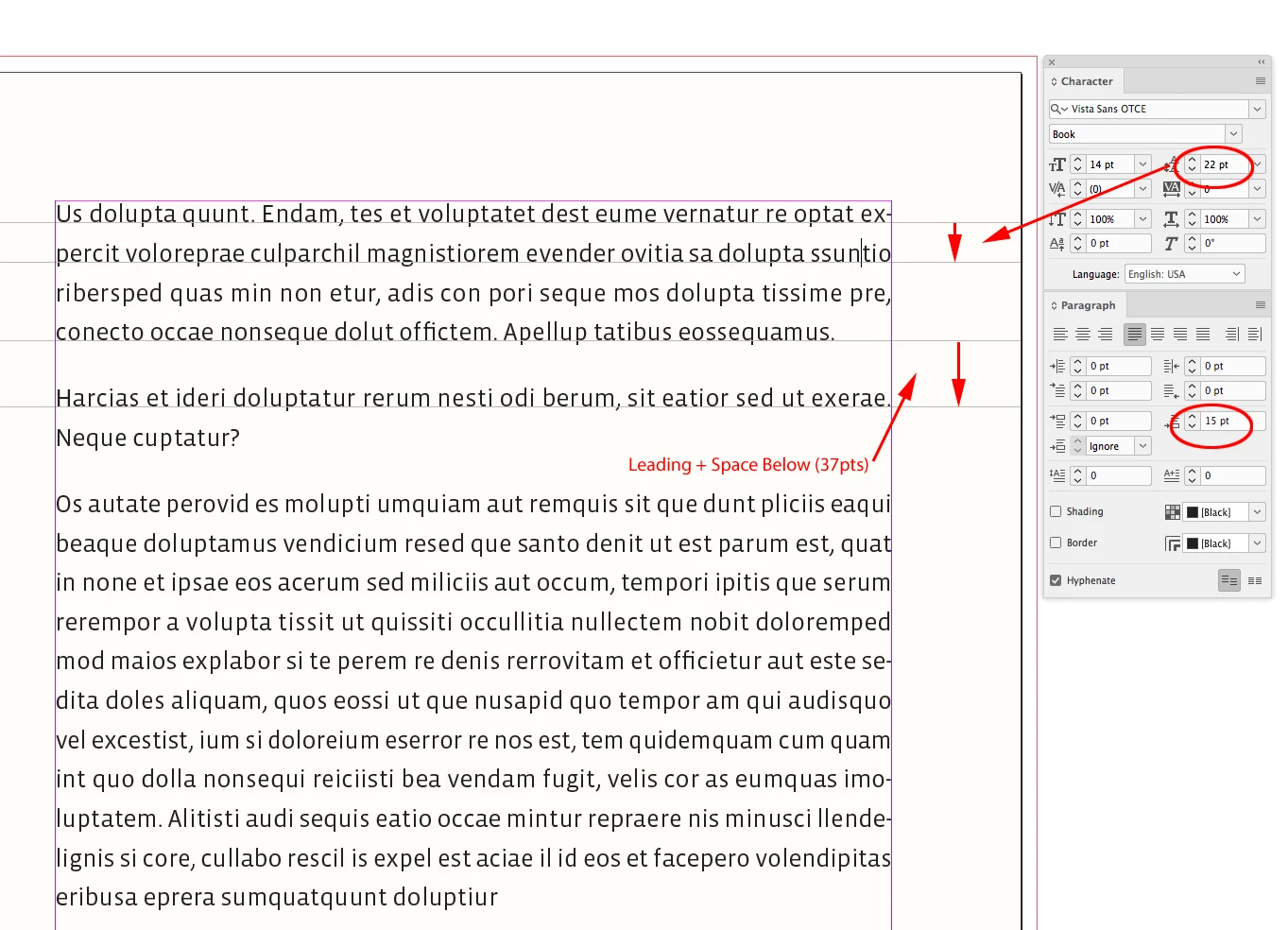
If the paragraph has more than one line, the line spacing is controlled by the Leading amount, which is the measurement between the lines’ baselines. If you add Space Below the amount is added to the Leading:


2 replies

Ashutosh_Mishra
Inspiring
September 25, 2020

Hi there,


Thanks for reaching out. In addition to information shared by Rob earlier, I'd request checking out this help article about formatting paragraphs in InDesign. Hope it helps.


Regards,

Ashutosh

rob day
Community Expert
rob dayCommunity ExpertCorrect answer
Community Expert
September 24, 2020

If the paragraph has more than one line, the line spacing is controlled by the Leading amount, which is the measurement between the lines’ baselines. If you add Space Below the amount is added to the Leading: