
Participant
April 16, 2023
Question

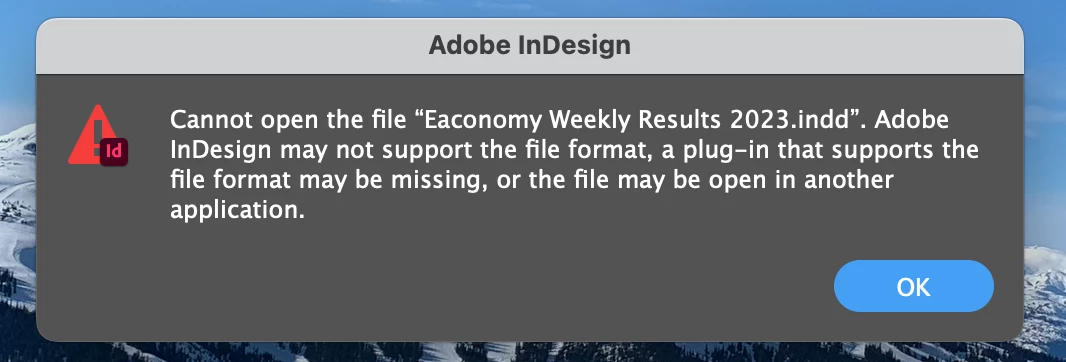
InDesign Plug-In Error

  • April 16, 2023
  • 4 replies
  • 807 views

Hello,

I'm having trouble opening my InDesign files all of a sudden. I keep getting an error that says "Adobe InDesign may not support the file format, a plug-in that supports the file format may be missing, or the file may be open in another application." I just had these files open this morning and now I get this error when trying to open any of them. I thought it might have to do with low storage on my Mac, but I delete files and created more storage so I'm not sure what to do. How do I fix this? 
This topic has been closed for replies.

4 replies

Community Expert
April 18, 2023

Check the filesize and see if it looks too small or too large. A suspicious filesize could point to a corrupted file.

-Manan

-Manan
Legend
April 17, 2023

Was there a crash or power cut while InDesign was running? 

BobLevine
Community Expert
Community Expert
April 17, 2023

Is this file in a cloud storage folder such as Dropbox, iCloud or OneDrive?

DT1616Author
Participant
April 17, 2023

-No not in anything like that, the files are all on my desktop 

Peter Spier
Community Expert
Community Expert
April 16, 2023

First thing to check is if there is a lock file (.idlk) in the folder withthe .indd. They are supposed to be deleted when a file is closed, but sometimes things happen. If you find one, and the file is not in use by someone else, you can delete the .idlk file and your .indd document should open.

DT1616Author
Participant
April 17, 2023

I could not find any .idlk files 

Peter Spier
Community Expert
Community Expert
April 17, 2023

And you have file extensions showing?