
Lavitas Macutis
Inspiring
September 17, 2018
Answered

InDesign Preflight says: “Graphic not ignoring CMYK profiles”

  • September 17, 2018
  • 1 reply
  • 1829 views

Hello

— I'm not sure whether this belongs here, or in the Illustrator forum; I'll try this one, please transfer if need be —

InDesign's preflight tells of two linked graphics (.ai files) that they are a “Graphic not ignoring CMYK profiles”. I guess that means that they will be converted, if on export any conversion is required? I tried to overhaul one of these files, which actually contain nothing but a vector graphic that should print 100% K and nothing else. They were RGB, I converted them to greyscale and set them to 100% K, with no change in InDesign's preflight warning.

So, my questions:

What, if anything, needs to be done here?

and

Is there a way to have Illustrator write a single colour (100% K) vector graphic?

Thanks a lot!

(InDesign/Illustrator CC 2014)
This topic has been closed for replies.
Correct answer rob day

The rule Profile Setting May Cause CMYK Conversion gets triggered if your document's CMYK Color Management Policy was not set to  Preserve Numbers (Ignore Linked Profiles) when the document was created.

The policies get saved with the document when it is created, so to make a change, try closing the document, open Color Settings, check the Ask When boxes, set the CMYK policy to Preseve Numbers, and reopen the file.

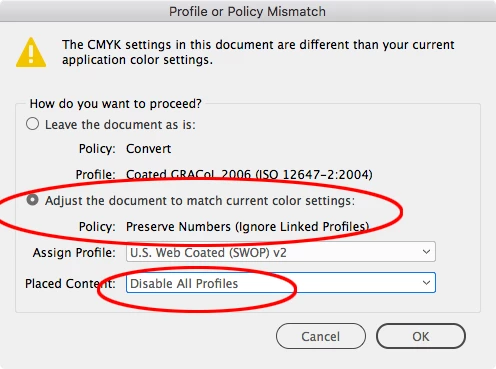
You should get a dialog that will let you change the document's policy, something like this:

Before you create new documents with your preflight profile make sure color settings is set to Preserve Numbers (Ignore Linked Profiles):

1 reply

Srishti_Bali
Legend
September 19, 2018

Hi Nikolai,

As per your query InDesign Preflight gives an error “Graphic not ignoring CMYK profiles”. Are you using any custom Preflight profile?

If yes, please share a screenshot of these options:

I would request you to please share a sample file with small graphic with some screenshots of the error it shows. I will try to reproduce it at my end.

Regards,

Srishti

Lavitas Macutis
Inspiring
September 22, 2018

Dear Srishti,

many thanks for your reply—and excuse my late answering, it's been a wild few days.

I'll post my preflight profile in an array of screenshots here along with one of the error message, and attach a folder of an excerpt of the original InDesign file.

Such are the settings. Here's the error message:

And since can't seem to figure out how to attach a file, I'll simply put it here.

Thanks!

Nikolai

rob day
Community Expert
rob dayCommunity ExpertCorrect answer
Community Expert
September 22, 2018

The rule Profile Setting May Cause CMYK Conversion gets triggered if your document's CMYK Color Management Policy was not set to  Preserve Numbers (Ignore Linked Profiles) when the document was created.

The policies get saved with the document when it is created, so to make a change, try closing the document, open Color Settings, check the Ask When boxes, set the CMYK policy to Preseve Numbers, and reopen the file.

You should get a dialog that will let you change the document's policy, something like this:

Before you create new documents with your preflight profile make sure color settings is set to Preserve Numbers (Ignore Linked Profiles):