Participant
August 3, 2018
Answered

Indesign Print Profile

  • August 3, 2018
  • 2 replies
  • 2688 views

Please help!

The work we are sending to print digitally is very washed out and the colors are a bit off. I know we will not get the same result as printing offset but thought maybe we are using the wrong settings.

Please see below for screen grabs I have included to make it easier to follow what I am asking.

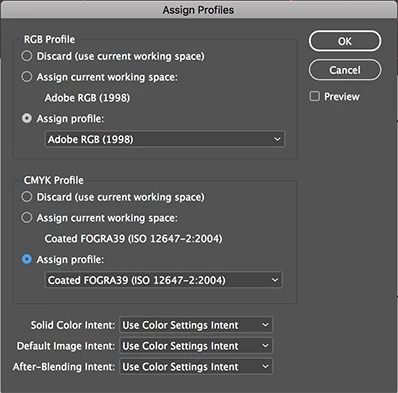
The photoshop images we use are RGB. When we save the inDesign files for print:

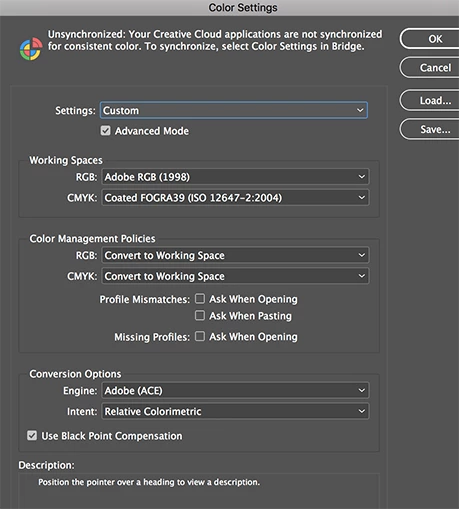
'Colour Settings' we assign Working Spaces > RGB > Adobe RGB (1998) and CMYK > Coated FOGRA39 (ISO 12647-2:2004)

'Assign Profiles' Adobe RGB (1998) and Coated FOGRA39 (ISO 12647-2:2004)

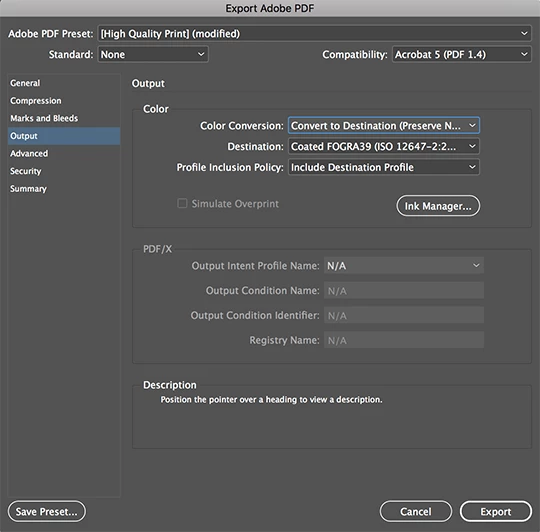
When the inDesign file is exported to Adobe PDF:

Output > Color > Color Coversion > Convert to Destination (Preserve Numbers)

Destination > Coated FOGRA39 (ISO 12647-2:2004)

Cheers

Sonja
    This topic has been closed for replies.
    Correct answer Laubender

    Hi Danny,

    well, digital printing is the key word here, I guess.

    And that could mean non offset printing or non conventional printing.

    So Sonja should check with the printers what exact color profile and printing condition is required.

    Some important details here about FOGRA 51 discussing digital printing and conventional printing:

    https://www.fogra.org/en/fogra-standardization/digital-printing-2-48/digital-printing-standardization.html

    Download the two PDFs and provide a weekend or two to read through the whole matter.

    Regards,
    Uwe

    2 replies

    Danny Whitehead.
    Legend
    August 3, 2018

    Those settings look good to me, presuming you're sending this to a printer in Europe or the UK.

    Have you asked the printer if they can recommend/provide the appropriate CMYK profile?

    These days, a decent digital press will match - if not improve upon - the vibrancy of offset. They're often set up to simulate FOGRA39, which actually shrinks their gamut from their full capabilities, for consistency.

    LaubenderCommunity ExpertCorrect answer
    Community Expert
    August 3, 2018

    Hi Danny,

    well, digital printing is the key word here, I guess.

    And that could mean non offset printing or non conventional printing.

    So Sonja should check with the printers what exact color profile and printing condition is required.

    Some important details here about FOGRA 51 discussing digital printing and conventional printing:

    https://www.fogra.org/en/fogra-standardization/digital-printing-2-48/digital-printing-standardization.html

    Download the two PDFs and provide a weekend or two to read through the whole matter.

    Regards,
    Uwe

    Participant
    August 5, 2018

    Thanks so much for getting back to me Uwe!

    Cheers

    Sonja

    Sonja Taylor

    Design Manager

    [Mod deleted phone number and other personal information. Please do not post personal information in this public forum.]

    Abambo
    Community Expert
    Community Expert
    August 3, 2018

    Discussion successfully moved from Adobe Creative Cloud to InDesign

    ABAMBO | Hard- and Software Engineer | Photographer