Anna the Art Professor
Participating Frequently
October 25, 2022
Question

InDesign Publish Online Not working

  • October 25, 2022
  • 3 replies
  • 247 views

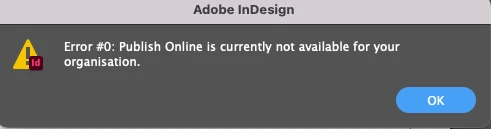
Hi! I am getting an error:

My students and I are at a loss as to why this is happening. We've done online publishing throughout the semester. We restarted the computers and signed in and out. The maintenance on the Adobe Systems said nothing is happening in our region.

Seems odd too...organization is spelled incorrectly. Advice?

Thanks all!

Thanks!

This topic has been closed for replies.

3 replies

Anna the Art Professor
Participating Frequently
November 1, 2022

Hey All,

Thanks so much for your help. I did contact IT and they worked with Adobe Support. However, it's still not working, which is unfortunate. We've used this feature for the last year and a half. It only just stopped. I also used this feature with another university for a while as well...we have the same licensing. So unless it was just pulled in the license feature, I don't know. The student accounts are wiped after they leave the school, so this is odd. They can use all of the other elements.

EPUB isn't the best option, but I will use that or publish their work by hand.

Cheers!

Diane Burns
Inspiring
October 25, 2022

It sure sounds like some kind of admin licensing, perhaps on your end. Can you contact the school IT dept and see if anything's changed there?

Also, just to have on file, here is Adobe's site for cloud server status: https://status.adobe.com

Geоrge
Legend
October 25, 2022

You are need to talk with Adobe Support Chat about it. 


Remember, never say you can't do something in InDesign, it's always just a question of finding the right workaround to get the job done. © David Blatner
Anna the Art Professor
Participating Frequently
November 1, 2022

Is there another way to publish online with video? I have them create digital portfolios that can also act as downloadable pdf portfolios (sans the video work, a still image standing in). We can epub of course. However, epub will disable some fonts. 

I do enjoy how Adobe has about five workarounds, but this one has me stumped. Thanks!