
Known Participant
May 7, 2018
Answered

InDesign Recent Items to Display Greyed Out

  • May 7, 2018
  • 2 replies
  • 3490 views

Windows 10 64-bit Pro

InDesign CC (updated)

Recently, for all users on our subscription, we are not able to see recent items in InDesign.

Preferences > File Handling > Saving InDesign Files > Number of Recent Items to Display: 0 is greyed out, so we cannot change this number.
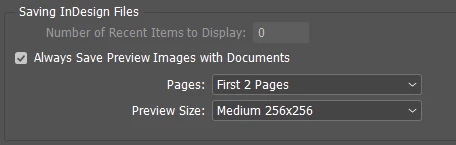
No settings that we are aware of have been modified, and this just started happening within the last few days. Any information on how we can get that box ungreyed is appreciated!

This topic has been closed for replies.
Correct answer Srishti Bali

I completed a full uninstall/reinstall today and deleted the folders you specified after the uninstall. After the reinstall, I opened InDesign, opened a few files, and then closed. I re-opened and there are still no items shown in the recent list. Saving InDesign Files in File Handling Preferences is still greyed out and I cannot change it from "0". I've also tried running InDesign as administrator and I still cannot change that preference.

This is affecting a minimum of four computers in our office, all on Windows 10 and running an up-to-date version of InDesign. I will check with other users to determine how many more computers have the same problem.


Hi,

In this case, I would request you to please contact our support team(Contact Customer Care ) for live troubleshooting. They will be able to look into your issue on a live remote session.

Regards,

Srishti

2 replies

Participant
October 5, 2023

Hi,

I was facing this same issue, and was able to narrow it down to to 1 specific GPO.

User Configuration > Administrative Templates > Start Menu & Task Bar > Remove Recent Items menu from Start Menu.

seems to be linked somehow, soon as I left it Not Configured in GPO, the Recent Items options would appear normal, once this GPO was set as Enabled, the Recent Itemsto Display would appear greyed out.

I'm using Windows 11 professional, local acocunt only, personal laptopso no Domain accounts.

ansehelm00144
Participant
October 11, 2023

This seems to be the case for me as well. I am using Windows 10, and as soon as the said GPO is set to Not Configured, InDesign's recent items would be functioning normally again.

jane-e
Community Expert
Community Expert
May 7, 2018

Did you try quitting and resetting the preferences?

Steve Werner
Community Expert
Community Expert
May 7, 2018

Here's how you reset (or restore) preferences:

Trash, Replace, Reset, or Restore the application Preferences

Known Participant
May 7, 2018

This link is very outdated, just an FYI. I can't reply to anything in that discussion because it's locked, but the Windows 10 file paths are completely different:

C:\Users\<USER>\AppData\Roaming\Adobe\InDesign\Version 13.0\en_US (InDesign Defaults)

C:\Users\<USER>\AppData\Local\Adobe\InDesign\Version 13.0\en_US\Caches (InDesign SavedData)

I did already reset both of those.