
Inspiring
August 26, 2025
Question

InDesign redraw bug when zooming in/out using opt+mouse wheel on Mac

  • August 26, 2025
  • 2 replies
  • 337 views

There seems to be a bug in InDesign 2025  (on some documents) when using opt+mouse wheel to zoom in/out. The bug is present in latest InDesign 2025 (20.5) and older versions of InDesign also. I am running a Mac Studio M2 Max.


I have a document where I can reproduce this consistently.

NB! If I create a new document from scratch, I am not able to reproduce the issue (at least when document contains no items).


Steps to reproduce are:

1. Hold space bar and use mouse to move document to the side and back a couple of times

2. Move mouse cursor slightly. This is important - if you zoom without moving cursor after moving document - the bug does not trigger.

3. Scroll in/out holding Opt key + using mouse wheel

4. Observe that document is not redrawn according to zoom - but rulers on side of document changes which indicates that zoom is actually happening (but screen not redrawn)

5. Let go of Opt key and move mouse slightly

6. Observe that document is now redrawn according to current zoom factor


I have created a video that shows the issue:

https://www.youtube.com/watch?v=F7gGx3JbZ8E


If you want the document to tests with - please let me know.

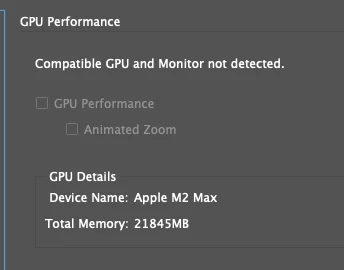
The GPU is turned off - because for some reason InDesign does not detect GPU (works in other Adobe products though). There were a recently fixed bug (with GPU off) where selections would not be shown until mouse was moved, which was fixed - and I suspect this redraw issue is somehow related to the same.


2 replies

Phoenix15
Known Participant
September 16, 2025

Yep, something has gone wrong with the animated zoom. It was working fine but something's ruined it.

Yes, I have turned the GPU/animated zoom check off & on and restarted InDesign but it still will not work.

InDesign 20.5, MacOS 15.6.1

Phoenix15
Known Participant
September 16, 2025

This now seems to be fixed in MacOS 15.7...

Community Manager
August 26, 2025

Hello @Stein99,

I'm sorry to hear about your experience. I tried replicating this behavior on my end but could not. Would you mind confirming the version of macOS installed, the display resolution and scaling set in the system preferences, and whether this happens with all files so I can better assist you?

Also, try running InDesign under a different administrator account (Windows / macOS) and share your observations.

Looking forward to hearing from you.
Anubhav

Stein99Author
Inspiring
August 27, 2025

I am running the latest Mac os version, but as I wrote, this has been an issue for earlier versions of InDesign also - so it is not bound to any specific version of Mac os. I am running resolution of 1900x1200 with no special scaling. I tested with new admin user. Same issue.

As I also wrote, I am not able to reproduce if I just create a new file - but I think the easiest will be to send you a test file where the bug is easily reproducable. Contact me on DM and I can send it to you. NB! GPU must be turned off while testing.


Abhishek Rao
Community Manager
Community Manager
September 1, 2025

Hi @Stein99,


Thanks again for all the details you've shared. I've sent you a DM so we can continue troubleshooting this further and review the test file you mentioned.

Abhishek