


Participating Frequently
Apr 4, 2025 1:07 PM UTC
Answered

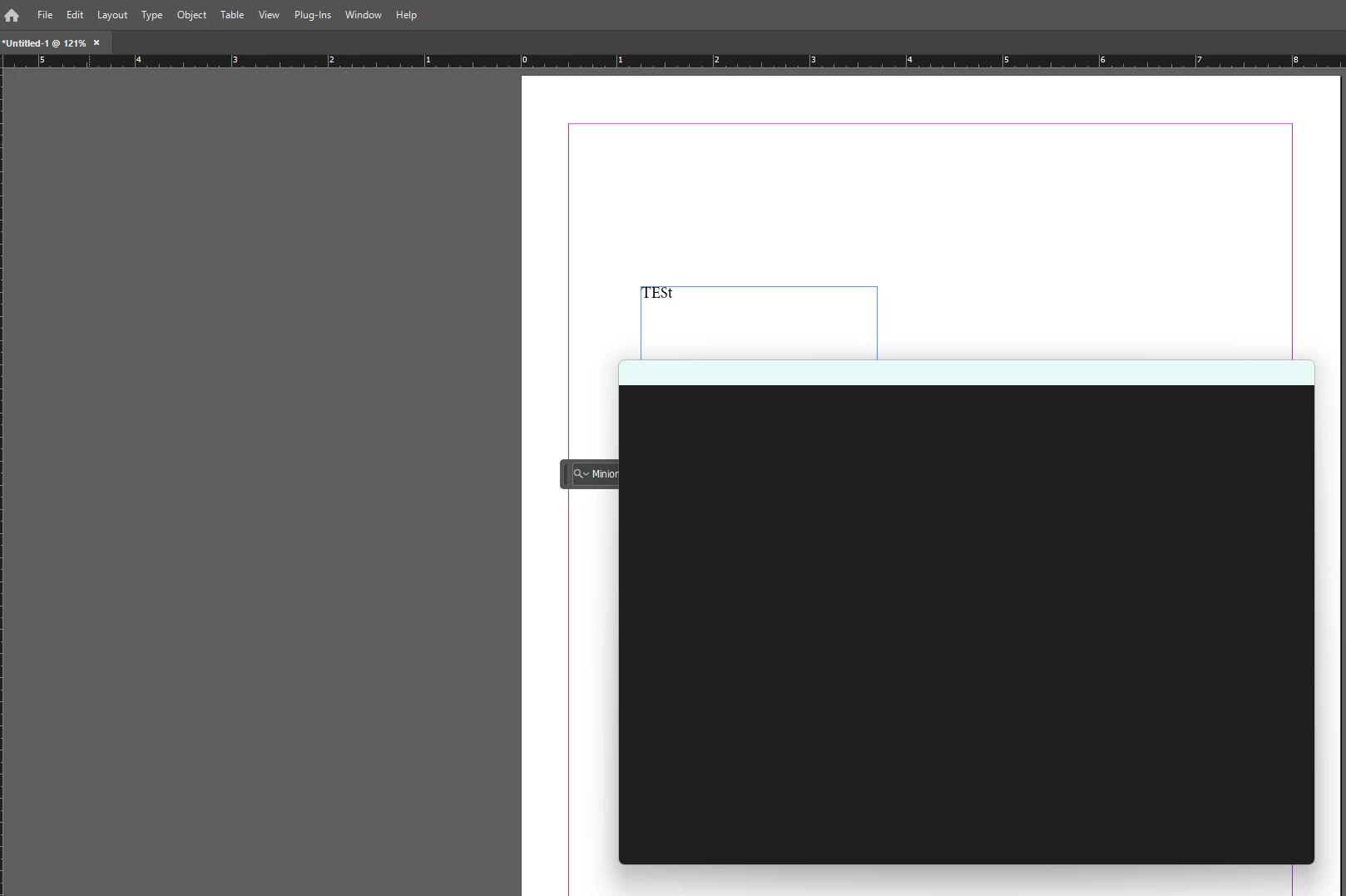
InDesign save as dialog is blank - not able to save document

Windows 11
See Screenshot: Blank Document -> File -> Save As -> Dialog freezes
InDesign Version 20.2
I have also opened old .indd files and tried to save them -> same result

Tried to uninstall and install again - same result
Tried to uninstall all previous versions and install InDesign Version 20.2 - same result

Need help!


diego_wla_dtpCorrect answer
Participant
Aug 7, 2025 8:54 PM UTC

I was able to fix it by going to InDesign Preferences / General / Use Legacy "New Document" Dialog (enable).
I hope it helps.

10 replies

Participant
Nov 19, 2025 1:13 PM UTC

I got exactly the same problem but with a 2025 version.

I applied some of the suggested options to fix this.... nothing to do.

Could be that it is because I have no GPU and only 1024Mb available on my laptop?


Translate
Anubhav M
Community Manager
Community Manager
Nov 19, 2025 6:59 PM UTC

Hello @defaultxngk4rfyphfl,

I'm sorry to hear you're having similar trouble with InDesign. Would you mind trying the following steps and checking if they help:

- Close all Adobe applications.

- Rename the UXP folder to UXP.old from the following location:

(Windows) Navigate to C:\Program Files\Common Files\Adobe\UXP

(macOS) Navigate to Macintosh HD/Library/Application Support/Adobe/UXP

- Relaunch InDesign


Looking forward to hearing from you.

Anubhav

Translate
Participant
Nov 20, 2025 8:53 AM UTC

Since working in a company. I am not the system administrator.

This doesn't let me rename files.

To experiment that way, I should create Tickets, involving IT and HelpDesks. Quite complicated and long.

For now I settle by using  "Save a Copy" and choosing  the "Save as type " "Indesign CS4 or later" to keep legacy with former versions".


Translate
diego_wla_dtpCorrect answer
Participant
Aug 7, 2025 8:54 PM UTC

I was able to fix it by going to InDesign Preferences / General / Use Legacy "New Document" Dialog (enable).
I hope it helps.

Translate
Bill Silbert
Community Expert
Community Expert
Apr 15, 2025 9:53 AM UTC

It is not clear from your posts if you have tried deleting your InDesign cache files. This process is not the same as deleting preferences. Deleting caches can fix issues that occur with the interface itself such as possibly the blank window that you're seeing.

To delete caches on a PC:

On Windows 7 and above the caches files are hidden. To find them go to the Control Panel and open Folder Options and then click the View tab. Then select “Show hidden files and folders” or “Show hidden files, folders or drive options” in Advanced Settings. Then delete (or rename) the folder at the end of this path: C:\Users\[User Name]\AppData\Local\Adobe\InDesign\Version [#]\<Language>\Cache.

Translate
Abhishek Rao
Community Manager
Community Manager
Apr 7, 2025 6:15 PM UTC

Hi @nice_amazement9191,


Thanks a lot for sharing all the steps you've already tried. Since the issue still persists, please confirm if this happens with all files or only with a specific to this document?

Please try restarting your system in Safe Mode and then launching InDesign to see if the Save As dialog behaves normally there? Ref: Start your PC in Safe Mode.

Also, just to isolate whether this might be profile-related, can you try creating a new Admin user account on your system and test if the issue occurs there as well? Ref: Manage user accounts in Windows.

If the Save As dialog is still blank or frozen even after that, would you mind testing this on InDesign version 20.1 to check if the issue might be specific to 20.2? Refer this article to revert: Install previous version of InDesign.


Let me know how it goes. 


^

Abhishek

Translate
Participating Frequently
Apr 15, 2025 7:30 AM UTC

After hours of trying to reset and clean up all the preferences it still did not work, so I installed it on another device to be able to work with it

Translate
Anubhav M
Community Manager
Community Manager
Apr 4, 2025 1:22 PM UTC

Hello @nice_amazement9191,

Would you mind trying the following steps and checking if they help:


- Close all Adobe applications.

- Rename the UXP folder to UXP.old from the following location:

(Windows) Navigate to C:\Program Files\Common Files\Adobe\UXP

(macOS) Navigate to Macintosh HD/Library/Application Support/Adobe/UXP


- Relaunch InDesign


Looking forward to hearing from you.


Anubhav

Translate
Participating Frequently
Apr 7, 2025 10:22 AM UTC

Unfortunately renaming folder 
(Windows) Navigate to C:\Program Files\Common Files\Adobe\UXP
did not work


I followed the instructions from here 

https://community.adobe.com/t5/indesign-discussions/reset-indesign-preferences-and-other-troubleshooting/td-p/11990234 
Close InDesign; then rename these InDesign folders:

C:\Users\user\AppData\Roaming\Adobe\InDesign

C:\Users\user\AppData\Local\Adobe\InDesign

In both places, rename the InDesign folder to InDesign.old. Now try to relaunch/restart InDesign
did not work either (same result)


Next try was "Reset with the nuclear option (4)"

A fourth and final way to reset InDesign is to uninstall the application using the CC Cleaner tool and reinstall from the Creative Cloud Desktop app. https://helpx.adobe.com/at/creative-cloud/kb/cc-cleaner-tool-installation-problems.html

Does not work either but now I get a different error message right at the begining:


Translate
BobLevine
Community Expert
Community Expert
Apr 4, 2025 1:22 PM UTC

Reset your preferences.

Translate