FalconArt
Known Participant
April 18, 2024
Answered

InDesign Script • Create Separate Files of Each Instance of a Single Linked Image

  • April 18, 2024
  • 2 replies
  • 2233 views

When I am prepping a book file for printing, I need both the ACTUAL and EFFECTIVE PPI to be 300. This is easily achieved with "Trista DPI InDesign to Photoshop Script" (which I love and use almost every day!) However, when I have multiple instances of the same image, the Trista script will find the largest one, and scale it down to a true 300. This is good because it maintains a 300 or better effective PPI.

   BUT some print projects will not let me have 300+ effective PPI. (An image at 300 actual PPI at 100% = 300 effective PPI. But a second instance of that link at 50% scale is 600 effective PPI.) So: is there a way to script out a function that looks for every instance of a linked image and creates multiples of that image (Image.jpg (3) → Image_01.jpg, Image_02.jpg, Image_03.jpg), before linking them back in with the newly copied and renamed images?

   This would allow me to then run Trista's script on EACH of those instances and scale them to a true 300 as separate files.


Check out the Becky's Graphic Design YouTube channel, where I feature a lot of scripts!

This topic has been closed for replies.
Correct answer Robert at ID-Tasker

Hopefully I'll find one in time!


quote

Hopefully I'll find one in time!


By @FalconArt


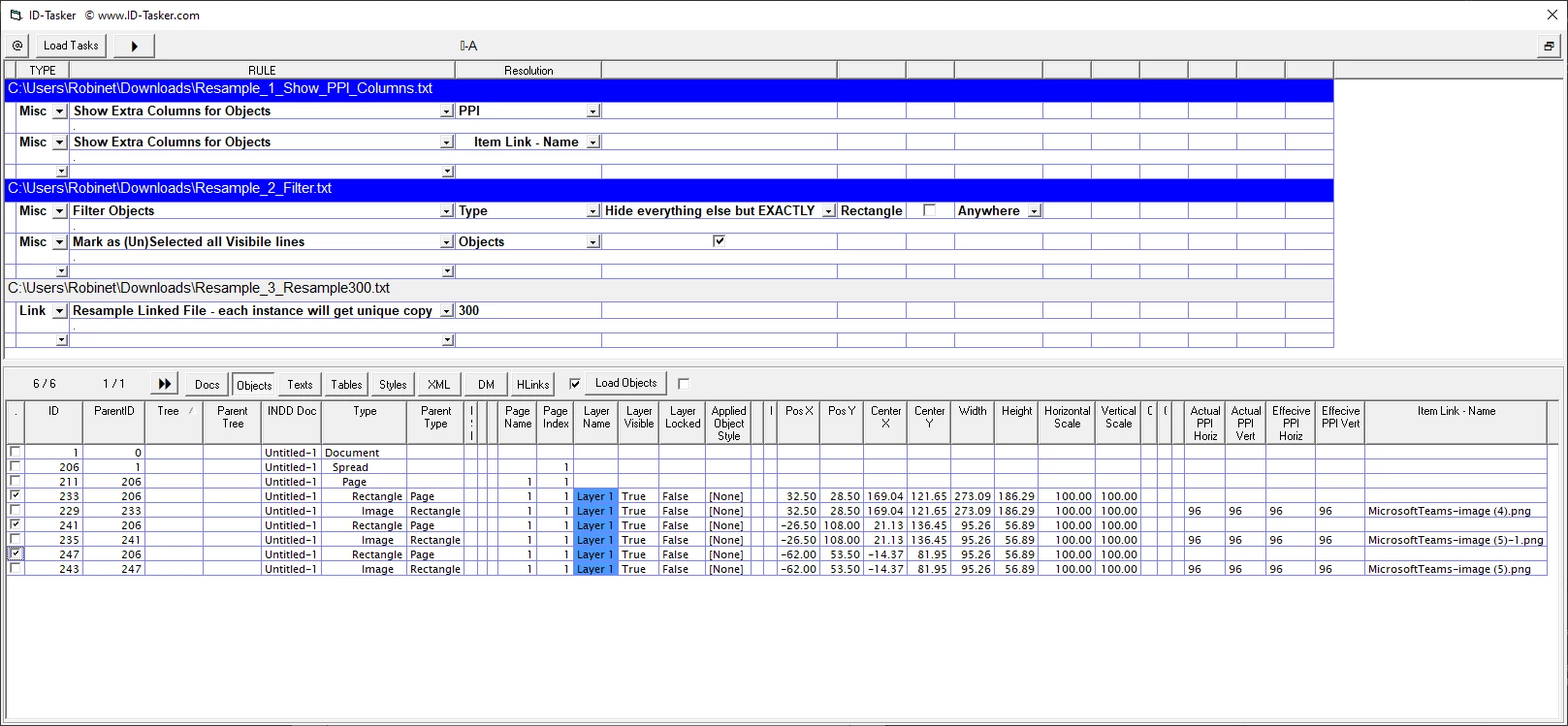
Done - Before:


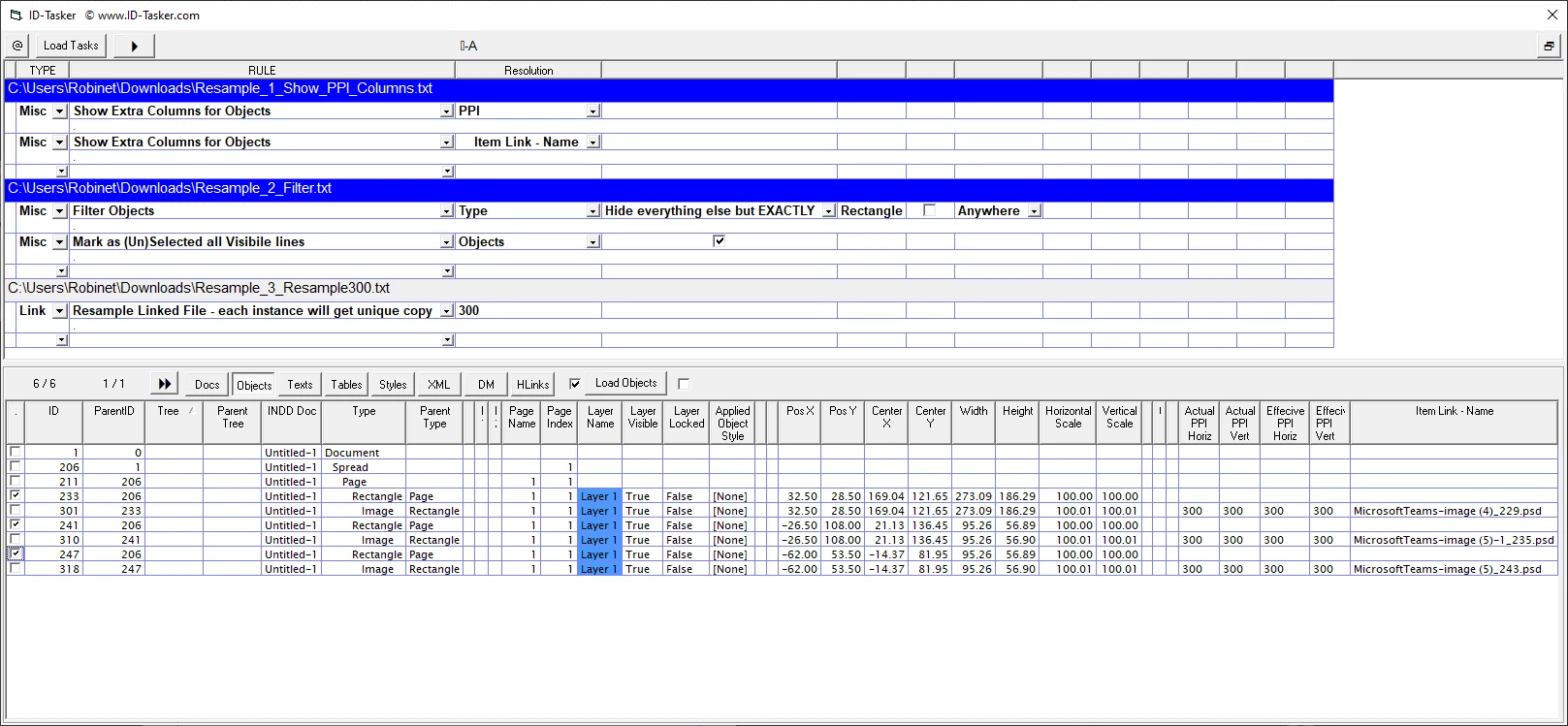
After:

Temporary inconvenience - resampled images are saved as PSD...


Not free - but I'm pretty sure well worth it.


Just 3x simple Tasks and any number of linked images can be processed.


Of course only selected links can be processed and finall resolution can be set as desired.


2 replies

FalconArt
FalconArtAuthor
Known Participant
May 9, 2024

I had an idea—what about this process? Is it possible? I've been trying to cobble this together from other scripts unsuccessfully:

  1.  Identify links that have multiple instances
  2. Embed them (to separate them)
  3. Apply a number counter to the end of the filename of each embedded instance
  4. Unembed and choose file location
Robert at ID-Tasker
Legend
May 10, 2024

@FalconArt


You can't modify stored link's name - in the INDD file.


The only way would be to export and edit IDML.


But if you really need to have your images as exactly 300PPI - link can be opened in Photoshop, resampled, saved with a new name and relinked.


FalconArt
FalconArtAuthor
Known Participant
May 13, 2024

Right—and I have a script which talks to Photoshop, opens up an image, and matches the actual and effective PPI, but it doesn't work when there are multiple instances of an image. And my current project has a lotttttttttt of those.

Community Expert
April 23, 2024

When you export to PDF - go to the compression settings - you can compress an image the 300 dpi that's above a certain resolution.

If you set it to 300 ppi for images above 301 

The images will reduce PPI as you want - using the same compression methods.


There's no advantage to resizing images to 300 ppi before placing to InDesign or in-situ in the design.

If it's 1200 ppi or 600 or 328 ppi - the software can reduce to 300 on export. 


There's very little need for 300 actual and 300 effective 

All you're doing is duplicating images on your hard drive and having 2 versions of the same image.

Where you could use 1 version of your image for all things - and only  have 1 file on your computer. 


When I say 'there's never a need' I mean rarely a need, of course, every workflow is different. 


But curious why you'd need such stringent controls when you they're already built into Adobe PDF export options. 


FalconArt
FalconArtAuthor
Known Participant
May 6, 2024

Trust me—I've tried accomplishing this through export settings. Somehow, IngramSpark still sees beyond my export settings and knows what the actual image files were like. Even if I tell it to reduce down to 300 on export, it will still get flagged. Could have something to do with the fact that they require a 2001x PDF version.

rob day
Community Expert
Community Expert
May 6, 2024

Hi @FalconArt , Are you using any Effects (e.g. Drop Shadows, Glows, etc)? With PDF/X-1a Effects get exported at less than 300ppi and that could be what Ingram is flagging. Can you share a PDF that is getting rejected?