


indesign script - export selected objects as JPGs - adding extra unwanted padding
hello all - wondering if i can get some help with a script.
script function - export all and only the selected objects on a page as individual JPGs.
issue - the JPGs keep exporting with extra padding at the top of the box IF there is text close to the top edge. nothing is exceeding the background (example text frame boxes etc) - everything is inside of the grouped background. it is also only happening if there is text next to a top edge - any other edge it does not add any extra padding, hopefully this screenshot will help explain
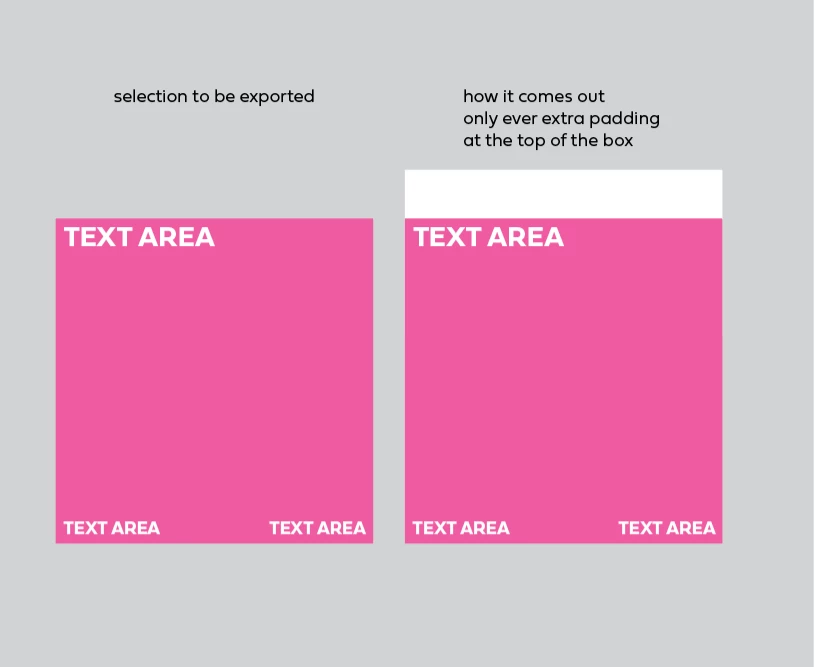
the script:
(function () {
if (app.documents.length === 0) { alert("Open a document first."); return; }
var doc = app.activeDocument;
if (!doc.selection || doc.selection.length === 0) {
alert("Select the items you want to export, then run the script.");
return;
}
var items = [];
for (var i = 0; i < doc.selection.length; i++) {
var it = doc.selection[i];
if (it.hasOwnProperty("geometricBounds")) items.push(it);
}
if (items.length === 0) { alert("Nothing exportable in the selection."); return; }
items.sort(function(a, b) {
var A = a.geometricBounds, B = b.geometricBounds;
var rowTolerance = 10;
if (Math.abs(A[0] - B[0]) > rowTolerance) {
return A[0] - B[0];
} else {
return A[1] - B[1];
}
});
var outFolder = new Folder('~/Desktop/Export');
if (!outFolder.exists) outFolder.create();
app.jpegExportPreferences.exportResolution = 144;
app.jpegExportPreferences.jpegQuality = JPEGOptionsQuality.MAXIMUM;
var prefix = "FileName_Export-";
function pad2(n){ n = String(n); return n.length < 2 ? "0" + n : n; }
for (var j = 0; j < items.length; j++) {
var filename = prefix + pad2(j + 1) + ".jpg";
var outFile = new File(outFolder.fsName + "/" + filename);
try {
items[j].exportFile(ExportFormat.JPG, outFile, false);
} catch (e) {
$.writeln("Failed to export selected item #" + (j+1) + ": " + e);
}
}
alert("Done! Saved to " + outFolder.fsName);
})();
----
thank you,
melissa
 AdChoices