
Moyer, John
Participant
August 18, 2022
Answered

InDesign seperation preview glitch

  • August 18, 2022
  • 5 replies
  • 378 views

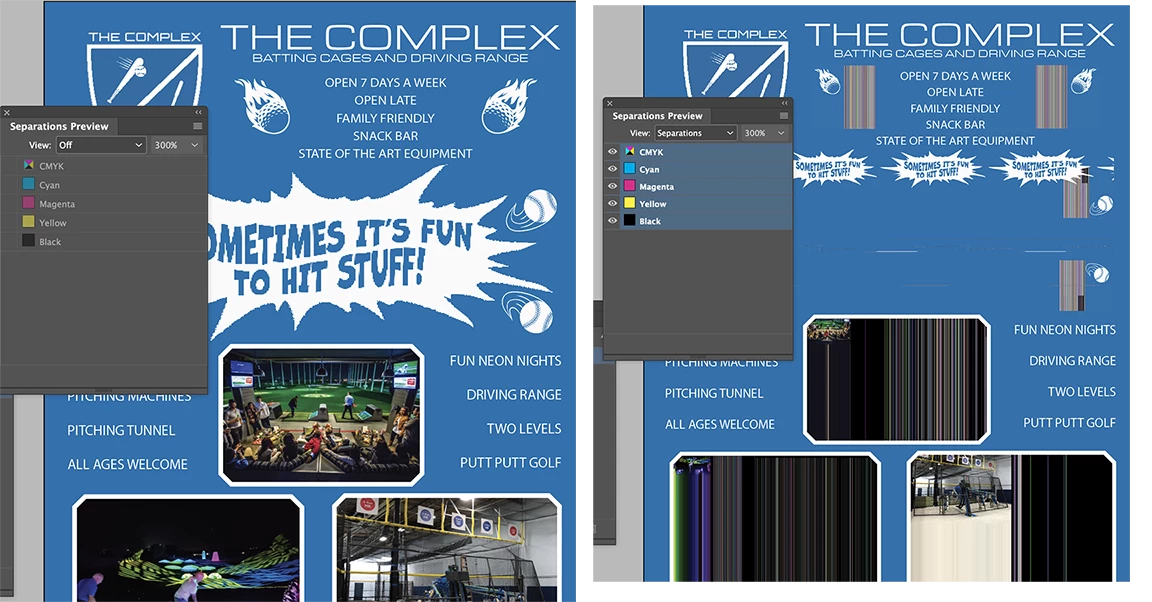
I'm having a problem with my separations preview. When I turn it on I loose my Tiff previews, off and it's back to normal. see attached     Anyone have any sugestions      I'm on a good Mac running Monterey with the latest inDesign update.  Please help . . .
This topic has been closed for replies.
Correct answer Peter Spier

Those look like the same sort of artifacts som Mac users see on a larger scale when video acceleration is enabled in the prefs. The other reports have not involved separations or overprint preview so that's a long shot, but worth checking.

5 replies

Peter Spier
Community Expert
Peter SpierCommunity ExpertCorrect answer
Community Expert
August 18, 2022

Those look like the same sort of artifacts som Mac users see on a larger scale when video acceleration is enabled in the prefs. The other reports have not involved separations or overprint preview so that's a long shot, but worth checking.

Brad @ Roaring Mouse
Community Expert
Community Expert
August 18, 2022

A friend of mine had the exact same issue and it turned out to be a permissions issue for him. i.e. a recent upgrade to Monterey reset the permissions to (among others) the Adobe apps. Check System Preferences > Privacy & Security > Full Disk access and see if all your Adobe apps are there and checked.

If that doesn't seem to be it for you, check back!

rob day
Community Expert
Community Expert
August 18, 2022

Hi @Moyer, John , does it happen if you resave the TIFFs as PSDs?

Legend
August 18, 2022

Are all of your links up to date? 

Try exporting the file as IDML, in case this is caused by corruption in your INDD file.

Geоrge
Legend
August 18, 2022

It looks like white overprint. Export to "pdf for print" and check separation preview in Acrobat. 

Remember, never say you can't do something in InDesign, it's always just a question of finding the right workaround to get the job done. © David Blatner
Legend
August 18, 2022

White overprint would not explain the static lines in the photos, the resizing and streaking pattern of golf balls, and the main burst being reduced and repeated. Something else is going on.