
Participant
September 14, 2020
Answered

InDesign Share for review - no Public Link option available

  • September 14, 2020
  • 1 reply
  • 422 views

Hi.


When I go to Share for review I don't have the option to choose public link, only to invite specific people. Anybdoy has an idea, why and how I can fix this?

InDesign is updated to last version.


Thanks

Nicole
Correct answer FelgueirasRoberto

Hi.

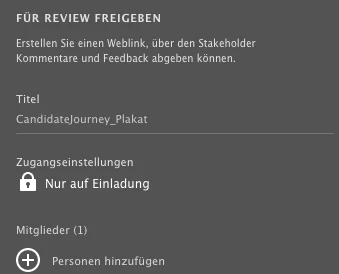
Unfortunately neither log out and log back in nor Reset ID preferences made any change. In the following a screenshot of how it still looks like.


Invite Only is locked and not clickable.


Is your account/workplace using an Enterprise account?

I had this same problem, and in reviewing it with my companies IT department, and we figuired out that if you work for a company that usues the enterprise login, for security purposes it limits sharing to internal invite access only.

1 reply

Diane Burns
Inspiring
September 14, 2020

Are you going to Access settings, then toggling to Public (view)? Set this before you share the document.

https://helpx.adobe.com/indesign/using/share-for-review.html

Participant
September 15, 2020

Hi Diane,

Thanks for the link, I already checked everything there, but my Create review window just looks different, the only access setting that is available is Invite Only. I cannot choose anything else. I created several new reviews (btw then I was not able to get back the old ones in the Share menu to update screens), then went to web view and deleted all, and started all over again... but again, only access setting is Invite Only, no chance to change that.


And as I said, I have an updated version of InDesign. 


Diane Burns
Inspiring
September 15, 2020

Strange. There are some standard troubleshooting steps. One is to log out of, then log back in your Creative Cloud app (this would occassionally solve Publish Online problems). The other is to reset ID Preferences. https://helpx.adobe.com/indesign/using/setting-preferences.html