
Participant
July 28, 2025
Answered

InDesign shortcut to parent folder attached to file name

  • July 28, 2025
  • 2 replies
  • 221 views

Hi. I know of a preference or pulg-in so that when you're in an InDesign file, the InDesign icon appears next to the file name and when you click on it it takes you to the parent folder in Finder. Don't know what this is called so have had no luck with searches. Any help please?
Correct answer Scott Falkner

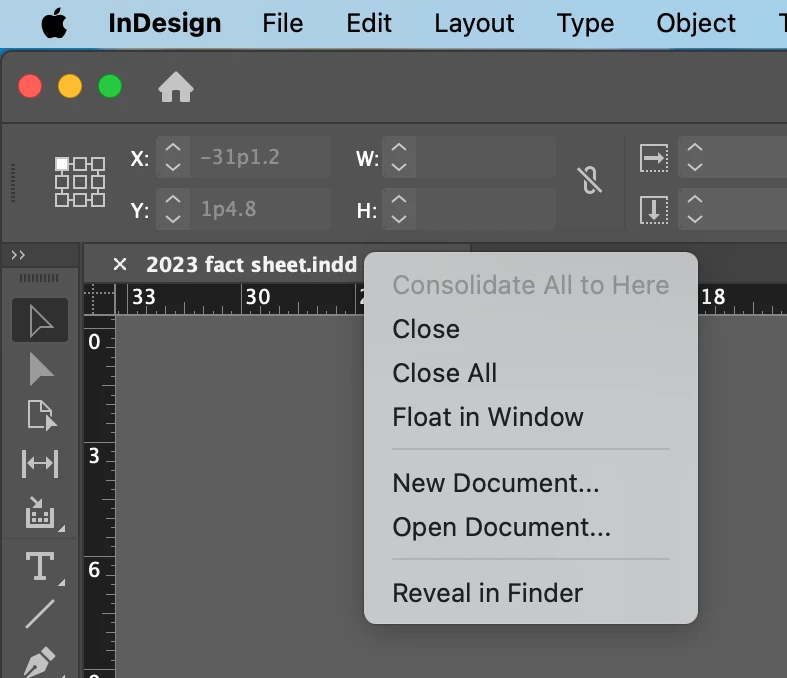
If you right click on the document tab you can select Reveal in Finder.

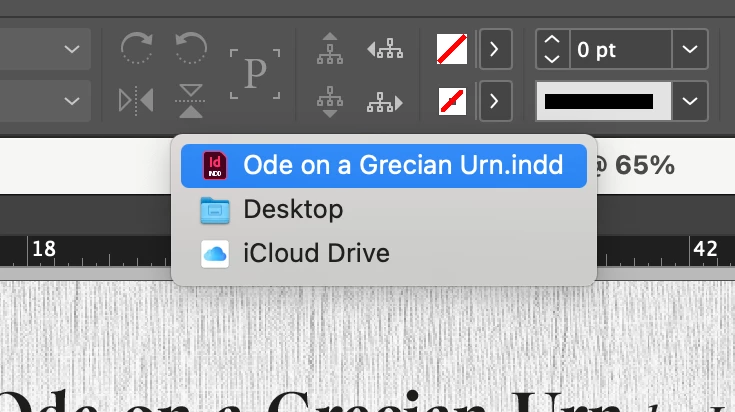
If you turn off the application frame you can view the file’s heirarchy by right-clicking on the filename in the window bar. Select a file or folder to jump to the finder and select the child item. For example, in the image below if I select Desktop I will open the Desktop folder and the InDesign file will be selected.

2 replies

Scott Falkner
Community Expert
Scott FalknerCommunity ExpertCorrect answer
Community Expert
July 28, 2025

If you right click on the document tab you can select Reveal in Finder.

If you turn off the application frame you can view the file’s heirarchy by right-clicking on the filename in the window bar. Select a file or folder to jump to the finder and select the child item. For example, in the image below if I select Desktop I will open the Desktop folder and the InDesign file will be selected.

Participant
July 29, 2025

Thank you! Magic!

Mike Witherell
Community Expert
Community Expert
July 28, 2025

Adobe Bridge (an application like macOS Finder or Windows File Manager) can do this. Right-click an InDesign file and choose Show Linked Files. In the InDesign file, click a graphic; click the Links panel menu button, choose Reveal in Bridge.

Mike Witherell