

L Gryfe
Inspiring
February 3, 2026
Question

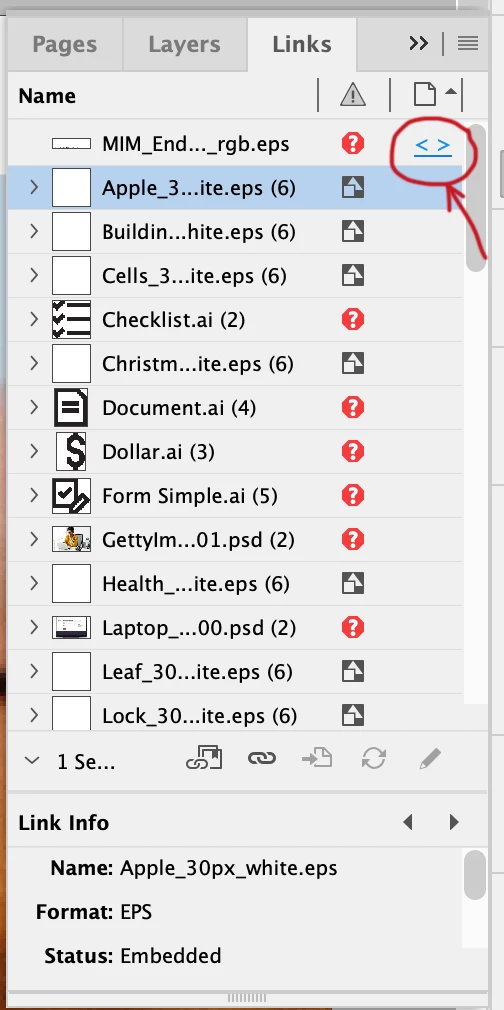
InDesign showing missing links to page that doesn't exist

  • February 3, 2026
  • 2 replies
  • 105 views

My InDesign file suddenly started listing missing images to a page that doesn’t exist. I am the only person who has ever worked on this file. These images weren’t listed in the links panel yesterday when I closed the file but they appeared this morning when I opened it.
 

    2 replies

    Willi Adelberger
    Community Expert
    Community Expert
    February 9, 2026
    1. Create a new document, without ANY STYLES.
    2. It has to have 2 pages, same size, same bleed.
    3. No additional layer, rename the existing layer to “OLD LAYER”
    4. Save this document.
    5. Open both, old and new document.
    6. In the new document: Layout > Pages > Move Pages … from old to new,  add at the end
    7. Save
    8. Delete the first 2 pages from the beginning and the “Old Layer”
    9. Save as INDD

    It should contain only valid items and end up with smaller file size.

    leo.r
    Community Expert
    Community Expert
    February 3, 2026

    try to export to IDML, then open it. will it make a difference?

    L Gryfe
    L GryfeAuthor
    Inspiring
    February 3, 2026

    Already tried that before posting. :)

    leo.r
    Community Expert
    Community Expert
    February 3, 2026

    what are your InDesign and operating system versions?