babaka24415349
Participant
October 7, 2019
Question

InDesıgn, Stroke Comes Over the Text When I Convert It to Outline!

  • October 7, 2019
  • 3 replies
  • 1834 views

Hi dear all, 


InDesign, stroke comes over the text when I convert it to outline! Is there any solution?
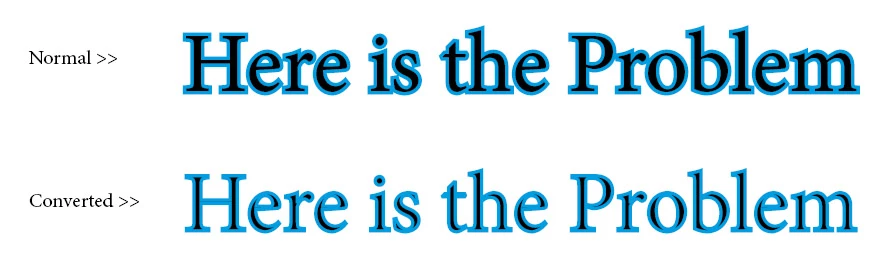
 

Thanks in advance

    This topic has been closed for replies.

    3 replies

    babaka24415349
    Participant
    October 15, 2019

    Any idea?

    Legend
    October 15, 2019
    Instead of converting to outlines, could you provide the pages in a PDF? That way, it will not matter if the destination computer has the fonts or not; they will be embedded in the file, and can be properly viewed and processed with Adobe Acrobat.
    Community Expert
    October 8, 2019

    If you're comfortable with Illustrator, you'll get a better result using that application to achieve this effec. In Illustratror you can use the Appearance panel to move the stroke behind the fill. Not only will it look better, but the text can remain live and editable, so no need to convert to outlines.

    babaka24415349
    Participant
    October 8, 2019
    Thanks for your reply. I have prepared more than 50 pages in indesign and it is already too late to immigrate to illustrator, so I am looking for a solution in indesign.
    Derek Cross
    Community Expert
    Community Expert
    October 7, 2019

    You can choose whether the stroke is inside, in the middle or outside the text in Photoshop under Layer Styles > Stroke and to a more limited degree in Paragraph Styles in InDesign.

    Don't convert to outline.


    babaka24415349
    Participant
    October 8, 2019

    Thanks for your reply...


    The font may not exist in destination computer so I have to convert it to outline. The problem is that it doesn't work when I convert it to outline and I look for a solution for this case.


    Best regards