Answered
indesign symbol meanings
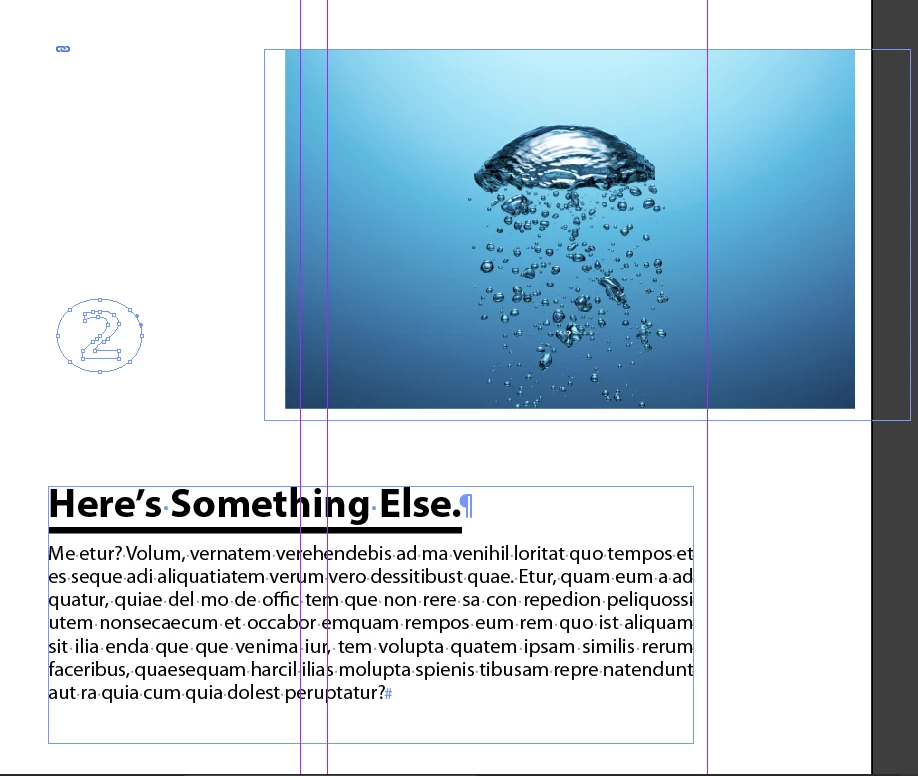 what does that blue symbol on the upper left that is two rings intertersecting mean? How do I make that symbol appear from indesign on a text box or image box like in the picture above?

what does that blue symbol on the upper left that is two rings intertersecting mean? How do I make that symbol appear from indesign on a text box or image box like in the picture above?
Hi,
The blue symbol indicates that the photo is linked from its source. You can get the graphic from stock.adobe.com if you search for "chain link".
If you go to the Links panel and right-click on the photo file, you can embed it which removes the blue symbol. Or, if you move the file to a different folder, you can re-link it to tell InDesign its new location.
Already have an account? Login
Enter your E-mail address. We'll send you an e-mail with instructions to reset your password.
 AdChoices