Inspiring
May 11, 2018
Answered

Indesign table cells to span rows

  • May 11, 2018
  • 2 replies
  • 1000 views

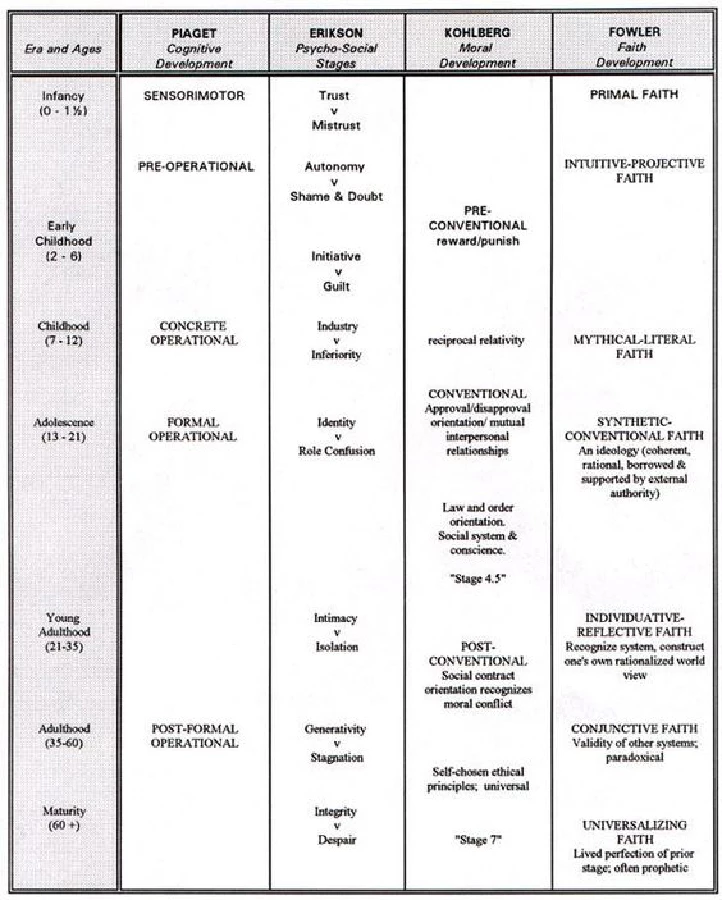
How do I create cells that span rows so that I can achieve the result show in this image?

Thanks in advance.
    This topic has been closed for replies.
    Correct answer Barb Binder

    Yes, that's would you would need to do to get that staggered look.

    ~Barb

    2 replies

    Inspiring
    May 11, 2018

    Thanks. Some of the entries are staggered, that is, they do not span a full row or occupy portions of adjacent rows. Is the only way to accomplish such an arrangement to split cells as necessary and then resize split cells so that the visual effect is correct (including hiding horizontal Lines as necessary). It just seems a bit non-computer like.

    Barb Binder
    Community Expert
    Barb BinderCommunity ExpertCorrect answer
    Community Expert
    May 11, 2018

    Yes, that's would you would need to do to get that staggered look.

    ~Barb

    ~Barb at Rocky Mountain Training
    Inspiring
    May 12, 2018

    Thanks.

    Barb Binder
    Community Expert
    Community Expert
    May 11, 2018

    Just select the cells you wish to merge and select Table > Merge Cells.

    Alternatively, leave the cells as is, and just hide the interior horizontal lines via Table > Table Options > Alternating Row Strokes.

    ~Barb

    ~Barb at Rocky Mountain Training