
Participant
May 20, 2020
Answered
InDesign - Table of Contents
- May 20, 2020
- 1 reply
- 1611 views

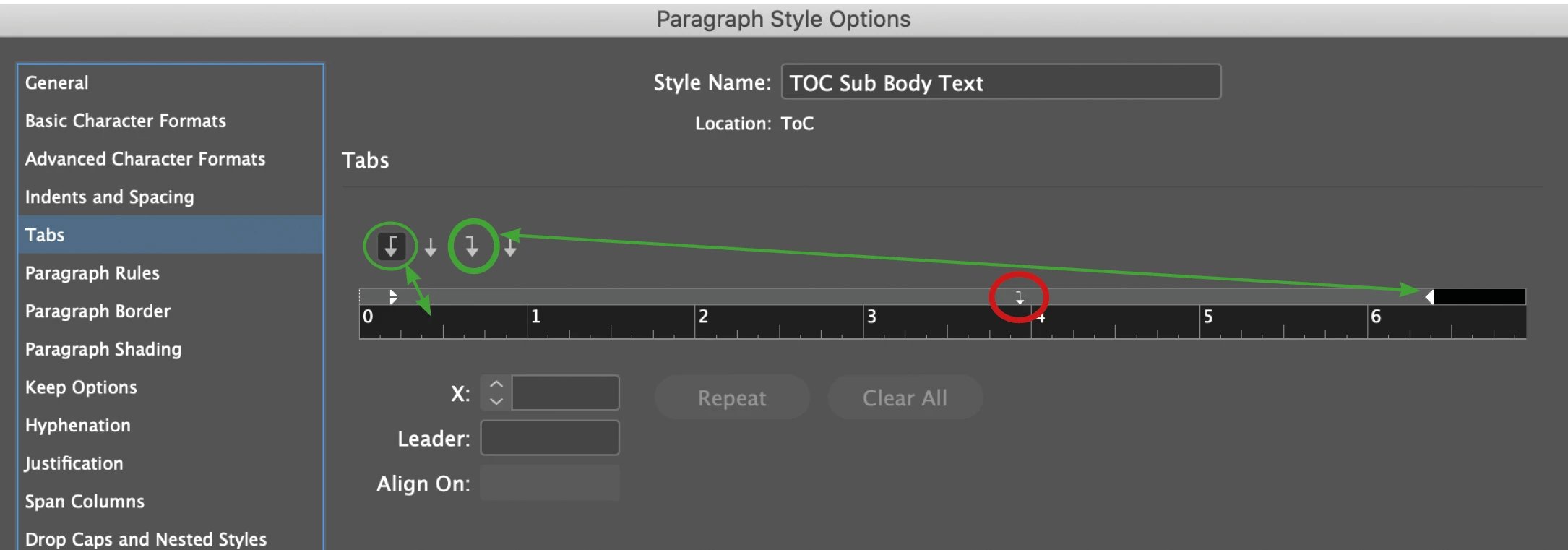
If you click on your tab in red circle you'll see surely one dot in "Leader". You have to eliminate this tab.
In the settings of your TOC "Between Entry and Number" you can eliminate the two tab and insert right indent tab as in the paragraph style "Heading 20 pt".
Or you can eliminate one tab. Then in paragraph style set the tab "right alineed in the right position as in the screenshot. Also set the first tab as in the paragraph style "Heading 20 pt" (without noting in "Leader")
Already have an account? Login
Enter your E-mail address. We'll send you an e-mail with instructions to reset your password.
 AdChoices