Participant
December 5, 2022
Question

InDesign table of contents - line breaks when I use '...' in my titles

  • December 5, 2022
  • 2 replies
  • 286 views

Hi all!

I am using the Table of Content feature in InDesign, which is working fine in general. However, some of my titles end with 3 dots ('...'). As soon as my title contains a single dot, the line seems to break and this causes the line number to disappear. The same goes for any symbols that include the dot, like '!' and '?'. Comma's and other signs are fine. I tried typing in the original title in the document, as well as typing directly into the table of contents block, same happens in both cases.


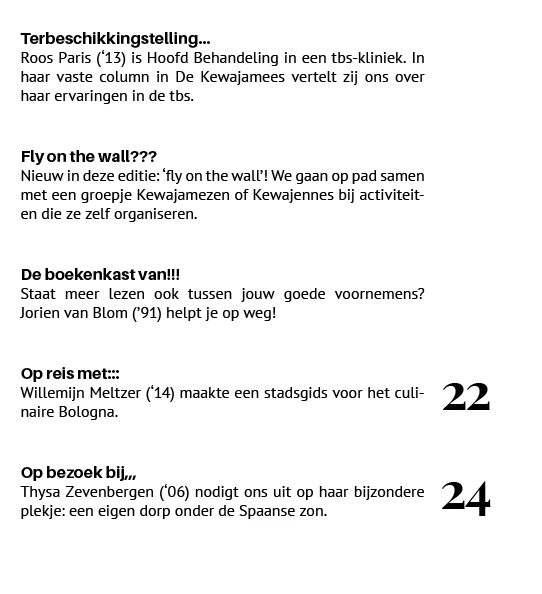
Does someone know how to fix this? Below you can see an example, note how in the first 3 cases the line breaks and the number disappears. The last 2 titles are fine.
 

This topic has been closed for replies.

2 replies

Bevi Chagnon - PubCom.com
Legend
December 5, 2022

Whether on Mac or Windows, you can insert an elipses by right-click at the text cursor and select Special Character / Elipsis.

I'm curious why punctuation with a dot — including a period or ? — would trigger the lost page number. I suspect that there's something in your TOC style and the paragraph formatting styles that is causing this.


|    Bevi Chagnon   |  Designer, Trainer, & Technologist for Accessible Documents ||    PubCom |    Classes & Books for Accessible InDesign, PDFs & MS Office |
Steve Werner
Community Expert
Community Expert
December 5, 2022

How about using a real ellipsis character which is made up of three dots but in a single glyph. On a Mac, it's created by typing Option-; [semicolon]. If you're in Windows, there should be a way of generating it as well.