Participant
May 1, 2024
Resuelto

Indesign Table - turn off autofit to contents and dissapearing cells when adding strokes

  • May 1, 2024
  • 2 respuestas
  • 596 visualizaciones

I have  made a table I would like to use, but it's very irritating that I  cant fix the column widths and row heights and it continues to revert back to autofit to content. How do I keep a fixed table and just resize the contents of each boxes? I've also found that when I start adding sttokes to unndividusl cells, other cells in the table dissapear. Hoew do I prevent this?
Este tema ha sido cerrado para respuestas.
Mejor respuesta de Robert at ID-Tasker

@FastMermaidLindsay 


Width of the Column will never resize on its own.


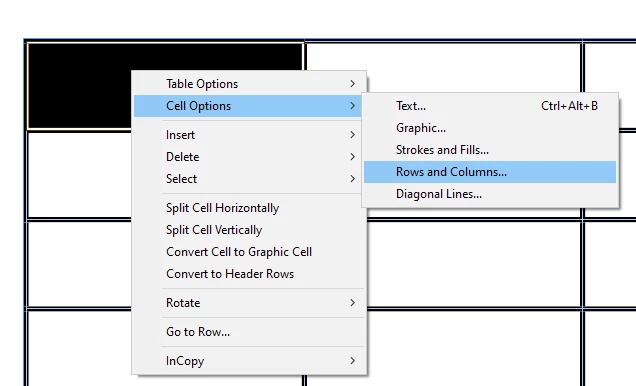
To set Height of the Cell - or rather all Cells in the Row - you need to select Cell / Row, then click right-mouse-button:


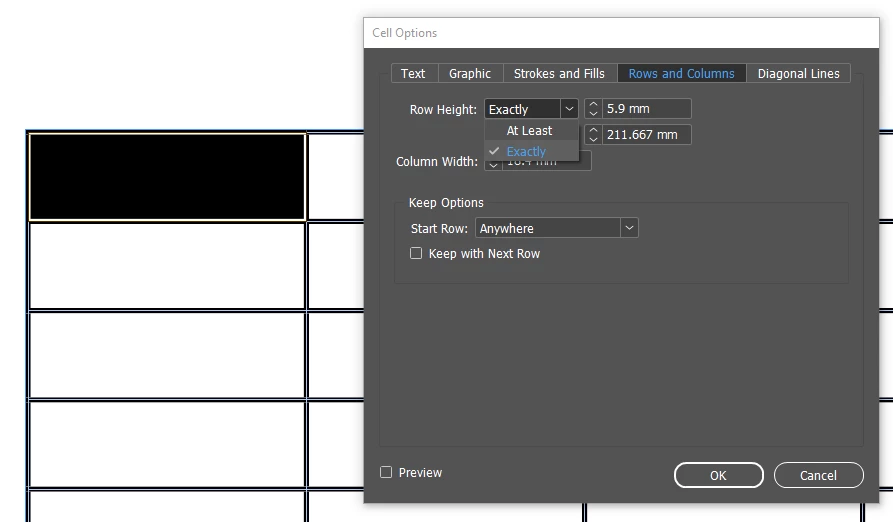
and set Row Heigh to EXACTLY:


What do you mean by " other cells in the table dissapear"?


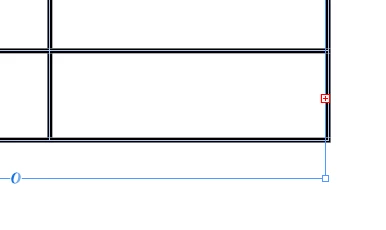
Do you get this red "+" in the right-bottom corner?


This means that some Rows are overset - you need to create a new TextFrame(s) and reflow your text.


2 respuestas

Robert at ID-Tasker
Legend
May 2, 2024

@FastMermaidLindsay 


Width of the Column will never resize on its own.


To set Height of the Cell - or rather all Cells in the Row - you need to select Cell / Row, then click right-mouse-button:


and set Row Heigh to EXACTLY:


What do you mean by " other cells in the table dissapear"?


Do you get this red "+" in the right-bottom corner?


This means that some Rows are overset - you need to create a new TextFrame(s) and reflow your text.


Rene Andritsch
Community Expert
Community Expert
May 1, 2024

What exactly do you mean with “resize the content of each boxes”? Do you mean table cells? Can you record a screen capture to show the disappearing issue? Usually if your text frame – which contains the table – is exactly the size of your table, the last row will disappear when you add a thicker stroke because this is treated like “overset text”. Make sure you make the text frame taller than your table. It will “grow” beyond the text frame horizontally but not vertically.