

Diane5EBA
Participant
February 16, 2026
Answered

InDesign Text Always Overset Even in Large Text Frames
  • February 16, 2026
  • 1 reply
  • 2 views

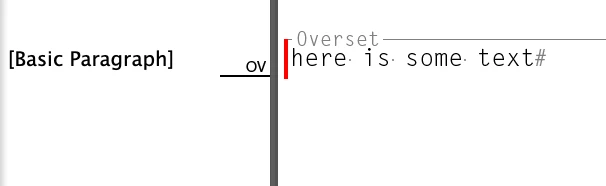
Text editor shows the text, but it’s always overset in the InDesign file, no matter how big I make the textbox or adjust the size/leading of the type. It’s an InDesign file that I didn’t create, so I deleted any existing paragraph styles and stripped out any formatting that was on it  but can’t figure out what is making any text I try to import or create automatically overset. What am I missing?

    Correct answer Diane5EBA

    It was text wrap from an image behind the text that was setting it off, so when that was removed, it worked properly again! 

    1 reply

    Dave Creamer of IDEAS
    Community Expert
    Community Expert
    February 16, 2026

    When you import text, do you Show Import Options and remove any formatting?


    It could be a column break.

    It’s a little hard to see in the Story Editor, but look for a small symbol:

    It’s easier in the layout with Show Hidden Characters on:


    David Creamer: Community Expert (ACI and ACE 1995-2023)
    Diane5EBA
    Diane5EBAAuthorCorrect answer
    Participant
    February 16, 2026

    It was text wrap from an image behind the text that was setting it off, so when that was removed, it worked properly again! 

    Dave Creamer of IDEAS
    Community Expert
    Community Expert
    February 16, 2026

    That will do it!

    David Creamer: Community Expert (ACI and ACE 1995-2023)