ladarketa
Participant
May 16, 2022
Question

Indesign Text-box (White shadow/space)
  • May 16, 2022
  • 4 replies
  • 426 views

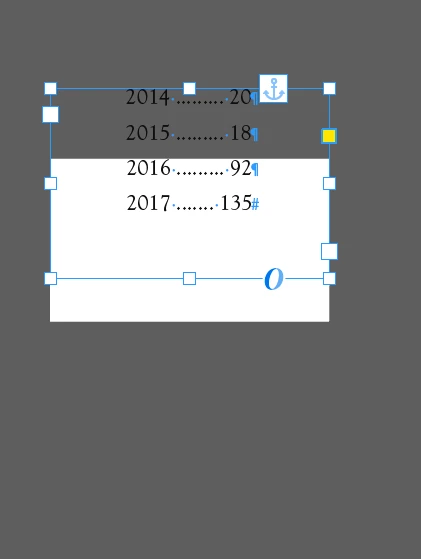
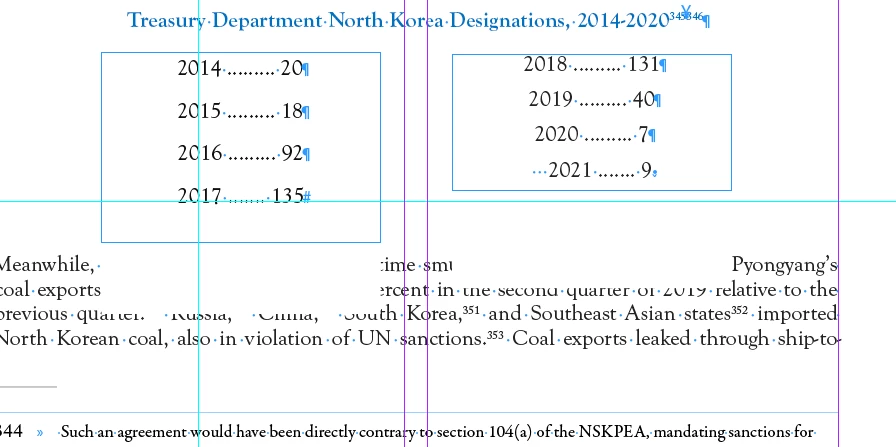
Can't figure out how to get these text boxes and text to not have a white "shadow" or space that impedes text from showing up. If I put in text boxes they don't have any white space until text is inside the box/ Any suggestions would be very helpful. 

This topic has been closed for replies.

4 replies

Community Expert
May 17, 2022

Hi ladarketa,

could be caused by text formatting.

Select all text in the text frame.


Make sure that:

[1] Paragraph Shading is turned off

[2] Paragraph Border is turned off

[3] Paragraph Rule Above and Rule Below is turned off

[4] No underline is used with the text


Regards,
Uwe Laubender
( Adobe Community Professional )

Peter Spier
Community Expert
Community Expert
May 16, 2022

can you share a sample page? There appears to be an anchored object involved as well which might have something to do with it.

davecourtemanche
Inspiring
May 16, 2022

Is there a paragraph style applied to the text? Could paragraph shading be turned on, perhaps?

melissapiccone
Community Expert
Community Expert
May 16, 2022

Look in your appearance panel - do you have a fill on the box? It looks like it's offset. 

Melissa Piccone | Adobe Trainer | Online Courses Author | Fine Artist
Willi Adelberger
Community Expert
Community Expert
May 17, 2022

Appearance Panel is part of Illustrator, not InDesign. In InDesign you find the features in the Effects Panel and in the Objects Styles.

melissapiccone
Community Expert
Community Expert
May 17, 2022

Yes, I meant the appearance section of the properties panel...


Melissa Piccone | Adobe Trainer | Online Courses Author | Fine Artist