


Participant
July 7, 2026
Question

InDesign Text Flows Into a Narrow Point Instead of the Full Text Box

  • July 7, 2026
  • 2 replies
  • 40 views

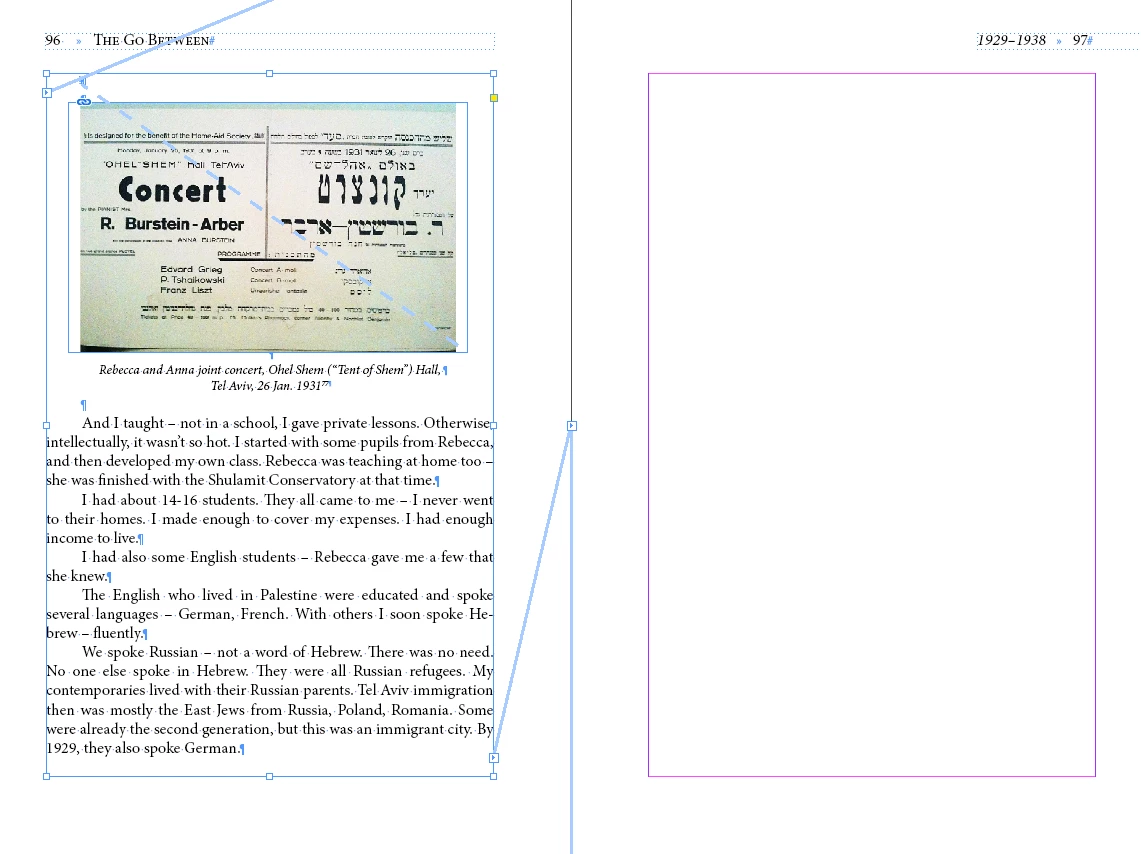
Screenshot attached. The text is threading into a small point in the middle of the page instead of the full text box. Anyone have any clue why this is happening or how to fix it? Thanks in advance!
 

    2 replies

    Dave Creamer of IDEAS
    Community Expert
    Community Expert
    July 7, 2026

    It looks like the frame is zero width is normally is not allowed. 

    The file might be corrupt. Try saving it as IDML, open the IDML, and save-as back to INDD.

    David Creamer: Community Expert (ACI and ACE 1995-2023)
    leo.r
    Community Expert
    Community Expert
    July 7, 2026

    Enable hidden characters, also check your text in the Story Editor to see if there’s something that’s pushing it further; also check your paragraph styles for the same.

    Dave Creamer of IDEAS
    Community Expert
    Community Expert
    July 7, 2026

    Hidden character is on. But there is something strange with the recto text frame. 


    David Creamer: Community Expert (ACI and ACE 1995-2023)
    leo.r
    Community Expert
    Community Expert
    July 7, 2026

    oh yeah now I see it. didn’t look at the screenshot carefully.