
Participant
January 16, 2024
Answered

InDesign Text wrap doing strange things

  • January 16, 2024
  • 2 replies
  • 3049 views

Hi,


Relative newbie here. I have a 96 page magazine that I publish every 3 months. I use the previous edition to build the next by deleting all that doesn't need to be in the new edition and then adding the new 'stuff'. I have done this successfully for 8 editions now.

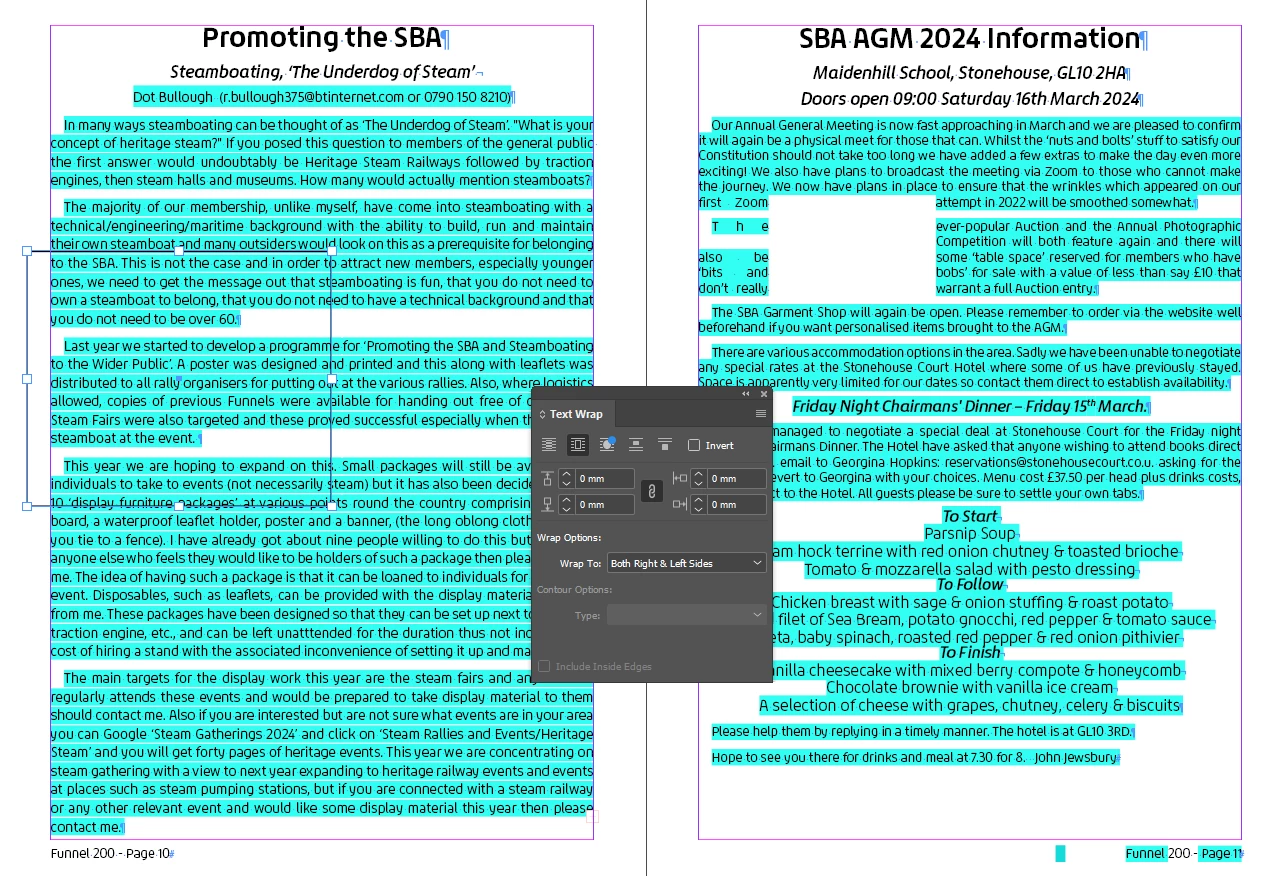
As of the current edition, I paste some new text (mostly from MS Word) into a text box which works fine but when I try to add a graphics frame into the text it refuses to wrap around it. 

It works as expected if I try to put a graphic frame into any of the existing (i.e. 'old') text.

Tried rectangle/elipse/polygon - all the same

There is only one layer in this whole document

Pasting the same 'new' text into a new document - the wrap works as it should.

Any suggestions most welcome!
Correct answer Peter Spier

There are two settings that could be affecting the text wrap.

First, right-click the text frame where wrao is not working and go to Text Frame Options. Be sure the Ignore Text wrap box is NOT checked.

Second, in the preferences , under Composition, check the status of the Text Wrap Only Affects Text Beneath box. This would cause problems if the graphis is below the text in the stacking order.

If it isn't one of these, odds are it's file corruption and can be cured by exporting to .idml, opening that and saving as a new .indd. And here's some advice for how to avoid that in the future: stop "recycling" issues of your magazine. Create a template file with all the required styles defined and Parent Pages for your various page layouts. You can include any content that is used in most or all issues (it can be deleted from a dopcument based on the template if not needed) and base all you issues on the template, so all files start with a clean first generation copy. It's a bit of work to set up the template the first time, but just as fast to use it once you've got it, and you minimize risk of accumulated corruptions that will eventually crash your file.

2 replies

Peter Spier
Community Expert
Community Expert
January 18, 2024

For th e benfit of others who may read this in the future, please let us know waht the final answer was...

Peter Spier
Community Expert
Peter SpierCommunity ExpertCorrect answer
Community Expert
January 16, 2024

There are two settings that could be affecting the text wrap.

First, right-click the text frame where wrao is not working and go to Text Frame Options. Be sure the Ignore Text wrap box is NOT checked.

Second, in the preferences , under Composition, check the status of the Text Wrap Only Affects Text Beneath box. This would cause problems if the graphis is below the text in the stacking order.

If it isn't one of these, odds are it's file corruption and can be cured by exporting to .idml, opening that and saving as a new .indd. And here's some advice for how to avoid that in the future: stop "recycling" issues of your magazine. Create a template file with all the required styles defined and Parent Pages for your various page layouts. You can include any content that is used in most or all issues (it can be deleted from a dopcument based on the template if not needed) and base all you issues on the template, so all files start with a clean first generation copy. It's a bit of work to set up the template the first time, but just as fast to use it once you've got it, and you minimize risk of accumulated corruptions that will eventually crash your file.