
Known Participant
March 12, 2024
Question

InDesign to Export RTF file - Which is the best Options (Tagged Text or RTF)

  • March 12, 2024
  • 4 replies
  • 2170 views

Hi All,

Here is my query, Can you anyone suggest which is the best options to export the InDesign to RTF file. 

I am using javascript to export the file, but I faced some issues for inline images are missing. Please refer the screenshots as below.

InDesign File input is the below screenshot:
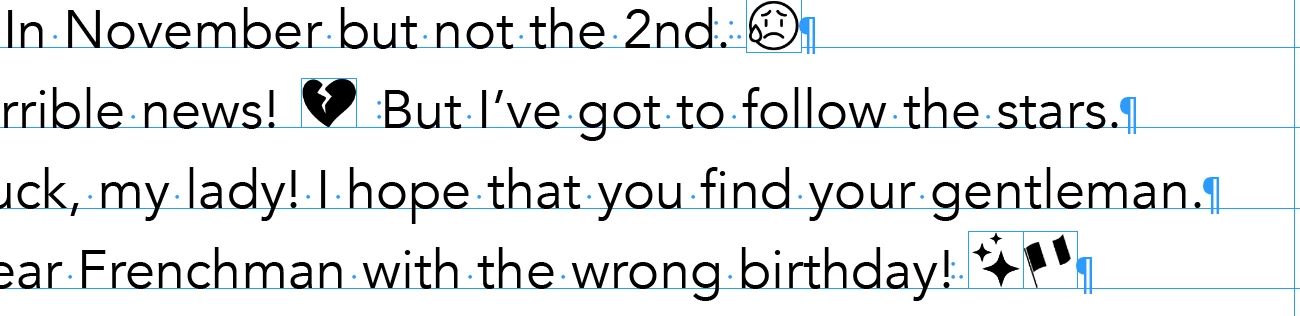


InDesign to Export RTF used has Tagged Text format is the below screenshot: Here all the inline images are missing while generating the RTF file it's replaced with the space.



InDesign to Export RTF used has RTF format is the below screenshot: The problem is some of the inline images are generated in the RTF file, some cases are not generated in the RTF file. What is the issue. All the inline figures are tif file format.



Your suggestion and ideas are much appreciated!


This topic has been closed for replies.

4 replies

Robert at ID-Tasker
Legend
April 29, 2024

@suntech


Have you tried converting your linked graphics to something "simpler" - JPEG / GIF / PNG - relink and then try again? 


suntechAuthor
Known Participant
April 29, 2024

@Robert at ID-Tasker 

I replaced all the EPS file into JPG file format, then export to RTF all the images are present in RTF file.


Robert at ID-Tasker
Legend
April 29, 2024
quote

@Robert at ID-Tasker 

I replaced all the EPS file into JPG file format, then export to RTF all the images are present in RTF file.


By @suntech


Great. 


EPS isn't exactly "widely popular" image format. 


Inspiring
April 29, 2024

Several others have suggested export via PDF but stylesheets do not transfer well and tables are often a big problem as well. I have been developing a script that uses the "Article" mechanism to organise the export text into the correct order and then export the entrie article as a single RTF document. However, this is currently not handling embedded or linked graphics. Text already exports beautifully and styles and tables come through as desired. Will update this conversation as soon as I have sorted out the image issue …

suntechAuthor
Known Participant
April 29, 2024

@Tim Sheasby 

Even if we go with the Article panels options user has to order the page elements one by one in every page items. Linked stories no issue, the problem is when multiple stories in the one pages that is the issue to order the elements that is visually we can identify easily, but scripting wise we have to do [x,y] that is also not good to order the page items text frames.

But in this case i request to user give the script lable and sort out the issues.

Robert at ID-Tasker
Legend
April 29, 2024
quote

@Tim Sheasby 

Even if we go with the Article panels options user has to order the page elements one by one in every page items. Linked stories no issue, the problem is when multiple stories in the one pages that is the issue to order the elements that is visually we can identify easily, but scripting wise we have to do [x,y] that is also not good to order the page items text frames.

But in this case i request to user give the script lable and sort out the issues.


By @suntech


What EXACTLY is your end goal? 


Export InDesign's document by element's order on the pages - including anchoring "side elements"? 


Kind of ePUB but as RTF? 


m1b
Community Expert
Community Expert
March 13, 2024

Hi @suntech, you might need to do some experimentation. I did a quick test: I exported selected story as HTML (gives lots of options, such as keeping original graphics) then from my browser I did Select All and Copy, and Pasted it into TextEdit (I'm on MacOS) and it seemed to do what you are asking. But that might be a direction you could explore—export html and convert html to rtf? Note that, on MacOS at least, .rtfd with embedded images is actually .rtfd.

- Mark

James Gifford—NitroPress
Legend
March 13, 2024

I guess there are endless permutations of export to one format or another, then export or capture from that format to save as a standard format. But for anything but what's already a clean text flow, there is likely to be garbage and broken formatting requiring line by line review and editing. ID to PDF to Word seems to be the most reliable method although it does require repair of the many line-breaks that PDF uses to control text flow — but a simple Search and Replace of all line breaks with spaces should do a 'mostly' job of restoring the text.


Export to HTML would probably work as well, depending on how many other elements are embedded inline.

suntechAuthor
Known Participant
March 13, 2024

@James Gifford—NitroPress I need the paragraph and characters styles as used in the InDesign, while export PDF and convert to WORD that is not workout for my request.

Anyway thanks for looking my post!

James Gifford—NitroPress
Legend
March 12, 2024

There are no good paths to getting completely "clean" text out of InDesign. Any control or formatting characters peculiar to ID will be exported as the sort of random characters you're seeing.


The only sort-of method for getting any quantity of text to an exported, editable form is to export the ID doc to PDF, then use Acrobat Pro to export that document to Word — and it won't be a lot easier to work with, but it won't have as many glitchy glyphs in it.


If the amount of text isn't huge, you can also cut and paste the content into a Word doc, cleaning up line breaks and so forth as you go.


There are also tools that export ID content to Word directly, but they're not free and may not be worth the cost for a single export job. Just export to "best" and manually clean up and reformat the content.