Participant
July 28, 2023
Question

InDesign to PDF interactivity

  • July 28, 2023
  • 3 replies
  • 401 views

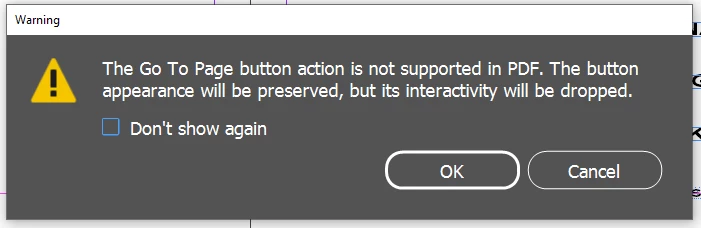
'Go to Page' buttons do not work when exported ot PDF. 'Go to First/Last' always works I just cannot set it to  specific page, really annoying when trying to create and interactive contents page.
 

This topic has been closed for replies.

3 replies

BobLevine
Community Expert
Community Expert
July 28, 2023

Which part of this is unclear? Seriously...it's right there in the button action you chose that it's for EPUB or Publish Online only. 


Jane Dot
Participating Frequently
July 28, 2023

Ok, thanks for your advises. For me, it's still too many differnt ways/windows to actually do what I want to do. There Objectstatus and buttons and forms, hyperlinks and…  So I'd like to be able to set an icon for "go to content" in a book, I need to use a hyperlink/text anchor instead of a button, the button doesn't work an interactive pdf-file. I'm sorry that I have a different way of working and don't find the things I want to add to my knowledge are over organized. Some functions have worked and but haven't survived the software evolution. I have a different understanding for interactive pdf files, that is more than filling words into a form. I am finding work arounds, but it is time consumming. Why can't one click pictures with the same editing for an epub in a so called interactive pdf?

BobLevine
Community Expert
Community Expert
July 28, 2023

The best advice I can give you is to get some training. Interactive PDF is a deadend and has been for years. I wrote this blog post SEVEN YEARS AGO: It's okay to say no to interactive PDF (boblevine.us)


It's just gotten worse. I can't even recommend using it for forms anymore.

Willi Adelberger
Community Expert
Community Expert
July 28, 2023

Instead of using a button, use a link to a page or an anchor.

Jane Dot
Participating Frequently
July 28, 2023

I have the same problem, and I don't understand why there is not a clear statement within adobe. Here are the functions for interactive pdf and here a the ones for epub.

Willi Adelberger
Community Expert
Community Expert
July 28, 2023

What else should Adobe do than describe it in the manual?
