
Known Participant
June 29, 2025
Answered

Indesign TOC doesn't display title as it should when manual font size changed are done

  • June 29, 2025
  • 1 reply
  • 2663 views

Hi everyone,


I’m working on a book in InDesign and running into a problem with my Table of Contents (TOC).


Each recipe page has a title that uses a consistent paragraph style (e.g., “TitleStyle”). However, inside some of these titles, I’ve manually changed the font size of certain words or segments for visual reasons—without changing the paragraph style itself.


Now, when I generate the TOC using that paragraph style, the titles where I changed part of the font size manually do not show up as they should but instead keep that manually changed font. 


I’ve already:


  • Confirmed that all the titles have the correct paragraph style applied

  • Tried manually changing the font size on the recipes or used a character style on the paragraph style
  • Made sure the TOC includes that paragraph style

  • Tried checking/unchecking “Include Style Overrides” in the TOC options

  • Ensured the TOC text box is large enough and the TOC is up to date

  • Export, save, change and all...


But the issue persists.


Is there a way to make the TOC ignore manual character formatting (like font size changes) ?

I joined pictures so you'll understand better 


Thanks in advance!
Correct answer Joel Cherney

I tried your technique, with clear override. 

I joined a little video of the problem but to explain briefly : the clear override or clear all doesn't apply to all the text but just to the one I selected


If you put your insertion point into a paragraph that has overrides and then click Clear Overrides - or, as you have shown, click "Apply TOC, Clear Overrides" - then overrides will be cleared in that paragraph only. If you select text, it will clear overrides on all selected text.  Since you have multiple levels of TOC, I'd suggest that you just whack Select All and then Clear Overrides. You don't need to Apply TOC, Clear Overrides because your TOC paragraph style is already applied. 


1 reply

Joel Cherney
Community Expert
Community Expert
June 29, 2025

Where are you finding this "Include Style Overrides" in the TOC options? Here are my TOC options, and I don't see that choice anywhere:


So I think "Hey, how are you building your TOC?" is the place to start. 


The method I use to address this issue is to have created styles for the TOC, so if any overrides come in from the chapter titles when generating the table of contents, I can simply Select All and Clear Overrides from the flyout menu on the Paragraph Styles panel. (I actually have Clear Overrides assigned to a keyboard shortcut.)


However, I'm not convinced that you're using the TOC tool to make your TOC.


Honestly, I wonder how much of your question was written by you, and how much was written by AI.


Please—if French is your language, just post in French 


Known Participant
June 29, 2025

About the "include style overrides" i got things missed up I was talking about "clear style overrides" from the paragraph style. 
I do use the TOC tool to create my TOC. 
I also created TOC styles so that, as you do, can manage them as I want without changing the original text. I joined a picture. 

None of my questions were written by AI, but yes, I do use it so sometimes I got things missed up. 
My langage is french but I speak english (my software is in english) and after hours and hours (and days) on this nothing's clear anymore 

Joel Cherney
Community Expert
Community Expert
June 29, 2025

Your English is great (far better than my French!) but I just wanted to make sure that we weren't miscommunicating due to bad machine translation. 


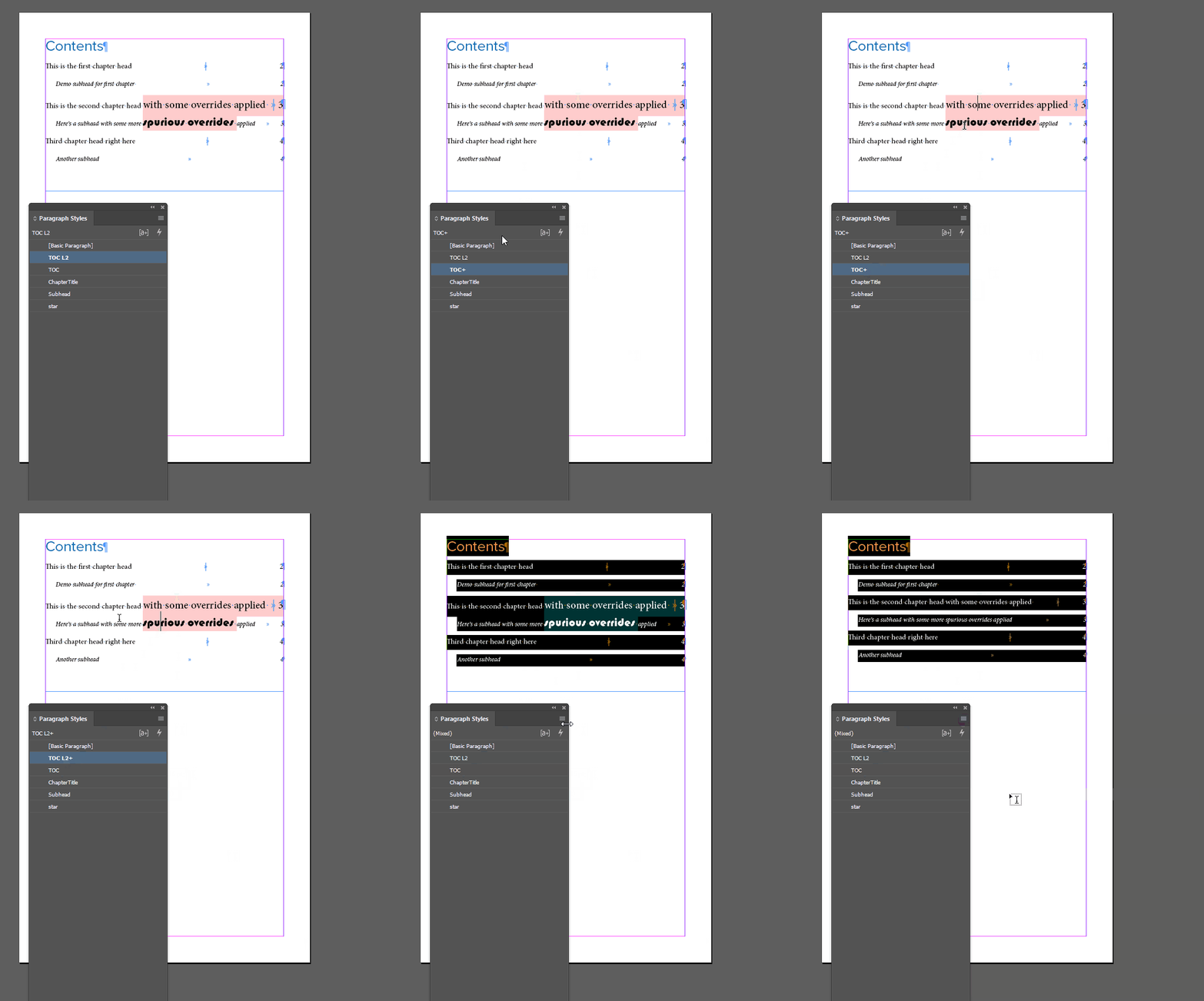
"Clear overrides" is the way to resolve this. In the following GIF, I make some manual overrides to the title of the second chapter, then I go back to the TOC and clear the overrides:


To answer your original question:


Is there a way to make the TOC ignore manual character formatting (like font size changes) ?


Not from the TOC menu. The TOC grabs text and applies a paragraph style to it. Local overrides come along, as well as Character Styles. If you have text in your TOC that is the wrong size, and clearing overrides doesn't work, then the only likely possibilities I can think of are 1) corrupt documents and 2) Character Styles you've forgotten about.