Participant
October 12, 2017
Question

Indesign Updates...

  • October 12, 2017
  • 5 replies
  • 1059 views

Hello

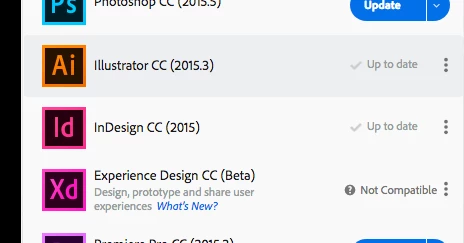
I have recently updated indesign CC to the latest version.. both on my mac at home and at work..However I am still having issues opening files..

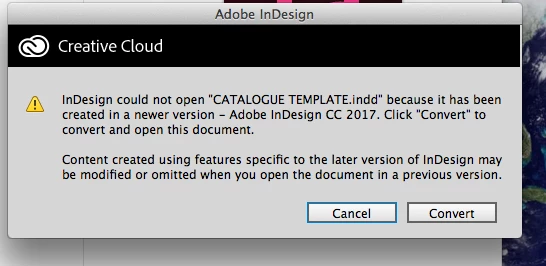
See attached.. has any one else had this? Any advice would be appreciated.. I can't keep having this.

(Since upgrading to Indesign CC, I seem to have so many updates. I can understand updating full versions etc, but I'm having to do this so often, or I cant open up files. It's so annoying.  It doesn't seem like this in photoshop though, just an indesign thing. This never use to happen.)

See attached.

Thanks


Chris
    This topic has been closed for replies.

    5 replies

    Participant
    October 13, 2017

    Hi

    Thanks for the feedback everyone.

    i know it says 2015, but I've been updating it since then, when the updates come up. So when I went to update it again it's said it can't be updated as it said was the latest version. I will uninstall it and try again .

    With regards to operating syste..Im using os x 10.10. I'll upgrade everything.

    thanks

    chris

    Om Nath Jha
    Legend
    October 13, 2017

    Hi  Chris,

    Mac OS 10.10 is compatible for CC 2017 version of InDesign. InDesign system requirements. ​Would you mind checking the Creative Cloud App once again. It seems you are not getting complete options for apps to install.

    Regards,

    Om

    Steve Werner
    Community Expert
    Community Expert
    October 13, 2017

    If the Creative Cloud desktop app isn't downloading the latest version, you may need to reinstall it:

    Download Adobe Creative Cloud apps | Free Adobe Creative Cloud trial

    amaarora
    Inspiring
    October 13, 2017

    Hi,

    What is the version of your MAC OS?

    Also, please sign out and then sign back in to ensure that all entries in the Creative Cloud application are refreshed and therefore if there is any available update, it is shown in the application.

    -Aman

    Legend
    October 12, 2017

    You say you updated to the latest version but your screenshot clearly shows you haven't.  Maybe your system is too old.

    Barb Binder
    Community Expert
    Community Expert
    October 12, 2017

    It doesn't seem like this in photoshop though, just an indesign thing.

    Photoshop has always had a feature called Maximize Compatibility that—when turned on—allows you to open a .psd in any version of Photoshop. InDesign does not. As per Jonathan, if you see that message, you are trying to open a file created in a newer version of the software. A few years ago, that would have been an issue, but notice the Convert button is one of the options. You can use that button to convert the newer InDesign file to one that you can work with in 2015.

    Or better yet take advantage of the free upgrade to 2017.1 via Help > Updates in InDesign, or in the Creative Cloud Desktop App. If updates are not available, talk with your IT department—they have likely restricted your installation rights.

    ~Barb at Rocky Mountain Training
    JonathanArias
    Legend
    October 12, 2017

    That box will not appear if you are using the newest version of adobe indesign to open files. It only happens when you are on an old version of indesign trying to open files save with a newer version. make sure you uninstall oder version of indesign, your screenshot shows you have 2015 install.. the newest version would be (2017).