
awhfman
Inspiring
November 1, 2022
Question

InDesign Version 18 Messing Up Objects

  • November 1, 2022
  • 1 reply
  • 190 views

InDesign Version 18 changes the size of anchored objects and pushes them off the page. I have them anchored next to the text and auto-sized to fit the content (Numberpile font). The frame width changes. Trying to resize the frame width  does nothing.

NOTE - This only happens when I switch the Conditional Text.

This is what it is doing:
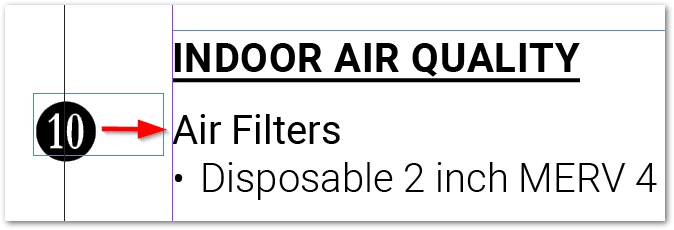
If I open the file (IDML) in 17.4 after saving them in 18 they are still out of position but the frame is resized back to where it should be. I then have to clear any overrides for the style to get it back to where it's supposed to be anchored.

This is how it's supposed to look:

We are rolling back to 17.4 until this issue is fixed.

Windows 10, version 20H2

This topic has been closed for replies.

1 reply

Community Expert
November 1, 2022

Can you make a file available here for testing?


In the meantime

Report bugs or make a feature request
https://indesign.uservoice.com/


awhfman
awhfmanAuthor
Inspiring
November 1, 2022

File attached. Open the file and change the Conditional Text from Lennox to Allied and watch the objects with the numbers jump. Not all of them do it. NOTE - Not all objects are the same style name.


Thanks Eugene

Community Expert
November 1, 2022

I cannot find a reason for that behaviour. 


I will add it's a very complex setup for a simple layout. 

I think if you had time you could simplify the layout a bit more and stop issues like this in the future. 


If you need help in this regard let us know.