Participating Frequently
March 21, 2021
Answered

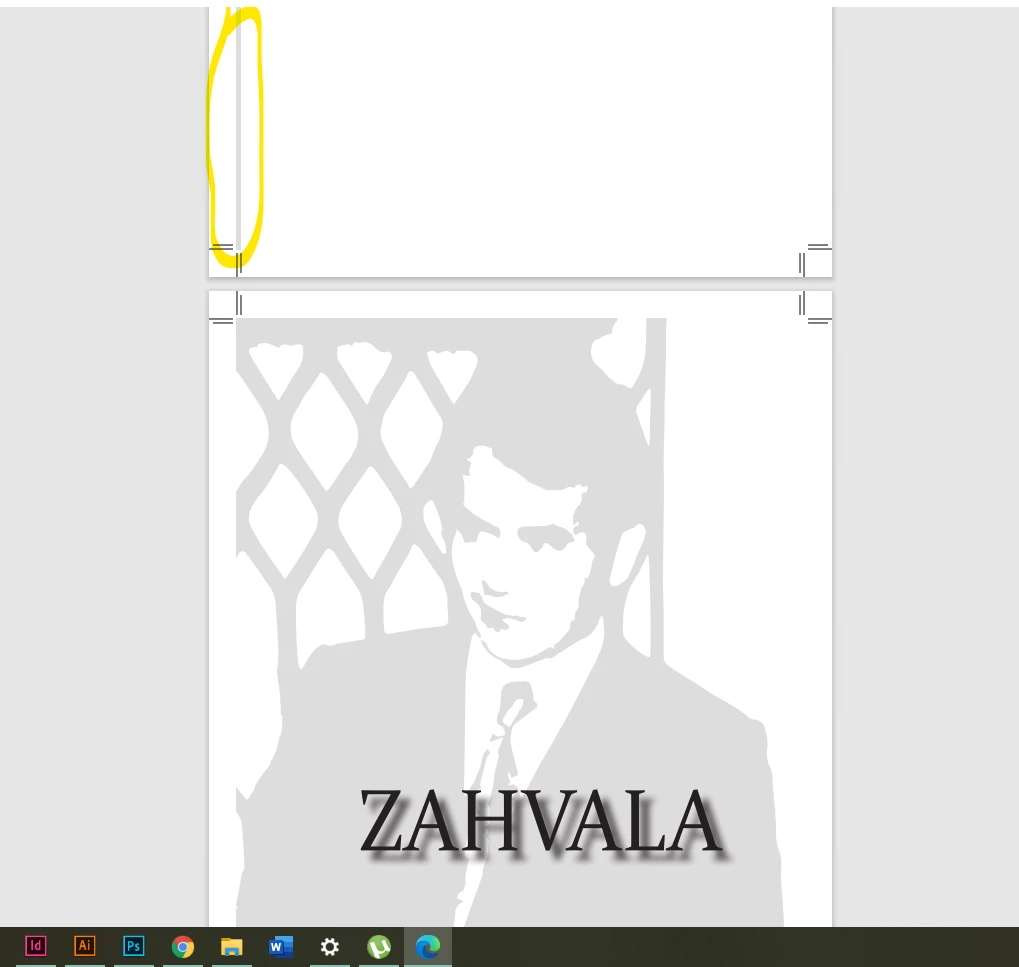
InDesign won't export my file propery (exporting spread to single sheets results in image overlay to

  • March 21, 2021
  • 2 replies
  • 277 views

Hello guys

So I have a problem with book exporting. 

It was made with spreads, where one image was put on left spread and text on the right. The image was contained within the frame, but when I export it as single pages (with crop marks and bleed marks), this is what the exported file looks like. 


Do you maybe have any idea why this might happen?


If nothing works, I guess I'll just set it up as a single page file with two masters for left and right spread..

But I'm not pretty much keen on doung that..


Thank you in advance if anyone had a similar problem. 


    This topic has been closed for replies.
    Correct answer Jumpenjax

    I have had that happen and this is what I found. Sometime it is hard to see a slight overlap. Zoom in on the problem area just to make sure the image box is not overlapping into the next page.

    2 replies

    Jumpenjax
    Community Expert
    JumpenjaxCommunity ExpertCorrect answer
    Community Expert
    March 22, 2021

    I have had that happen and this is what I found. Sometime it is hard to see a slight overlap. Zoom in on the problem area just to make sure the image box is not overlapping into the next page.

    Lee- Graphic Designer, Print Specialist, Photographer
    Nancy OShea
    Community Expert
    Community Expert
    March 21, 2021

    [Moderator moved from Using the Community (forums) to InDesign.]


    Nancy O'Shea— Product User & Community Expert