

Anna_Lander
Community Expert
Community Expert
March 5, 2026
Answered

InDesign works extremely slowly with quite simple tasks

  • March 5, 2026
  • 2 replies
  • 100 views

There is a really boring problem with simple tasks like selecting text or using the Find/Change feature in large documents. 
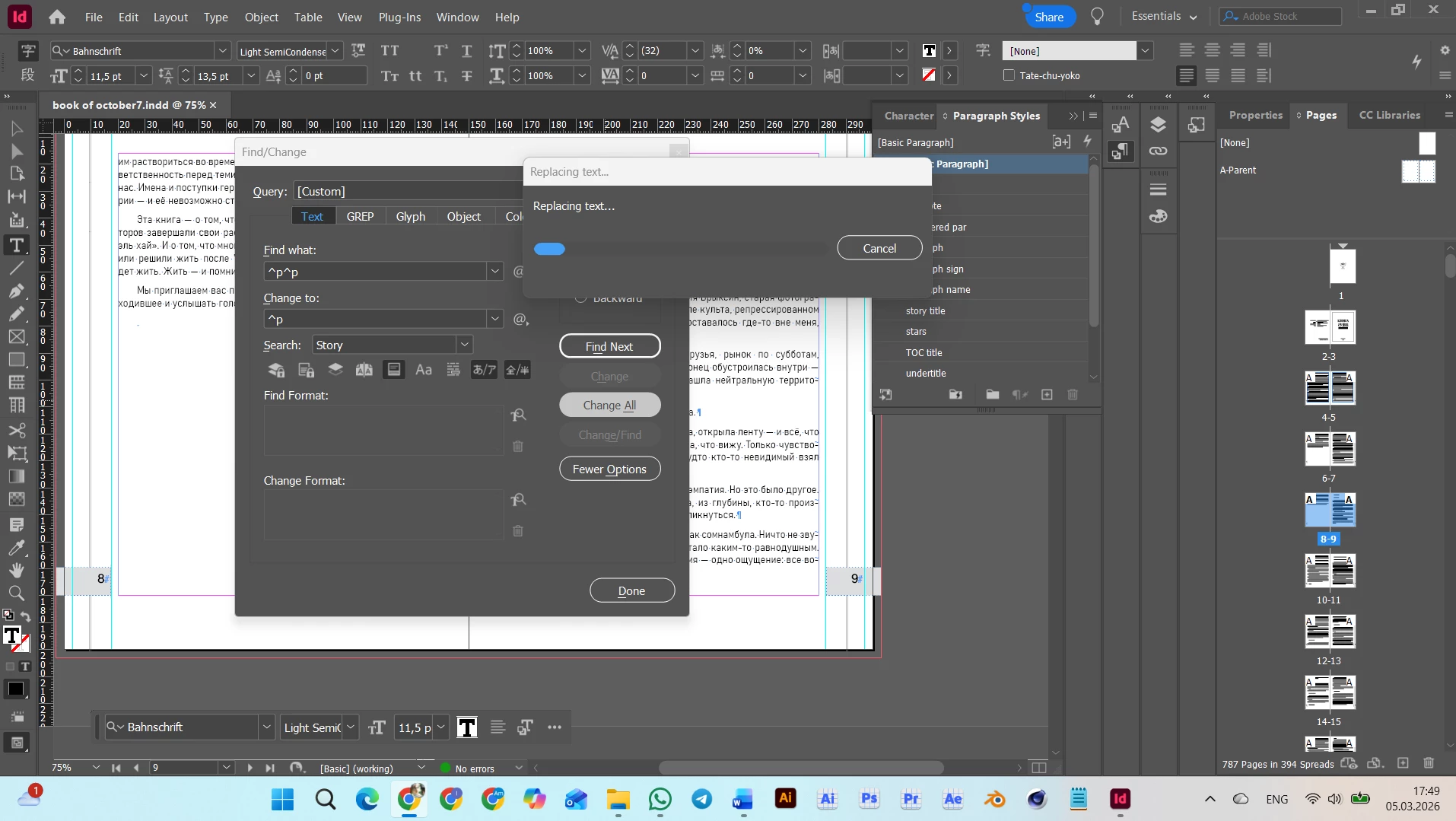
For example, this task has already taken about 1.5 hours, and I don’t know how long it will take. As you can see, the task is very simple: just find/change text elements. The exact query is not important; it may be selecting a sentence, changing a word, or something similar. And every time it takes ages.
It started with about InDesign version 2022, but was not so noticeable. And for now, it has grown to disrupt the entire workflow.
What could be done? I can divide the document into smaller parts, but it’s unwanted for this project, and there aren’t any warnings in the documentation about the document’s length. The Text Editor does not help; it works as slowly as the layout mode.

The system is good enough for comfortable work:
Processor    13th Gen Intel(R) Core(TM) i7-1355U (1.70 GHz)
Installed RAM    32,0 GB (31,7 GB usable)
System type    64-bit operating system Windows 11, x64-based processor

The checked InDesign version 21.2
 

Correct answer Eugene Tyson

It's incredibly frustrating when a high-end machine like an i7 with 32GB of RAM is brought to its knees by a "simple" Find/Change. Seeing that progress bar crawl for 1.5 hours is definitely not normal behavior, even for a large document.


The "Preflight" Bottleneck
The most common reason for InDesign hanging during text edits is the Live Preflight. Every time you change a character, InDesign tries to recalculate text wrap, overset text, and transparency for the entire document.

Turn off Preflight while doing heavy editing. Look at the bottom bar of your InDesign window (next to the error count) and set it to "Preflight is off."

High-Quality Display Performance
InDesign is trying to render every page in high resolution while you are performing global changes.

Go to View > Display Performance > Typical Display (or even Fast Display). This prevents the GPU/CPU from trying to redraw complex images while the text engine is working.

Preferences & "Advanced Type"
There are two specific settings that often cause "lag" in modern versions of InDesign:

Hyperlinks: If your document has many automatic hyperlinks, InDesign re-indexes them every time text shifts.

GREP vs. Text
In your screenshot, you are using the Text tab to find ^p^p. While this works, the Text engine in InDesign is actually slower for pattern matching than the GREP engine.

Switch to the GREP tab. Find \r\r and Change to \r. GREP often bypasses some of the "formatted text" overhead that the Text tab carries.


Clear the Cache (The "Version 2022+" Bug)
You mentioned this started around 2022. Recent versions are notorious for bloated "SavedData" files that don't clear properly.

Close InDesign. Hold Ctrl + Alt + Shift while restarting the app. Confirm "Delete InDesign Preference files." This often resets the internal "memory leaks" that cause this specific slowdown.

2 replies

Scott Falkner
Community Expert
Community Expert
March 5, 2026

Another possible cause is the use of GREP Styles. If there is a not of text formatted using GREP Styles InDesign will take a long time to reflow the text as it is constantly evaluating the expressions. At leas, thatÆs my theory. I had an annual report that had a 30-page story that used GREP Styles moderately and edits were taking a long time. The file’s performance improved significantly when I removed GREP Styles from the formatting.

Anna_Lander
Community Expert
Community Expert
March 6, 2026

Thanks, it’s a good idea to check.

Eugene TysonCommunity ExpertCorrect answer
Community Expert
March 5, 2026

It's incredibly frustrating when a high-end machine like an i7 with 32GB of RAM is brought to its knees by a "simple" Find/Change. Seeing that progress bar crawl for 1.5 hours is definitely not normal behavior, even for a large document.


The "Preflight" Bottleneck
The most common reason for InDesign hanging during text edits is the Live Preflight. Every time you change a character, InDesign tries to recalculate text wrap, overset text, and transparency for the entire document.

Turn off Preflight while doing heavy editing. Look at the bottom bar of your InDesign window (next to the error count) and set it to "Preflight is off."

High-Quality Display Performance
InDesign is trying to render every page in high resolution while you are performing global changes.

Go to View > Display Performance > Typical Display (or even Fast Display). This prevents the GPU/CPU from trying to redraw complex images while the text engine is working.

Preferences & "Advanced Type"
There are two specific settings that often cause "lag" in modern versions of InDesign:

Hyperlinks: If your document has many automatic hyperlinks, InDesign re-indexes them every time text shifts.

GREP vs. Text
In your screenshot, you are using the Text tab to find ^p^p. While this works, the Text engine in InDesign is actually slower for pattern matching than the GREP engine.

Switch to the GREP tab. Find \r\r and Change to \r. GREP often bypasses some of the "formatted text" overhead that the Text tab carries.


Clear the Cache (The "Version 2022+" Bug)
You mentioned this started around 2022. Recent versions are notorious for bloated "SavedData" files that don't clear properly.

Close InDesign. Hold Ctrl + Alt + Shift while restarting the app. Confirm "Delete InDesign Preference files." This often resets the internal "memory leaks" that cause this specific slowdown.