Answered
Indic language options not available in InDesign 2020 Preferences
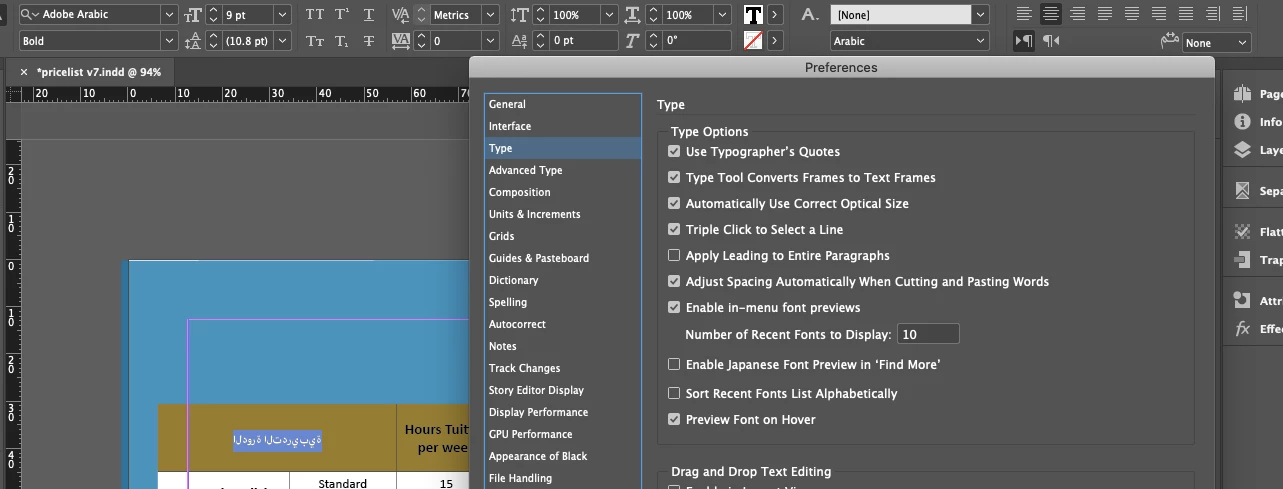
I am translating a document from english into Arabic using Indesign 2020. I couldnt find the language options in preferences. Any ideas please?
{Renamed by MOD}

I am translating a document from english into Arabic using Indesign 2020. I couldnt find the language options in preferences. Any ideas please?
{Renamed by MOD}
Hi Mohamed,
Thanks for reaching out. This option is not available in InDesign preferences. To type Arabic in InDesign, please install English-Arabic version of InDesign (https://helpx.adobe.com/indesign/kb/access-install-hebrew-arabic-indesign-illustrator-CC.html).
Once done, please take a look this help article for Arabic and Hebrew features in InDesign (https://helpx.adobe.com/in/indesign/using/arabic-hebrew.html).
Regards,
Srishti
Already have an account? Login
Enter your E-mail address. We'll send you an e-mail with instructions to reset your password.
 AdChoices