Known Participant
Aug 16, 2024 2:25 PM UTC
Answered

Inhaltsaufnahme Werkzeug (b)

Sollte sich nicht ein kleines Fenster öffnen,
wenn ich das Inhaltsaufnahme Werzeug anwähle?
Es öffnet sich nichts und ich finde auch
unter "Fenster" nichts, um es eigenständig zu öffnen.

Rene Andritsch
Rene AndritschCorrect answer
Community Expert
Aug 18, 2024 9:02 AM UTC

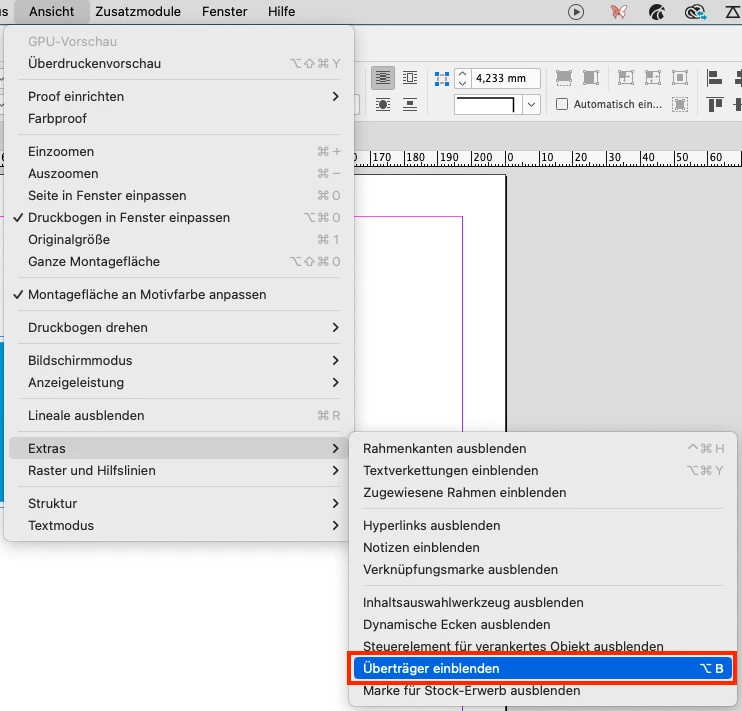
Überprüfen Sie, ob im Ansichtsmenü unter »Extras« die Option »Überträger ein/ausblenden« aktiviert ist.

3 replies

Rene Andritsch
Community Expert
Rene AndritschCommunity ExpertCorrect answer
Community Expert
Aug 18, 2024 9:02 AM UTC

Überprüfen Sie, ob im Ansichtsmenü unter »Extras« die Option »Überträger ein/ausblenden« aktiviert ist.

Translate
derAktiveAuthor
Known Participant
Aug 19, 2024 8:49 AM UTC

Perfekt. Vielen Dank.
Da muss ich wohl versehentlich irgendwann mal das Tastenkürzel gedrückt haben.

Translate
Abhishek Rao
Community Manager
Community Manager
Aug 16, 2024 2:41 PM UTC

Hello @derAktive, 


Thank you for sharing the information. I know that's really frustrating. We are unanle to reproduce the issue at our end. I would request you to please share a few more details like:

  • Please confirm the exact version of the InDesign and details of the operating system. 
  • Is the issue specific to a single file or happening with all the files? 
  • Do you experience the issue with a new Document as well? 
  • Please try to sign in to the Creative Cloud Desktop app again. Follow the steps:
    1. Close all Indesign files. 
    2. Open Creative Cloud Desktop app and sign out from it. 
    3. Restart your machine.
    4. Login back to Creative Cloud and then try and test the issue, if persists. 


We will wait for your response. 


Thank you, 

Abhishek Rao

Translate