Known Participant
July 28, 2022
Answered

Inline anchor box text remove and text place in the paragraph

  • July 28, 2022
  • 3 replies
  • 651 views

Dear Friends,

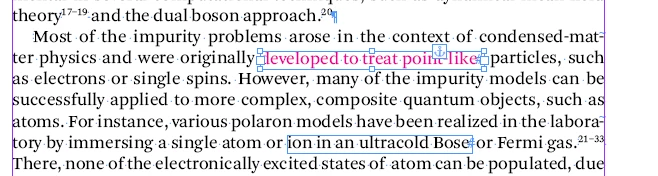
Now i am doing one project, that project requirement some of the words doing inline anchor box in the runnng paragraph (please see the screen shot). My requirement is remove the anchor box and same anchor box text place in the same place.

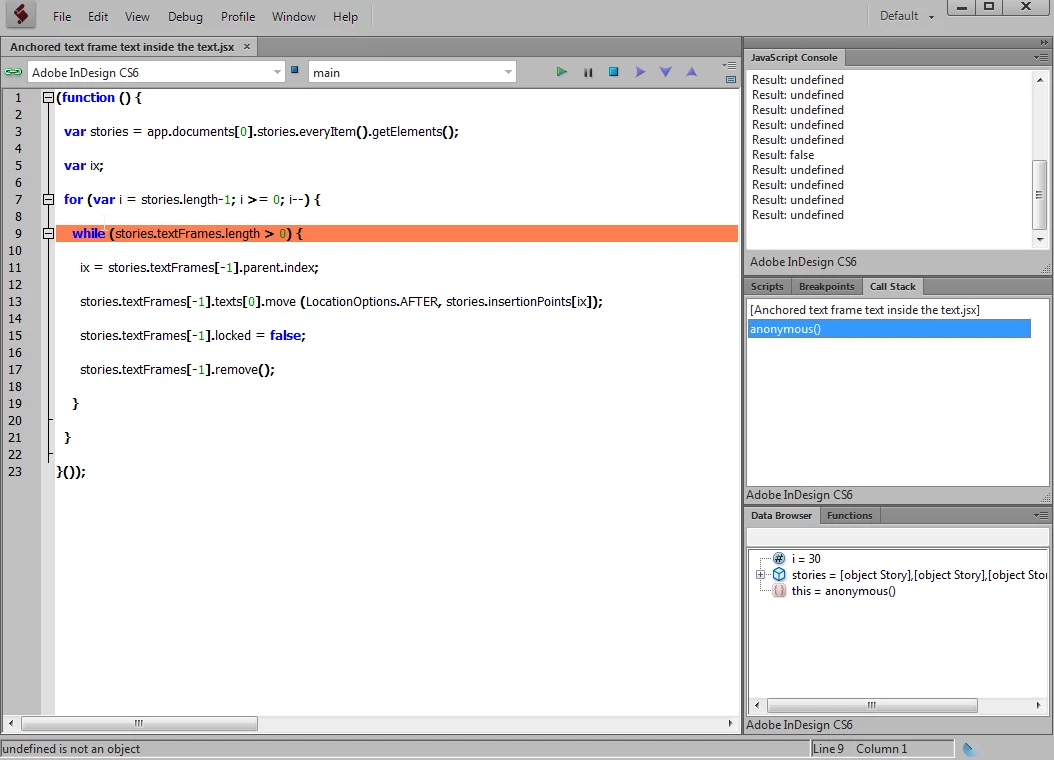
I using "Peter Kahrel" script, but its not run the script, its showing error (Please see the screen shot), kindly advice.

---------------------------

(function () {

var stories = app.documents[0].stories.everyItem().getElements();

var ix;

for (var i = stories.length-1; i >= 0; i--) {

while (stories.textFrames.length > 0) {

ix = stories.textFrames[-1].parent.index;

stories.textFrames[-1].texts[0].move (LocationOptions.AFTER, stories.insertionPoints[ix]);

stories.textFrames[-1].locked = false;

stories.textFrames[-1].remove();

}

}

}());

------------------
 

 Thanks

kanagakumar.k

This topic has been closed for replies.
Correct answer jctremblay

Corrected script [Thanks Peter] below:

(function () {
var stories = app.documents[0].stories.everyItem().getElements();
var ix;
for (var i = stories.length-1; i >= 0; i--) {
while (stories[i].textFrames.length > 0) {
ix = stories[i].textFrames[-1].parent.index;
stories[i].textFrames[-1].texts[0].move (LocationOptions.AFTER, stories[i].insertionPoints[ix]);
stories[i].textFrames[-1].locked = false;
stories[i].textFrames[-1].remove();
}
}
}());


3 replies

Community Expert
July 29, 2022

Hi @kanagakumar ,

just a note:


Because the iterators [i] are missing several times in the code you posted in your inital post, you may found the script code somewhere in the forum here. A typical forum bug with old code! Very likely this code was damaged when the old thread was moved from the old InDesign Scripting forum to this new InDesign forum here in October 2019.


So be careful to copy old code pre October 2019 here from forum posts.


Regards,
Uwe Laubender
( Adobe Community Professional )

Known Participant
July 29, 2022

Dear Laubender,

Noted "Laubender". Thank you for your valuable guidance. Your guidance is precious mine.

Thanks

kanagakumar.k


jctremblay
Community Expert
jctremblayCommunity ExpertCorrect answer
Community Expert
July 28, 2022

Corrected script [Thanks Peter] below:

(function () {
var stories = app.documents[0].stories.everyItem().getElements();
var ix;
for (var i = stories.length-1; i >= 0; i--) {
while (stories[i].textFrames.length > 0) {
ix = stories[i].textFrames[-1].parent.index;
stories[i].textFrames[-1].texts[0].move (LocationOptions.AFTER, stories[i].insertionPoints[ix]);
stories[i].textFrames[-1].locked = false;
stories[i].textFrames[-1].remove();
}
}
}());


Known Participant
July 29, 2022
Peter Kahrel
Community Expert
Community Expert
July 28, 2022

Replace

stories.textFrames

with

stories[i].textFrames

everywhere (five times).

jctremblay
Community Expert
Community Expert
July 28, 2022

We also need to replace this:

 stories.insertionPoints[ix]);

by this:

stories[i].insertionPoints[ix]);