Inspiring
April 6, 2012
Answered

Inner Margin and Bleed Settings

  • April 6, 2012
  • 4 replies
  • 82757 views

I am working on a MacBooPro OS 10.6.8 with InDesign CS5.

I have laid out a 257 page book in 6" x 9" format with facing pages. Some of the pages have full-bleed graphics so I set the bleed of all edges at 0.125" (1/8"). When I make a PDF of the layout, however, the inner margin is strange. Instead of having a proper bleed, some of the facing page gets assigned to the page. (see attached images).

Am I doing something wrong? How can a full-bleed book be set up so that each individual page has a bleed in the gutter, rather that a portion of the neighboring page?

Marc

    This topic has been closed for replies.
    Correct answer rob day

    Thanks again for all the answers and suggestions.

    My problem is that I am uploading the file to an online publisher. Their automated system needs to have a full bleed around each page (including the spine) or it will not accept the PDF.

    Still, it seems like it would be so easy and helpful to have ID arranged so that when an inner margin bleed is selected in Document Setup for a facing pages arrangement, the facing pages slide apart enough to show the red bleed line go all around the pages. That way you could see your layout as the reader would (two-up) and also work with the bleed.

    Anyway, one for the wish list.

    Marc


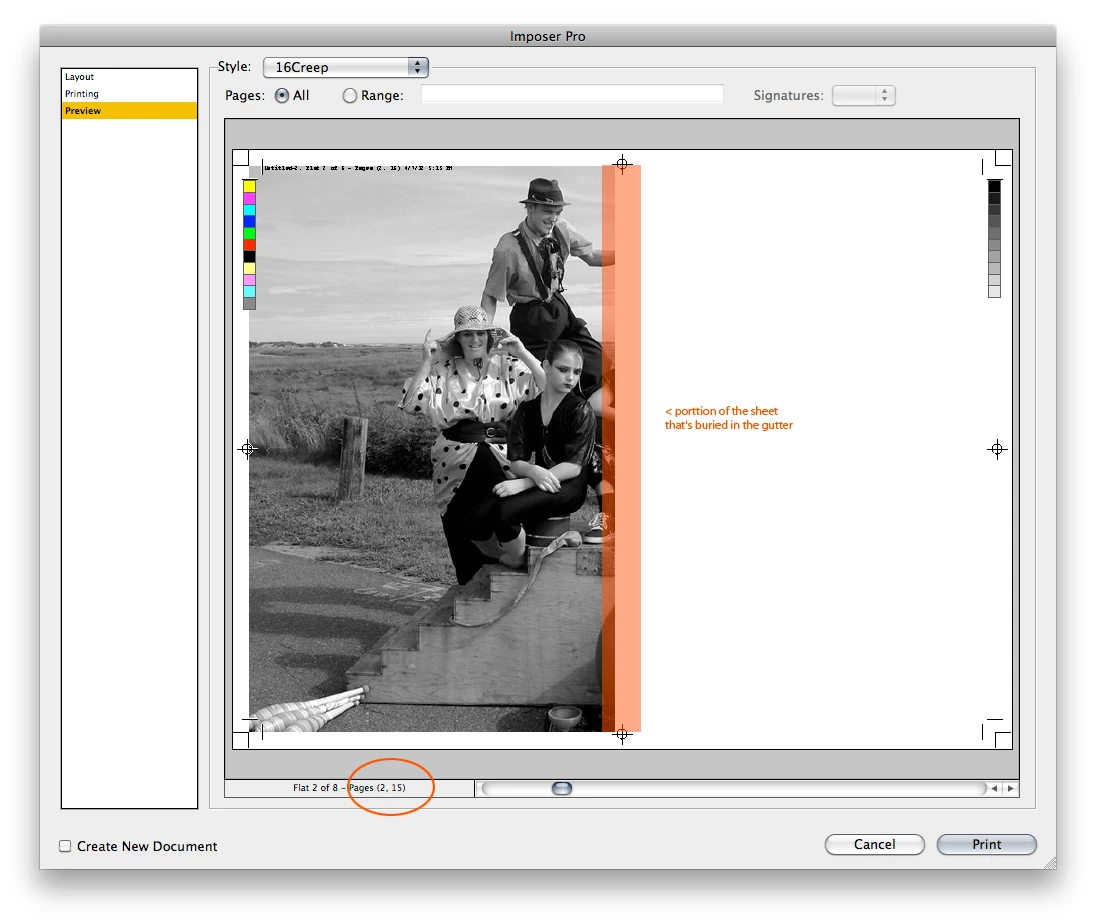
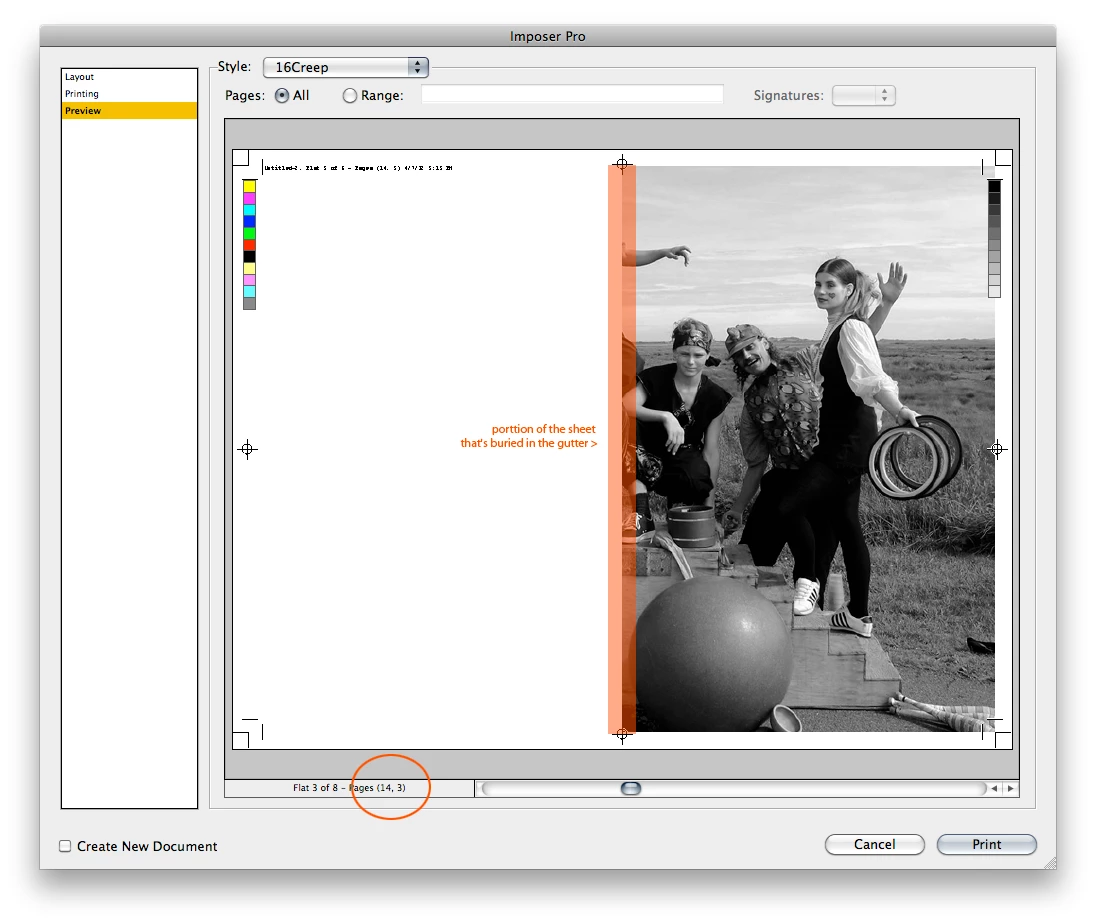
    This might help with imposition and objects that hit the gutter and why you don't need to make adjustments in your pagelayout or worry about inside bleeds. These are from the simplest 16 page imposition out of ImposerPro where I've exaggerated the amount of creep Imposer will apply. You can see what happens to the same crossover image on 2-3 vs. 8-9:

    4 replies

    Participant
    October 6, 2023

    Hi! I really need help. I m new into Indesign, and I try to format my book, but I'm a lil bit confused about the bleeding. When I upload my manuscript on Amazon KDP, they said it's ready to print. But I'm concerned about the interior bleed. Is this correct? I attached a picture below, one from my Indesign and one from amazon. Is the middle part correct? I don't want that line to be visible on printing. The last one is from PDF ready to print. 

    rob day
    Community Expert
    Community Expert
    October 6, 2023

    Any Inside Bleed amount gets removed with the imposition—with saddle stitch and perfect binding the inside edge is folded on the spine not trimmed.

    Participant
    October 6, 2023

    So that's perfectly fine the way it is? That interior line will be cutted out?

    Cheryllion
    Known Participant
    February 28, 2020

    I, too am amazed at how jerry-rigged the "solution" here seems. This should be a basic feature. Of COURSE we want to design in 2-up layout. I vaguely remember having to do this in PageMaker back in the 90s and there was a way to assign the images to each page so that the bleeds would show up the correct way. Thought I'd come here and see a "push this button and you're done" type of answer. This is nuts!

    Derek Cross
    Community Expert
    Community Expert
    February 28, 2020

    This is an eight-year-old thread, please start a new thread and indicate your InDesign version and OS and your issue.

    mpkadobeAuthor
    Inspiring
    April 7, 2012

    Thank you to everyone for all your comments. I was able to use the technique Peter linked to in order to get bleeds on the inner margin for those pages with full-bleed graphics.

    Honestly, however, I am stunned that InDesign, which is supposed to be made for laying out books, wouldn't automatically separate facing pages when bleeds are selected so that designers can see their work in a two-up facing pages presentation AND also get bleeds on all sides. This seems like a basic procedure. How on earth could you lay out a full color magazine with full-bleed graphics on every page without that feature?

    Peter Spier
    Community Expert
    Community Expert
    April 7, 2012

    Most of the time, even with full bleed graphics, you don't need the bleed at the spine, and if the images cross the spine you don't need to split a spread since the crossover becomes its own bleed. I't only in situations like your initial illustration that there is a problem that requires a split.

    While I can understand your desire to have the inside bleed show in the spread, that is only useful for your case of two different images bleeding at the spine, and it would mean you woould need to place crossovers twice and calculate the correct positioning to allow for that stripe down the center of your layout that is not visible in the finished publication.

    Peter Spier
    Community Expert
    Community Expert
    April 6, 2012

    That's exacly what is supposed to happen. Bleed at the gutter is on the opposite page unless you split the spread and extend the art.

    See InDesignSecrets » Blog Archive » Breaking Pages Apart to Bleed Off a Spine

    mpkadobeAuthor
    Inspiring
    April 6, 2012

    Hello Peter.

    How does one "split the spread"? (I know how to extend the art)

    If I de-toggle "facing pages" I know I can get the bleed line all around the page but I lose the ability to have, for instance, automatic left and right page numbers.

    Is there a way I can take a 257 page book that is already laid out and split the spreads without having to rework the book from scratch?

    Thanks for your help.

    Marc

    Steve Werner
    Community Expert
    Community Expert
    April 7, 2012

    Look at the link Peter gave you. It's very easy to do.