Answered
Insert sample page doc.pages.add();
I can't find one thing, inserting a sample page, for Indesign CS6
doc.pages.add();Can you recommend documentation, example scripts. I found some, but not this.
Thanks
Jirka

I can't find one thing, inserting a sample page, for Indesign CS6
doc.pages.add();Can you recommend documentation, example scripts. I found some, but not this.
Thanks
Jirka
I don't speak English well, so the wording, the thinking may not be accurate.
Deepl translates it perfectly, I translate it, then back translate it to see if it's "mangled" and makes sense.
I've looked at other scripts in InDesign. Regarding the line in "CropMarks.jsx" for example, I didn't read it.
The advice from you, was cool ;-).
So I apologize for the inaccuracies.
The above
doc.pages.add();was meant to create a page from a template, the other way around than it was understood.
Then it is possible to create all pages and transfer the "pattern" to all at once.
Manually I can do it, scripting can't either.
Thank you for your patience and answers
Jirka
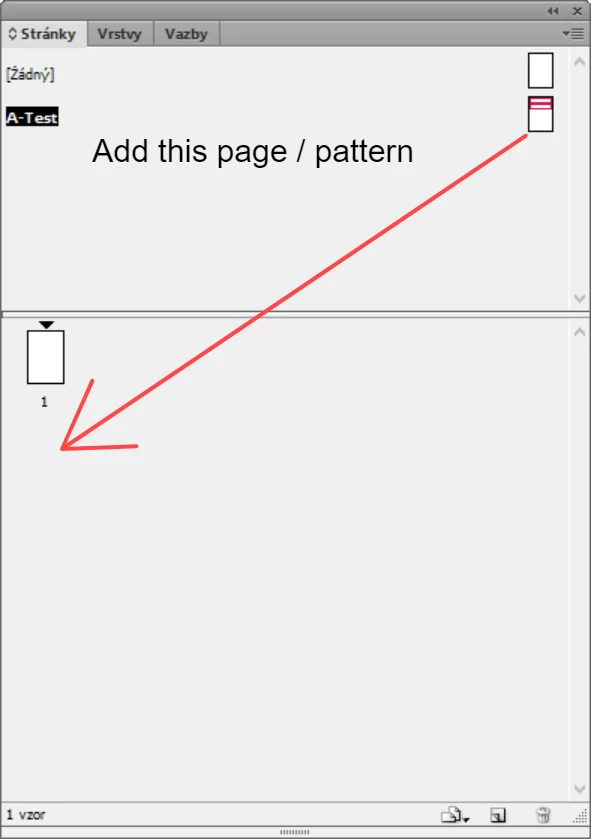
Ok so you are trying to create new document pages and apply a parent page to it. Try the following code, it will add a page at the end of the document and apply the master A-Test to it
var doc = app.documents[0]
var ms = doc.masterSpreads.itemByName("A-Test") //Change the name of the master as needed
doc.pages.add(LocationOptions.AT_END, null, {appliedMaster:ms})
You can look the details of the add method using the link below
https://www.indesignjs.de/extendscriptAPI/indesign-latest/#Pages.html#d1e205483__d1e205532
-Manan
Already have an account? Login
No account yet? Create an account
Enter your E-mail address. We'll send you an e-mail with instructions to reset your password.


 AdChoices