Participating Frequently
February 20, 2024
Answered

Inserting a video in a shape not working

  • February 20, 2024
  • 3 replies
  • 378 views

Hello Community, 


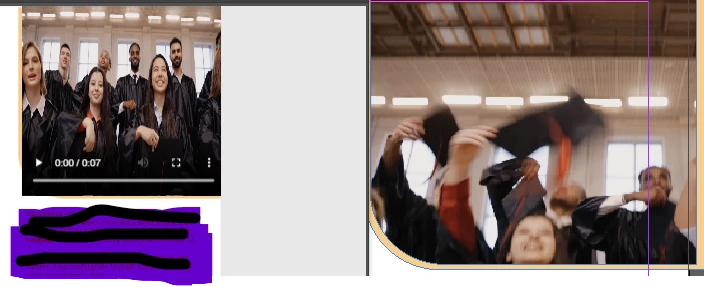
Is there any trick to insert a video into a shape... On preview it seems to be a rectangle when I see it in preview mode (Image on the left) and whenever I use the " fit to content" option, it just shrinks the video size.  Do you know if there is a way to mask the clip or something like that, I want the round edge   on the bottom left side to appear on the final interactive pdf. (Like the image on the right)


This topic has been closed for replies.
Correct answer BobLevine

You will NEVER get this to work in a PDF.

3 replies

Barb Binder
Community Expert
Community Expert
February 20, 2024

Oops. I walked away and forgot to hit the Post bottom and so didn't see Bob's reply until I returned and clicked the button. 


We are both expressing the same concern—this is not likely to turn out well.


~Barb

~Barb at Rocky Mountain Training
Barb Binder
Community Expert
Community Expert
February 20, 2024

Hi @damian31044151fy17:


What you might do is add an image in the custom shape to the InDesign page for the play area in the PDF, and then place the movie (without a poster) on top of the placed image. Note that video is not going to play in a custom shape—it will be rectangular when watched in the PDF—with or without the custom image in the play area.


Also worth noting that you may get consistent results with the video playback in a PDF across different browsers and operating systems. You can ask more about this on the Acrobat forum. https://community.adobe.com/t5/forums/searchpage/tab/message?advanced=false&allow_punctuation=false&filter=location&location=category:ct-acrobat&q=video%20played%20in%20an%20ellipse


~Barb

~Barb at Rocky Mountain Training
BobLevine
Community Expert
BobLevineCommunity ExpertCorrect answer
Community Expert
February 20, 2024

You will NEVER get this to work in a PDF.