


November 26, 2025
Answered

Insertion d'un texte sur une image dans InDesign 2026

  • November 26, 2025
  • 4 replies
  • 544 views

Bonjour,

La version 2026 : impossible d'insérer du texte sur une image.

Créer de nouvelles versions, c'est bien mais,

si cela doit nous empêcher de travailler, ce n'est pas cool !!!

De plus, il nous est impossible de rester sur la version 2025. Quand on a un travail en cours et que l'on ne peut plus bosser dessus à cause d'un bug, franchement, je suis un peu énervée

 

Correct answer Derek Cross

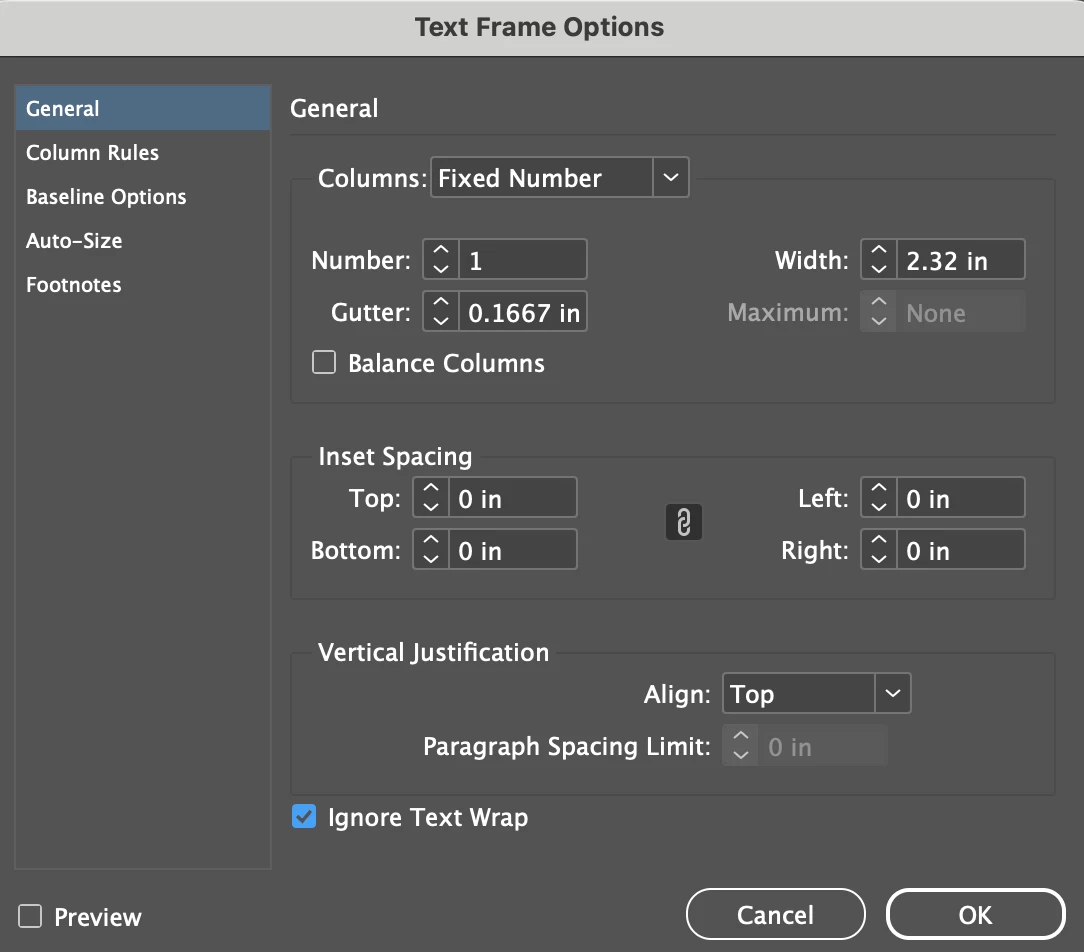
Try this, under the Object tab select Text Frame Options and tick Ignore Text Wrap.

866252i446B74839A39DA25.png


4 replies

Participant
July 2, 2026

Apparently I have the same problem. I have an image in the background of my page and would just like to add a legend with text on top. I tried the suggestion above but I still can’t see the text. I checked the layers and they are ordered appropriately. Anyway to fix these besides installing an older version ? I’m surprised that in 7 months this hasn’t been corrected. Thanks !


Abhishek Rao
Community Manager
Community Manager
July 14, 2026

Hi ​@Wendy22225679vf20


I'm sorry you're experiencing this issue and for the delay, and thanks for reaching out.

Could you please help us with a few details? Please confirm your InDesign version and operating system (Windows/macOS). Also, let us know whether the text frame is created but the text is invisible, or if you're unable to create a text frame on the image at all. Does this happen only in this document, or can you reproduce it in a newly created document as well?

Additionally, please select the background image and check if Text Wrap is enabled. If it is, temporarily set it to No Text Wrap and test again. Also, go to Preferences > Composition, toggle the Text Wrap Only Affects Text Beneath option, and see if that makes any difference.

If possible, could you also share a short screen recording showing the document layout, the Layers panel highlighting the text and image layers, and the behavior you're seeing? 


Looking forward to hearing back.

Abhishek


jmlevy
Community Expert
Community Expert
November 26, 2025

La version 2026 : impossible d'insérer du texte sur une image.

Bonjour @ARWEEN36233549vrl6 

peux-tu préciser le problème que tu rencontres ? 

November 26, 2025

Bonjour, à ce moment précis, je tiens à préciser que j'ai supprimé la version 2026 et je suis revenue à la version 2025.

Voici le problème rencontré. En faisant la mise en page de mon magasine, comme d'habitude depuis 2 ans (j'ai l'habitude de bosser avec InDesign), je pose mon image et , très souvent, j'écris une légende sur l'image.

Avec la version 2026, impossible de procéder en utilisant la fonction du T qui ouvre une fenêtre sur l'image...

Je trouve très gentil que vous preniez le temps de vous y intéresser.

Bonne fin de journée

jmlevy
Community Expert
Community Expert
November 26, 2025

Avec la version 2026, impossible de procéder en utilisant la fonction du T qui ouvre une fenêtre sur l'image...

Que veux-tu dire par « qui ouvre une fenêtre sur l'image » ?

Tu n'arrives pas à créer de bloc texte, ou bien le texte n'apparaît pas ? As-tu vérifié ce que suggère @Derek Cross ? C'est peut-être un problème d'habillage ?

Derek Cross
Community Expert
Derek CrossCommunity ExpertCorrect answer
Community Expert
November 26, 2025

Try this, under the Object tab select Text Frame Options and tick Ignore Text Wrap.

866252i446B74839A39DA25.png


November 26, 2025

Merci beaucoup. Effectivement avec la mise à jour, l'option s'était décochée

RvdT
Legend
November 26, 2025

You can turn off auto updates (disable/enable) and install an older/other version in the Creative Cloud app.

Vous pouvez désactiver les mises à jour automatiques (activer/désactiver) et installer une version antérieure ou différente dans l'application Creative Cloud.

866245iB7E58B352B625D96.png

866247i51907E2C36C0E29B.png

November 26, 2025

Merci beaucoup pour votre réactivité.

j'ai effectivement remis la version antérieure.