Om Nath Jha
Legend
September 12, 2019
Answered

Install Hebrew or Arabic version of InDesign

  • September 12, 2019
  • 3 replies
  • 3481 views

In order to install Hebrew or Arabic version if InDesign, please follow the steps below:

  1. Open the Creative Cloud app and change the App Language from the Preferences
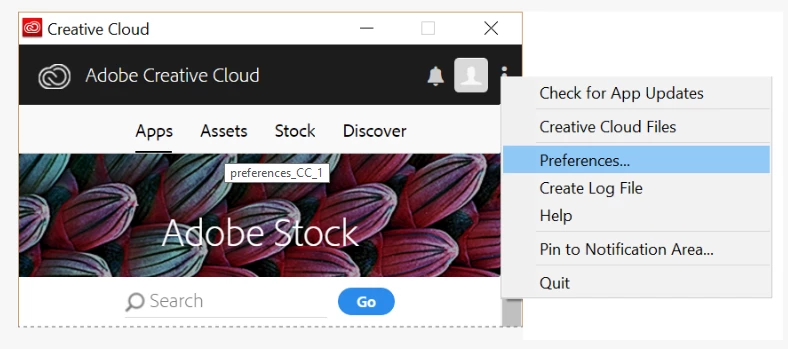


  1. Choose Arabic or Hebrew from the list
  2. Go back to the Apps list and click the Install button

Please check this help article for more details: https://helpx.adobe.com/indesign/kb/access-install-hebrew-arabic-indesign-illustrator-CC.html

This topic has been closed for replies.
Correct answer Willi Adelberger
  1. I think it is important to mention that you need NOT to uninstall your primary language. The installer adds only missing plugins which are necessary to work with RTL texts.
  2. If you want to work with the UI in your primary language you have to change back the preferences to that language. E.g. if you work in German, you will install these languages and if you do not switch back to German in your preferences you will have the UI in English.
  3. The same path is also to be choosen with Asian and other language systems which are able but I do not recommend to install all available language systems as InDesign or InCopy will become unstable.

3 replies

Legend
October 16, 2021

I recently came across this article where Dr. Ken Lunde shares another approach:

https://ken-lunde.medium.com/adobe-indesign-tips-japanese-cjk-functionality-english-ui-redux-539528e295c6


Participating Frequently
October 17, 2021

thanks but that doesn't solve my problem

Participating Frequently
October 16, 2021

I installed the InDesign version for Arabic following your instructions.

But when I restore my Italian language from the Preferences, InDesign continues to open the Arabic version and not my previous one by default. Can you help me? Thanks

Willi Adelberger
Community Expert
Community Expert
October 16, 2021

Normally InDesign draws its language from the primary language of the OS. The preference in the CC App controls the installation.

Participant
October 23, 2021

Thanks, Willi, it helped

https://dugish.com/mom/
Willi Adelberger
Community Expert
Willi AdelbergerCommunity ExpertCorrect answer
Community Expert
September 12, 2019
  1. I think it is important to mention that you need NOT to uninstall your primary language. The installer adds only missing plugins which are necessary to work with RTL texts.
  2. If you want to work with the UI in your primary language you have to change back the preferences to that language. E.g. if you work in German, you will install these languages and if you do not switch back to German in your preferences you will have the UI in English.
  3. The same path is also to be choosen with Asian and other language systems which are able but I do not recommend to install all available language systems as InDesign or InCopy will become unstable.
Om Nath Jha
Legend
September 16, 2019
Thank you so much for adding your valuable inputs Willi. This would provide more clarity to the users, really appreciate it!