PHILIP CHAN
Participant
February 27, 2026
Question

Installed Font Appears but Doesn’t Work in InDesign and Illustrator
  • February 27, 2026
  • 1 reply
  • 52 views
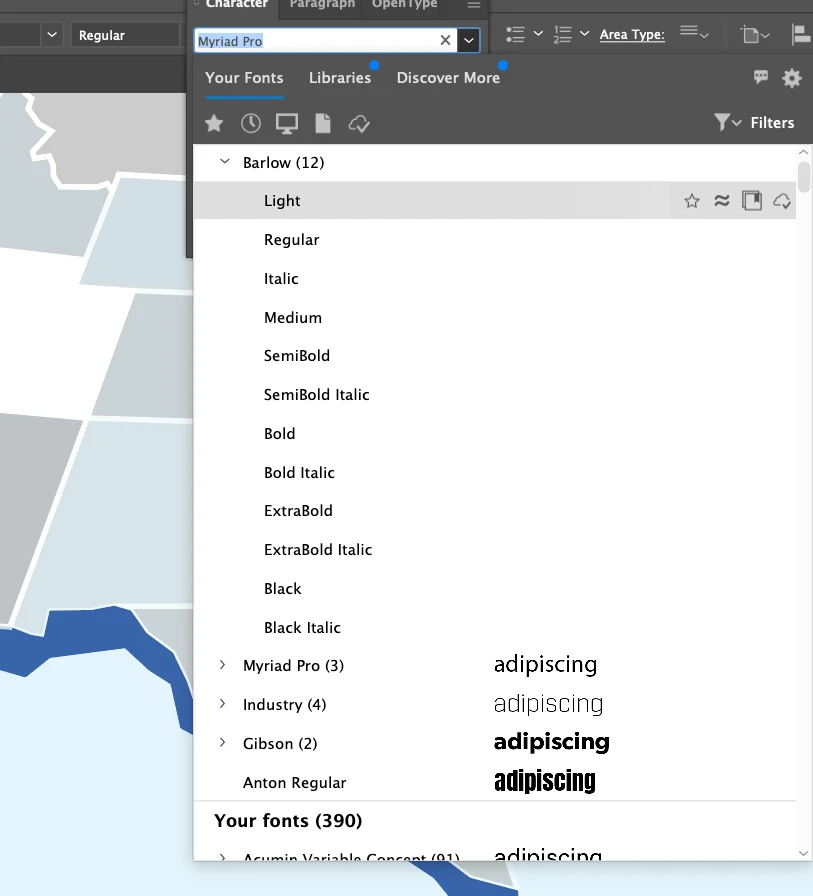
This is what I see in AI

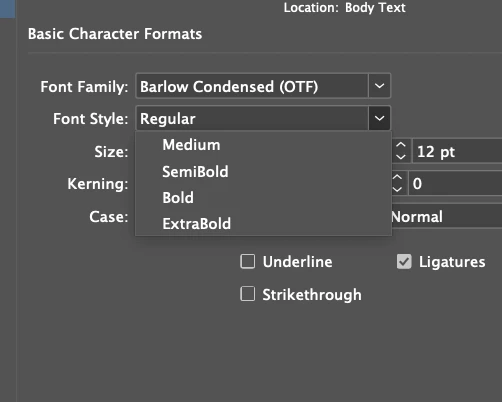
I have a font - Barlow (and Barlow Condensed) installed according to CC. I noticed that both INDD and AI recognize the font, but either do not display the entire font family or if it recognizes it, does not allow it to be used. In INDD specifically, I cannot use it to correct a style, but I can select it from the ribbon at the top and then “reset” the style. Similarly in AI, i see the font, but then when selected for my text, turns it blank.

I have installed and uninstalled several times, reset computer etc. It’s like it’s default to a font that doesn’t work even though the font is obviously there.


Above is what is see in Illustrator. Below is the style and the ribbon discrepancy. 


    1 reply

    Abhishek Rao
    Community Manager
    Community Manager
    March 10, 2026

    Hi @PHILIP CHAN,


    I’m just following up to check if you are still experiencing this issue with the Barlow fonts in InDesign and Illustrator. I understand how frustrating it can be.

    If the problem is still occurring, could you please share the exact InDesign version and your operating system details so I can look into this further with the team? It would also help to know whether the Barlow fonts are coming from Adobe Fonts or from a third-party font source, and whether this issue is happening only with this particular font family or if other fonts are also affected while working in InDesign or Illustrator.

    In the meantime, I’d recommend going through the troubleshooting steps mentioned in this article as they cover common font recognition and rendering issues in both apps:
    https://helpx.adobe.com/fonts/kb/troubleshoot-fonts-illustrator-indesign.html

    Please try the suggestions there and let me know how it goes.


    Looking forward to your update.

    Abhishek