Participant
June 6, 2017
Answered

Interactive PDF: Video plays only once

  • June 6, 2017
  • 2 replies
  • 6206 views

Simple question:

I have multiple very short videos I'd like embed in my document. The videos should start playing when clicked.

This works fine but unfortunately once the video played it won't play again. How to I fix this?

I don't want any controls over the videos.

Thank you!

This topic has been closed for replies.
Correct answer Srishti_Bali

Hi kitkat23,

You may use button and add action like play pause resume and stop to the PDF.

To do that please follow these steps:

1) Place video on the docuemnt

2)  Create Button

Use the Pen tool or a drawing tool, such as the Rectangle tool or Ellipse tool, to draw the button shape. If necessary, use the Type tool to add text to the button, such as “Play” ,“Pause" , "Resume"and "Stop".

Highlight object say text frame that says "Play" and got to choose Window > Interactive > Buttons

In Buttons and Forms menu

Choose

Type as Button

Event as On Click

Then click + in front of action and choose Video
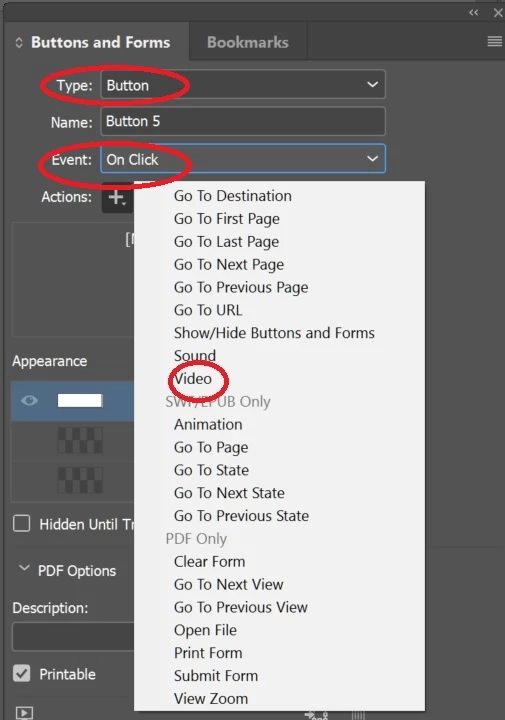
It will automatically select video placed on document.

then choose Play from Options
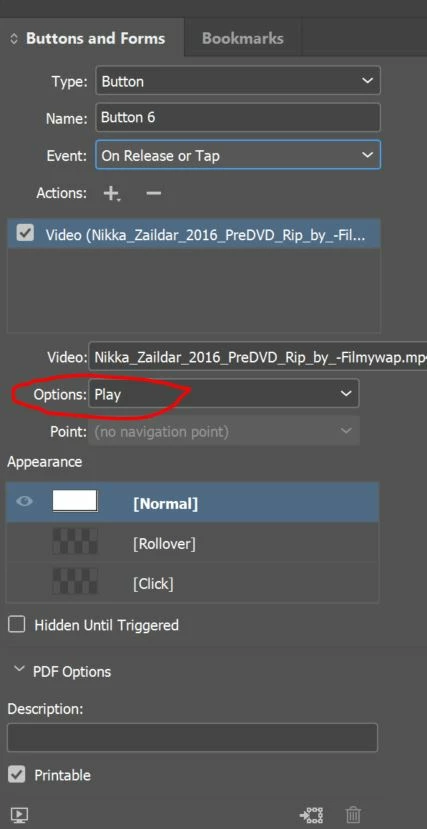
And you can do the same for "Pause" , "Resume"and "Stop".

For more details and options on buttons you may check below mentioned link.

Add interactive buttons in InDesign

Regards

Srishti

2 replies

Srishti_Bali
Srishti_BaliCorrect answer
Legend
June 6, 2017

Hi kitkat23,

You may use button and add action like play pause resume and stop to the PDF.

To do that please follow these steps:

1) Place video on the docuemnt

2)  Create Button

Use the Pen tool or a drawing tool, such as the Rectangle tool or Ellipse tool, to draw the button shape. If necessary, use the Type tool to add text to the button, such as “Play” ,“Pause" , "Resume"and "Stop".

Highlight object say text frame that says "Play" and got to choose Window > Interactive > Buttons

In Buttons and Forms menu

Choose

Type as Button

Event as On Click

Then click + in front of action and choose Video

It will automatically select video placed on document.

then choose Play from Options

And you can do the same for "Pause" , "Resume"and "Stop".

For more details and options on buttons you may check below mentioned link.

Add interactive buttons in InDesign

Regards

Srishti

Participating Frequently
February 18, 2021

Thanks for this, but it doesn't work.

When I save PDF for interactive, The button appears on the PDF where I placed it but it does nothing. It is just the same as before I made the button - there is a hand that plays the video once, but then disappears and I cannot play it again, until i close and reopen the PDF.

BobLevine
Community Expert
Community Expert
February 18, 2021

This post is four years old and with the death of flash a lot has changed. There are countless recent discussions on video in PDF and the bottom line is this: avoid it unless you can control what PDF reader people are using and how they have their preferences set up.

If you need more info, please create a new discussion. This one has been answered and you'll get way more help by starting a new one.

BobLevine
Community Expert
Community Expert
June 6, 2017

Interactive PDF depends heavily on the reader application being used. How are you testing this? What version of InDesign is being used? What operating system? What format is the video?

KitKat23Author
Participant
June 6, 2017

Windows 10, InDesign C6, Acrobat Reader DC, mp4