
Participating Frequently
September 11, 2023
Answered

Interactive Text Fields - Formatting

  • September 11, 2023
  • 1 reply
  • 953 views

Hello, 

I created an interactive text field for a PDF form. Within InDesign I have the text cursor located in the upper left of the text box. When I export to interactive PDF the text cursor moved to the center left of the text box. How do I get the text cursor to remain in the upper left of the text box when I export to PDF?

Thank You,
This topic has been closed for replies.
Correct answer Joel Cherney

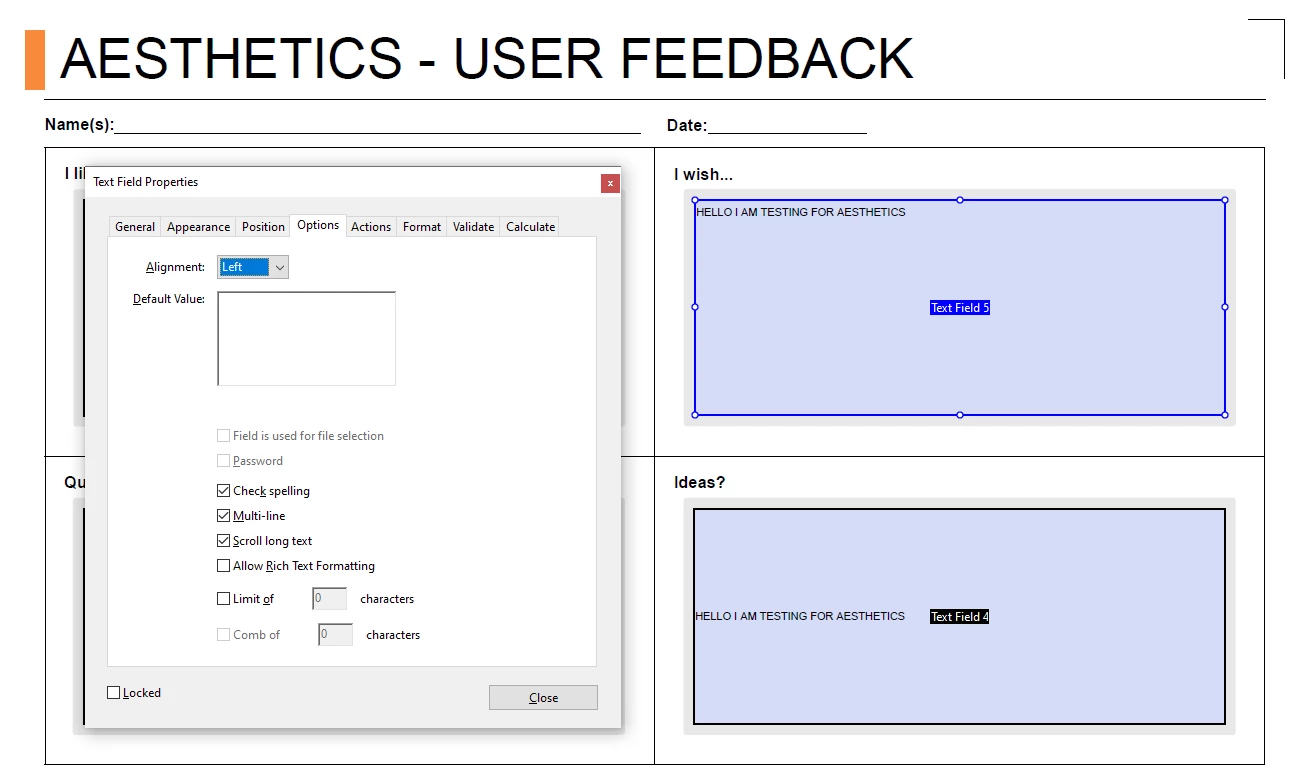
You could make them into multiline fields:


(There's a checkbox in the Buttons and Forms panel in InDesign, you don't have to choose Multiline in Acrobat, which is what I have shown here.)

1 reply

Joel Cherney
Community Expert
Joel CherneyCommunity ExpertCorrect answer
Community Expert
September 11, 2023

You could make them into multiline fields:


(There's a checkbox in the Buttons and Forms panel in InDesign, you don't have to choose Multiline in Acrobat, which is what I have shown here.)

J_IDAuthor
Participating Frequently
September 11, 2023

That did the trick. Thank you!