
Participant
February 16, 2023
Answered

Interactive tick boxes

  • February 16, 2023
  • 3 replies
  • 671 views

Hi,

I made an interactive PDF form in InDesign, but I am getting feedback that the checkboxes are not printing for some people.


These are the setting I used for the checkbox:
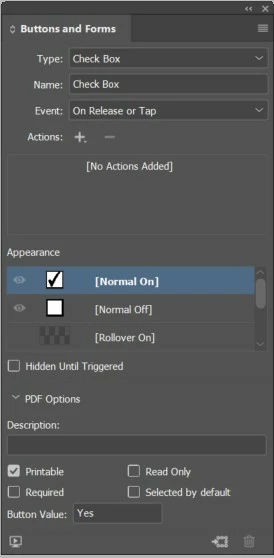
I exported the form as an Interactive PDF. When I open the form in Adobe Acrobat Reader or Pro, the tick boxes are showing as an interactive element. When I have printed the form on both Canon and Epson printers, the tick boxes have printed. However, 25% of users have reported that when they print the PDF from our website, the tick boxes to not print.


Any suggestions would be welcome! 
This topic has been closed for replies.
Correct answer barbara_a7746676

First of all, make sure that users are opening and printing your PDF in either Adobe Reader or Adobe Acrobat, not in the Mac Preview application or some other 3rd party PDF reader.


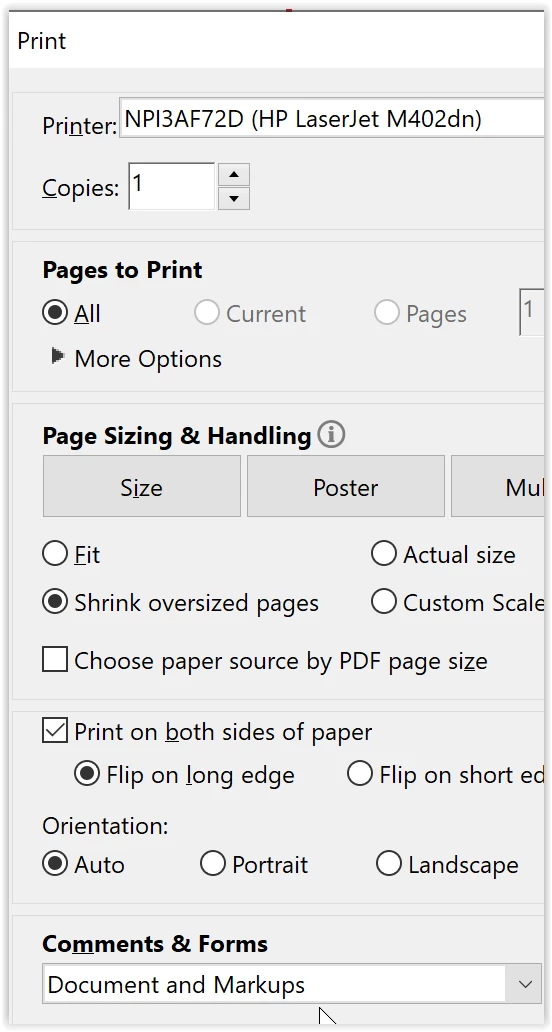
In the Print dialog box, make sure that 'Document and Markups' is selected.

3 replies

barbara_a7746676
Community Expert
barbara_a7746676Community ExpertCorrect answer
Community Expert
February 16, 2023

First of all, make sure that users are opening and printing your PDF in either Adobe Reader or Adobe Acrobat, not in the Mac Preview application or some other 3rd party PDF reader.


In the Print dialog box, make sure that 'Document and Markups' is selected.

Participant
February 16, 2023

Thank you! I think that it must be a case of customers using non-Adobe PDF readers, though we advise to use Adobe Reader. 

jane-e
Community Expert
Community Expert
February 16, 2023

@Alethea26303225rg28 


Be sure to give your customers instructions and the download link. 

https://get.adobe.com/reader/


Jane