

Lew Yedwab, Resideo
Participating Frequently
March 4, 2025
Question

Is InDesign getting fonts from a folder next to the .indd file instead of the Fonts folder on my PC?

  • March 4, 2025
  • 2 replies
  • 143 views

I am about to set my hair on fire and walk across the Long Island Expressway barefoot and blindfolded. 

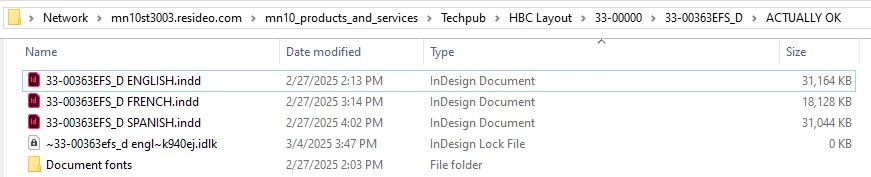
I was getting a Missing Font error until I moved the old, old "Document fonts" folder right next to the .indd files I'm editing. Now the error has gone away. 

That sure ain't what I was raised to accept as The Way Things Work, but as long as the error went away, I'm grateful to whatever forces of the Universe are responsible.
 

2 replies

Robert at ID-Tasker
Legend
March 5, 2025

@Lew Yedwab, Resideo


Furst, InDesign is looking for fonts in this local folder, then Adobe Fonts folder - then system Fonts folder.


But make sure you don't have duplicates - or worse, different versions with the same names - or corrupted.


James Gifford—NitroPress
Legend
March 5, 2025

Under Windows, ID usually only references fonts that are installed at a system level. Macs, as I understand it, work or can work from an auxiliary font folder that's part of the CC installation — I'm hazy on the details but have seen a number of threads where installing a font on the MacOS system doesn't correctly show up in an InDesign doc.


I don't know that ID will even look for local fonts under Windows; maybe. But I'd make sure those fonts are correctly installed at the system level, through the Windows Fonts app or a good font manager, and see if the doc will then tolerate having them moved away.