

dublove
Legend
February 20, 2025
Question

Is it not possible to adjust the selected row height in steps of 0.1 each time?

  • February 20, 2025
  • 1 reply
  • 135 views

Sometimes tables are not aligned to the bottom of the typearea, and need to be adjusted manually, and I find that the default step is 1mm.


This is not practical.

I need to try 2-5 times to determine the value of the row height.


Can't this be set in the software?

Thank you.
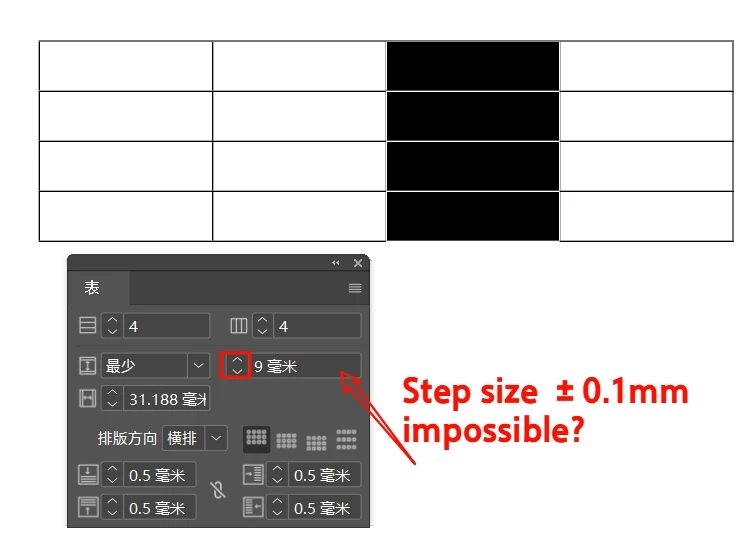

1 reply

Robert at ID-Tasker
Legend
February 20, 2025

You can type any value you want - including a different type - "+2pt" even if you have "5 mm" there already - InDesign will automatically do the necessary conversion. 


Or you can do it through a script - and apply keyboard shortcut. 


Or maybe you can set it there: 


https://helpx.adobe.com/indesign/using/rulers-measurement-units.html#:~:text=To%20change%20the%20units%20in%20Units%20&,InDesign%20%3E%20Preferences%20%3E%20Units%20&%20Increments


Never had the need to work too much with tables this way - so never checked if any of the settings from the preferences are related. 


dublove
dubloveAuthor
Legend
February 20, 2025

Thank you very much.

I chose the smallest unit "Mils".
Fine tuning is possible ......
It's a bit weird though, you may still need to switch to mm after tuning.
Because only the size of the mm value can be sensed.