Inspiring
November 15, 2022
Answered

Is it possible to change paragraph styles with find/replace type?

  • November 15, 2022
  • 2 replies
  • 941 views

Is it possible to make a "global" change to paragraph and character styles with find/replace type? Or is it necessary to go into each individual style to change the font?

This topic has been closed for replies.
Correct answer Eugene Tyson

If it's a different font to everything else you an use Type>Find/Replace Font

Then select the font you want to change - and click the redfine style checkmark at the bottom.

You would do it on a Case by Case basis by choosing Find First -then if happy with the selection - you can update the font and redefine the style.
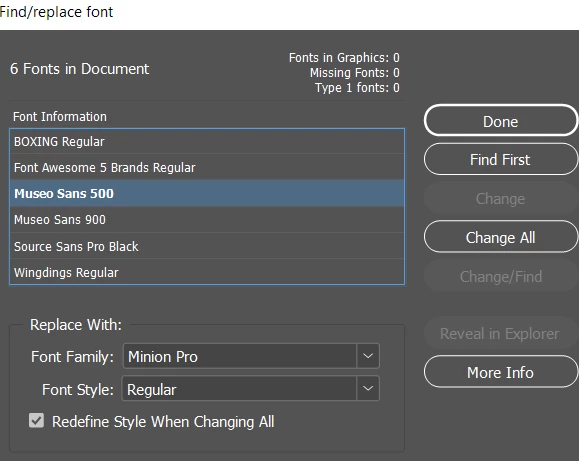
 

A bit laborious but would work.


2 replies

Barb Binder
Community Expert
Community Expert
November 16, 2022

Hmmm. I marked Eugene's answer as correct after your acknowledgement, and then saw Eugene's last note. Was that the solution, @Grundoon Groundhog?


~Barb

~Barb at Rocky Mountain Training
Inspiring
November 16, 2022

I think so, but happily I realized I didn't have to make the change. 

At this point I am strongly considering abandoning Indesign in favor of Affinity, which opens easily and costs less, and has essentially the same features. I will miss this Community, if I do.

Barb Binder
Community Expert
Community Expert
November 15, 2022

Hi @Grundoon Groundhog:


It depends on how you set up your styles. Ideally, you have defined top level styles with child styles using the Based On feature. When you change the top level style, it rolls down to the child styles. 


For example, Head1 could be a top-level style. Head2 is based on Head1, Head3 is based on Head2. They all use the same font, but the type size decreases with each level. Edit the Head1 font, and all the Head1s, Head2s and Head3s update.


~Barb

~Barb at Rocky Mountain Training
Inspiring
November 15, 2022

Yes, I know that. I was hoping not to have to go into each parent style and change it by hand, but to use the Find/Replace feature. Thanks anyway!

Eugene TysonCommunity ExpertCorrect answer
Community Expert
November 15, 2022

If it's a different font to everything else you an use Type>Find/Replace Font

Then select the font you want to change - and click the redfine style checkmark at the bottom.

You would do it on a Case by Case basis by choosing Find First -then if happy with the selection - you can update the font and redefine the style.


A bit laborious but would work.