Known Participant
March 11, 2025
Answered

is it possible to change the colour of the header row with just one click?

  • March 11, 2025
  • 4 replies
  • 1423 views

is it possible to change the colour of the header row with just one click, for a table if a document has multiple tables.


Similarly to how text colour can be changed through pressing a paragraph style

Correct answer Barb Binder

Hi James:


Here's a demo of how it will work when you get the process straightened out. I'm showing you the first two components individually, and then how the nesting works when I click on the table style.
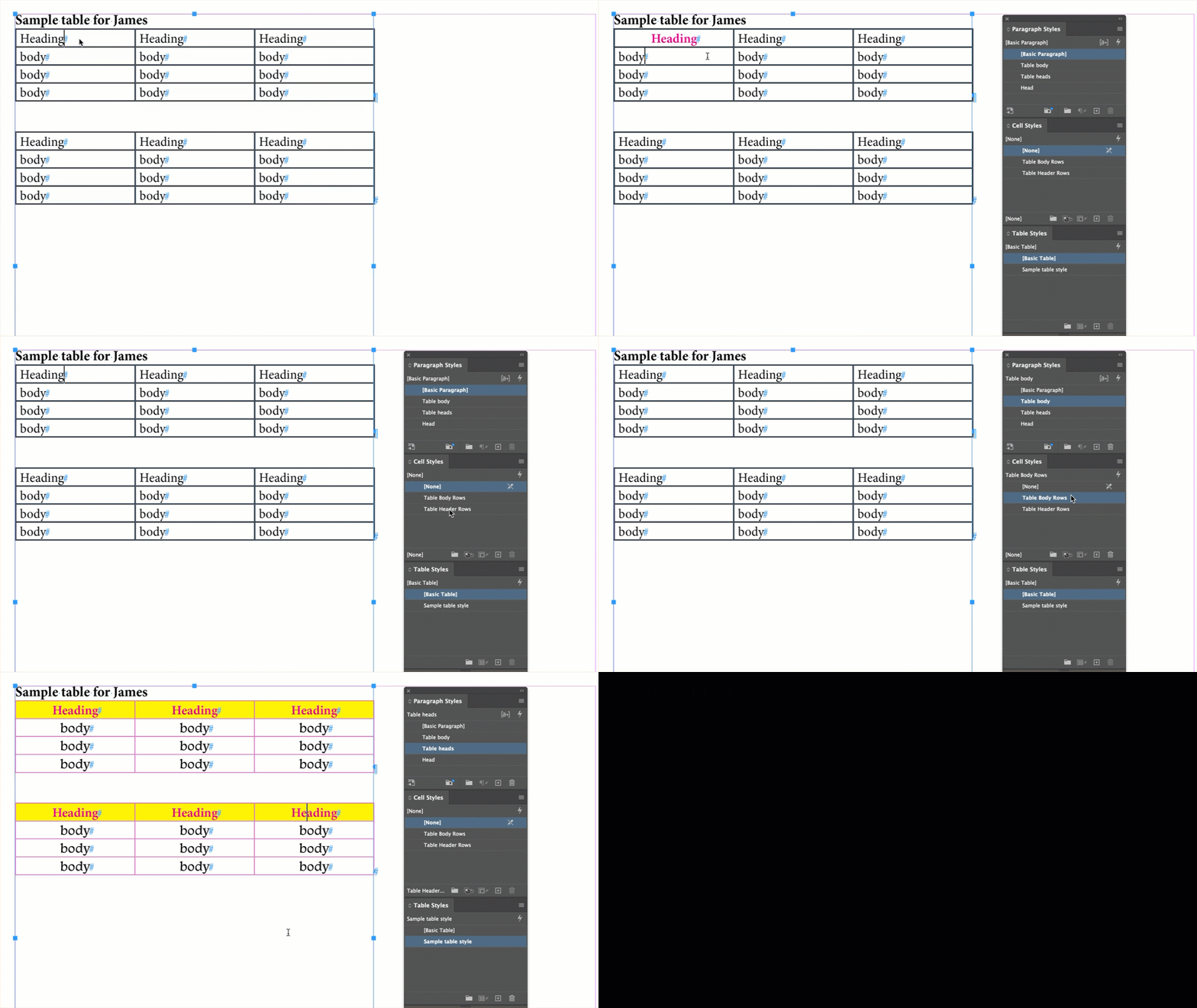


And two good points were made while I was making the demo: be sure you clear all overrides from the table (see: https://www.rockymountaintraining.com/adobe-indesign-tables-that-wont-accept-table-and-cell-styles/) and be sure the top row is designated a header row. 


~Barb


EDIT: Thank you for sharing the screenshot. You do have the cell style nested correctly, so it's one of the two things that were already pointed out. Overrides or the top row was not designated as a heading row, or both. Almost there! 😊

4 replies

Barb Binder
Community Expert
Barb BinderCommunity ExpertCorrect answer
Community Expert
March 11, 2025

Hi James:


Here's a demo of how it will work when you get the process straightened out. I'm showing you the first two components individually, and then how the nesting works when I click on the table style.


And two good points were made while I was making the demo: be sure you clear all overrides from the table (see: https://www.rockymountaintraining.com/adobe-indesign-tables-that-wont-accept-table-and-cell-styles/) and be sure the top row is designated a header row. 


~Barb


EDIT: Thank you for sharing the screenshot. You do have the cell style nested correctly, so it's one of the two things that were already pointed out. Overrides or the top row was not designated as a heading row, or both. Almost there! 😊

~Barb at Rocky Mountain Training
Barb Binder
Community Expert
Community Expert
March 11, 2025

Hi James:


Can you show us the table style definition? Right click blue table > Edit "blue table". Stay in the General category and grab a screen shot.


~Barb

~Barb at Rocky Mountain Training
Known Participant
March 11, 2025

Barb Binder
Community Expert
Community Expert
March 11, 2025

Hi @James3669094303ct:


Tables in InDesign are admittedly awkward in certain situations, but one of the strongest features is the ability to nest styles within styles.

When I am setting up tables, the first thing I do is define the paragraph styles for the text in the header and the body rows.


The second thing I do is create cell styles to control the look of the header rows—including the background color—and the body rows. I can then nest the paragraph style definitions in the cell styles, so that assigning a cell will simultaneously assign the paragraph style I created in the previous step. 


Finally, I create a table style to control the look of the entire table and as part of the table style definition, I can nest the cell styles so that they are automatically assigned to the header rows and the body rows.


Not only does this offer one click formatting for a simple table, but it allows us to redefine the background color of the cell style being used by the header rows, which will then change every table that that's using that cell style.


Styles are one of the most important features InDesign when you're looking to streamline your workflow. If you're new to styles, I would take some time to get up to speed on each of these three different style categories and then pull them all together.


If you have questions, of course come back and ask us.


~Barb 

~Barb at Rocky Mountain Training
Known Participant
March 11, 2025

Nothing happens to the header when I select the table style? I'm expecting it to change to blue rather than it being grey

Robert at ID-Tasker
Legend
March 11, 2025

@James3669094303ct


There might be "local style overrides" - local formatting - so after you select whole Table, you need to clear Cell Overrides, then Table Overrides, THEN apply your Table Style again.


Or do it the other way around - after applying Table Style - clear overrides. 


Robert at ID-Tasker
Legend
March 11, 2025

Yes, if you already have TableStyle defined and applied.


If not - it can be asily scripted - but, do all your Tables should have exactly the same TableStyle applied?


Known Participant
March 11, 2025

How do you apply a table style?

Robert at ID-Tasker
Legend
March 11, 2025