dublove
Legend
June 30, 2025
Answered

Is it possible to create more than one new paragraph style at a time?

  • June 30, 2025
  • 2 replies
  • 515 views

Simpler to implement this way?
Multiple paragraph styles are created by passing a parameter that determines the style of the paragraph.

//GetParStyle
creatParStyle(paraStn, contiParaStn, bodyParaStn, headerParaStn, capLStn, capCStn, capCSDhtn);

//creatParMode
function creatParStyle(pn) {
    if (!app.documents[0].paragraphStyles.item(pn).isValid);
    app.documents[0].paragraphStyles.add({ name: pn });


Correct answer dublove

It's still not mass-produced


You mean something like this?


var s, styl;
//an array of style names (names need to be enclosed in "")
var sa = ["paraStn", "contiParaStn", "bodyParaStn", "headerParaStn", "capLStn", "capCStn", "capCSDhtn"];
//create the 7 styles
for (var i = 0; i < sa.length; i++){
  s = creatParStyle(app.activeDocument, sa[i])
};   

//set the seven paragraph styles properties as needed
//get the style by name
styl = app.activeDocument.paragraphStyles.itemByName(sa[0]);
//set its prperties
styl.properties = {appliedFont:"Minion Pro	Regular", pointSize:14, capitalization:Capitalization.ALL_CAPS};

styl = app.activeDocument.paragraphStyles.itemByName(sa[1])
styl.properties = {appliedFont:"Minion Pro	Regular", pointSize:40}

//...

/**
* Makes a new named ParagraphStyle 
* @ param the document to add the style to 
* @ param style name 
* @ return the new paragraph style 
*/

function creatParStyle(d, n){
  if (d.paragraphStyles.itemByName(n).isValid) {
      return d.paragraphStyles.itemByName(n);
  } else {
      return d.paragraphStyles.add({name:n});
  }
}
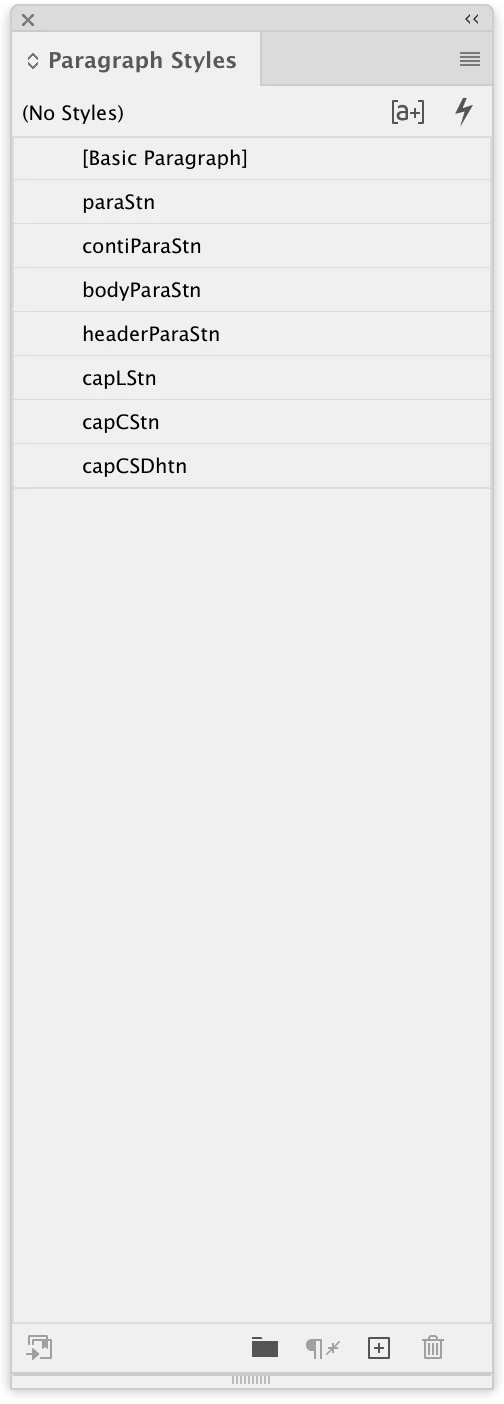


Hi @rob day 

It worked. This works great.
You've taught me this before, and I've used it in some places, and I've never figured out why I added it.

But it's more than one new one at a time, and I originally passed in the actual parameters.
Didn't feel the benefit of (d,n) corresponding to (app.activeDocument,styleName) originally, so used the dumbest method.

Finally used an opt-in technique this time.
ME. Growing up again.

Thank you very much.

2 replies

rob day
Community Expert
Community Expert
June 30, 2025

Also, your createStyle(pn) function is throwing an error, as does pn = []:


As others are showing, there are losts of ways to create styles—I do this:


var s = creatParStyle(app.activeDocument, "MyStyle");
//set properties after the style is created
s.properties = {appliedFont:"Minion Pro	Regular", pointSize:14, capitalization:Capitalization.ALL_CAPS}


/**
* Makes a new named ParagraphStyle 
* @ param the document to add the style to 
* @ param style name 
* @ return the new paragraph style 
*/

function creatParStyle(d, n){
  if (d.paragraphStyles.itemByName(n).isValid) {
      return d.paragraphStyles.itemByName(n);
  } else {
      return d.paragraphStyles.add({name:n});
  }
}


dublove
dubloveAuthor
Legend
June 30, 2025

 Hi@rob day 
you this you originally taught me, I tried it.
It's the best. It's still not mass-produced.

It also seems to pop up the name already exists question.

rob day
Community Expert
Community Expert
June 30, 2025

It's still not mass-produced


You mean something like this?


var s, styl;
//an array of style names (names need to be enclosed in "")
var sa = ["paraStn", "contiParaStn", "bodyParaStn", "headerParaStn", "capLStn", "capCStn", "capCSDhtn"];
//create the 7 styles
for (var i = 0; i < sa.length; i++){
  s = creatParStyle(app.activeDocument, sa[i])
};   

//set the seven paragraph styles properties as needed
//get the style by name
styl = app.activeDocument.paragraphStyles.itemByName(sa[0]);
//set its prperties
styl.properties = {appliedFont:"Minion Pro	Regular", pointSize:14, capitalization:Capitalization.ALL_CAPS};

styl = app.activeDocument.paragraphStyles.itemByName(sa[1])
styl.properties = {appliedFont:"Minion Pro	Regular", pointSize:40}

//...

/**
* Makes a new named ParagraphStyle 
* @ param the document to add the style to 
* @ param style name 
* @ return the new paragraph style 
*/

function creatParStyle(d, n){
  if (d.paragraphStyles.itemByName(n).isValid) {
      return d.paragraphStyles.itemByName(n);
  } else {
      return d.paragraphStyles.add({name:n});
  }
}


Community Expert
June 30, 2025

I am not sure what you are trying to simplify. Creation on styles would also need setting the style options you did not show that. Otherwise it is all about calling your method multiple times to create new styles.

-Manan

-Manan
dublove
dubloveAuthor
Legend
June 30, 2025

Isn't it possible to create all the styles with a single collection of parameters?

creatParStyle(paraStn, contiParaStn, bodyParaStn, headerParaStn, capLStn, capCStn, capCSDhtn);

Do I have to,

like this: Each one to be called once?

creatParStyle(paraStn);
creatParStyle(contiParaStn);
 ... 
creatParStyle(capCSDhtn);


dublove
dubloveAuthor
Legend
June 30, 2025

@dublove something like this?

function main() {

    var doc = app.activeDocument;

    var styleNames = ['Heading 1', 'Heading 2', 'Heading 3', 'Body Text', 'Body Text Indented', 'Bulleted List', 'Numbered List'],
        styles = [];

    for (var name in styleNames) {

        var style = doc.paragraphStyles.itemByName(styleNames[name]);

        if (!style.isValid)
            // create the style if it does not exist
            style = doc.paragraphStyles.add({ name: styleNames[name] });

        styles.push(style);

    }

}
app.doScript(main, ScriptLanguage.JAVASCRIPT, undefined, UndoModes.ENTIRE_SCRIPT, 'Create Paragraph Styles');


But as @Manan Joshi mentioned, you don't even mention the most important aspect, which is the properties of the styles. Maybe something like this...

function main() {

    var doc = app.activeDocument;

    var styleProperties = {
        autoLeading: 120,
        capitalization: Capitalization.ALL_CAPS,
        composer: 'Adobe Paragraph Composer',
        fillColor: doc.swatches.itemByName('C=100 M=0 Y=0 K=0'),
        fontStyle: 'Bold',
        justification: Justification.CENTER_ALIGN,
        leading: 44,
        pointSize: 48,
        spaceAfter: 10,
        spaceBefore: 0,
        tracking: 20,
    };

    var font = app.fonts.item('Minion Pro');

    if (font.isValid)
        styleProperties.appliedFont = font;

    var myStyle = editParagraphStyle(doc, 'My Paragraph Style', styleProperties);

};
app.doScript(main, ScriptLanguage.JAVASCRIPT, undefined, UndoModes.ENTIRE_SCRIPT, 'Edit Paragraph Style');

/**
 * Edits or creates a paragraph style in the document.
 * If pararaph style `name` already exists, it will be edited,
 * otherwise a new paragraph style will be created.
 * @author m1b
 * @version 2025-06-30
 * @param {Document} doc - an Indesign document.
 * @param {String} name - the style's name.
 * @param {Object} properties - the properties to apply.
 */
function editParagraphStyle(doc, name, properties) {

    var style = getThing(doc.allParagraphStyles, 'name', name);

    if (!style)
        style = doc.paragraphStyles.add({ name: name });

    style.properties = properties;

    return style;

};

/**
 * Returns a thing with matching property.
 * If `key` is undefined, evaluate the object itself.
 * @author m1b
 * @version 2024-04-21
 * @param {Array|Collection} things - the things to look through.
 * @param {String} [key] - the property name (default: undefined).
 * @param {*} value - the value to match.
 * @returns {*?} - the thing, if found.
 */
function getThing(things, key, value) {

    for (var i = 0; i < things.length; i++)
        if ((undefined == key ? things[i] : things[i][key]) == value)
            return things[i];

};


Hi m1b

Your settings for these properties are something I may need in the future, bookmarked for now.
Thank you very much.
