
Participant
November 30, 2020
Answered

Is it possible to export a font with layer styles from photoshop to indesign?

  • November 30, 2020
  • 2 replies
  • 543 views

Hi,


so I applied some layer styles to a font to make it look like this:
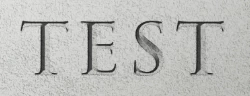

Is it possible to export that font with these layer styles in order to use it in indesign? Or is it possible to export the layer styles, so that i can use them in indesign and apply them to a text? Because I dont want to always have to create everything in photoshop and then export it as a image into indesign.


Thanks in advance


This topic has been closed for replies.
Correct answer Barb Binder

George is correct that you can't import Photoshop layer styles, but InDesign does have some of Photoshop's layer styles capabilities, so potentially, you can recreate something like this in InDesign, and save it as a object style for reuse. Which ones did you use?


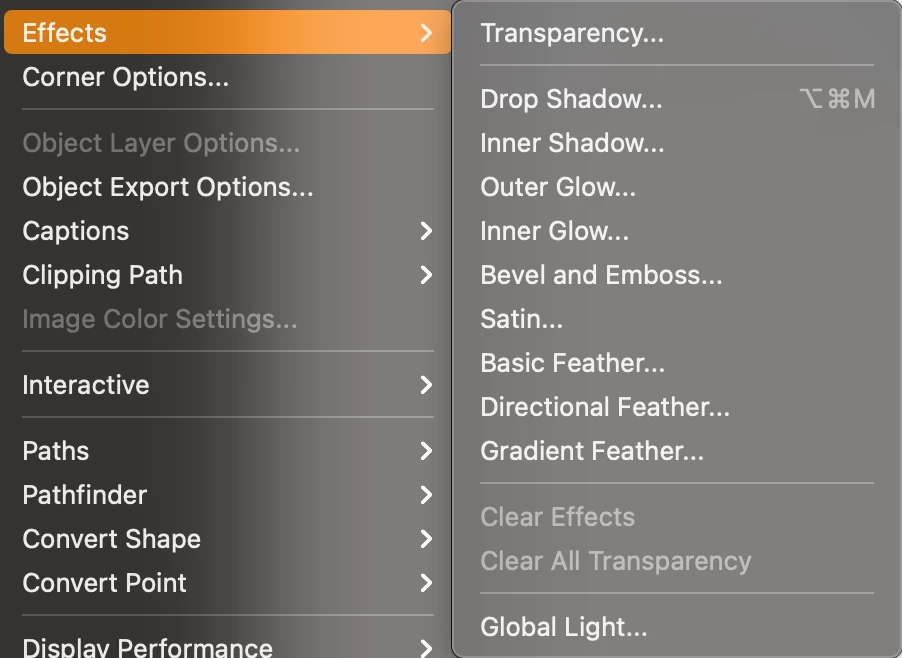
Select a text frame and choose Object > Effects. 


You might also want to google "chisled fonts". There are some that might be close enough.


~Barb 


2 replies

Barb Binder
Community Expert
Barb BinderCommunity ExpertCorrect answer
Community Expert
November 30, 2020

George is correct that you can't import Photoshop layer styles, but InDesign does have some of Photoshop's layer styles capabilities, so potentially, you can recreate something like this in InDesign, and save it as a object style for reuse. Which ones did you use?


Select a text frame and choose Object > Effects. 


You might also want to google "chisled fonts". There are some that might be close enough.


~Barb 


~Barb at Rocky Mountain Training
Geоrge
Legend
November 30, 2020

No, you can't. You can do something like this with InDesign effects, but I do prefer Photoshop or Illustrator here.

Remember, never say you can't do something in InDesign, it's always just a question of finding the right workaround to get the job done. © David Blatner