
Participant
October 18, 2023
Answered

Is it possible to extend the list of style fields when creating a New Style Pack?

  • October 18, 2023
  • 2 replies
  • 1476 views

Is it possible to extend the list of style fields when creating a New Style Pack? Seems quite limiting otherwise particularly when working on a magazine that encompasses various paragraph styles. The only way I could use this feature is by creating multiple style packs for different sections of the magazine.
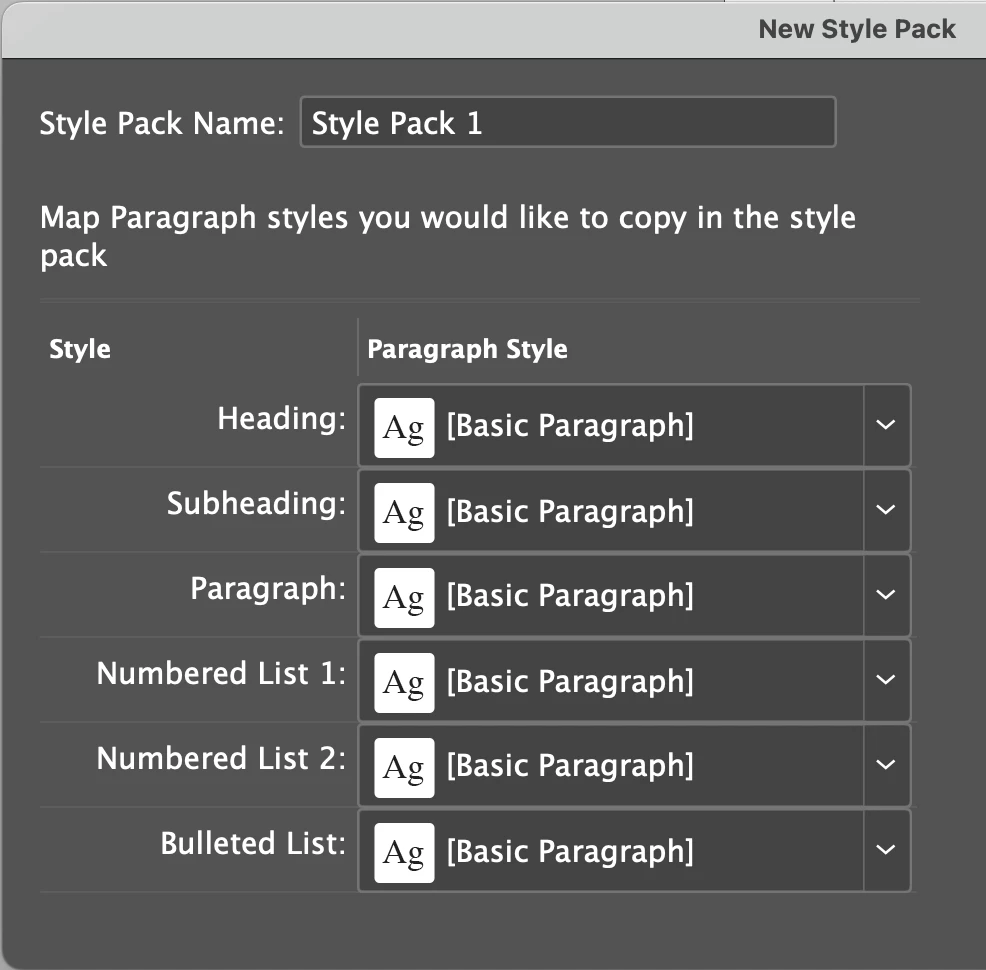
 

Thanks.

Correct answer Rishabh_Tiwari

Hi @C&CCDesigner,


Thank you for reaching out. The style field can be extended in a limited manner in InDesign 2024. This can be achieved via dragging and dropping a new style within a Style Pack in the Paragraph Style Panel. If this newly added style field is manually applied to some text, then in that case, switching of style packs can be made to work if another style pack also contains a style with the same name. To demonstrate this functionality for more clarity, I am attaching a video. Here, in this case, I have created a new style field, "Heading 2" and applied it to a text manually. In the other style pack,  I have the same style field, "Heading 2". In this case, you can seamlessly switch between the style packs.


Thanks

Rishabh


2 replies

lynnephelps49
Participant
April 3, 2024

How do I add additional paragraph styles into a style pack? I have far more than the six canned types listed in the panel. Additionally character and object styles. For this to be useful, we need to be able to export them all into a style pack.

Rishabh_Tiwari
Community Manager
Rishabh_TiwariCommunity ManagerCorrect answer
Community Manager
October 18, 2023

Hi @C&CCDesigner,


Thank you for reaching out. The style field can be extended in a limited manner in InDesign 2024. This can be achieved via dragging and dropping a new style within a Style Pack in the Paragraph Style Panel. If this newly added style field is manually applied to some text, then in that case, switching of style packs can be made to work if another style pack also contains a style with the same name. To demonstrate this functionality for more clarity, I am attaching a video. Here, in this case, I have created a new style field, "Heading 2" and applied it to a text manually. In the other style pack,  I have the same style field, "Heading 2". In this case, you can seamlessly switch between the style packs.


Thanks

Rishabh


Participant
October 20, 2023

Many thanks for your reply. That's really useful information and will enable me to set up some up timesaving style packs.